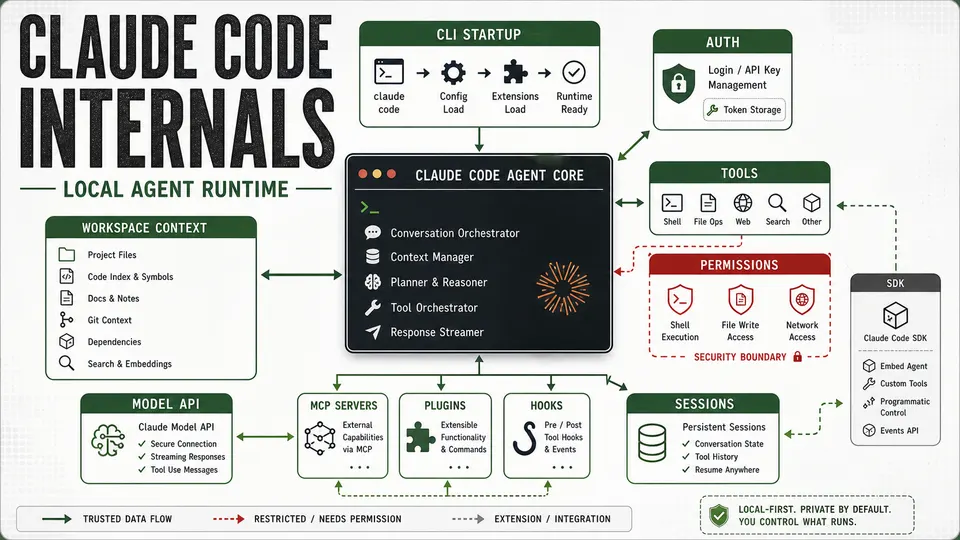
A practical systems-level explanation of Claude Code as a local agent runtime, covering startup, authentication, tools, permissions, sessions, MCP, plugins, and the Agent SDK.
Claude Code looks like a terminal chat tool, but it is better understood as a local agent runtime for software development. It connects a language model to your working directory, shell commands, local files, configuration, permissions, extensions, and persistent sessions. Open-source agents built the same way carry their own risks, covered in the OpenClaw and Hermes Agent security comparison.
That combination is what makes it useful. Claude Code can inspect code, explain behavior, edit files, run commands, use tools, and continue work across turns. A normal chat API client sends messages and receives text. Claude Code does more than that. It prepares project context, manages authentication, decides which tools are available, asks for permission before sensitive actions, records transcript state, supports plugins and MCP servers, and can be controlled programmatically through an SDK. Which subscription tier you run it under matters too: see Claude Max $100 vs $200 for Claude Code usage.
This article explains Claude Code from a practical systems perspective: what likely happens during startup, how authentication works, how the Agent SDK fits in, how the runtime coordinates tools and permissions, where sessions matter, and what security boundaries developers should care about.
No credential values, API keys, OAuth tokens, cookies, or private user data are included.
Claude Code Is a Local Agent Runtime
A useful way to think about Claude Code is as a coordinator between five worlds:
- The user in the terminal.
- The local development environment.
- The model API.
- Tooling such as file readers, editors, shell commands, MCP servers, and plugins.
- Persistent state such as settings, sessions, transcripts, and credentials.
When you type a prompt, Claude Code does not simply forward that text to a model. It first needs to understand the mode it is running in, the current working directory, available settings, authentication source, project instructions, tool permissions, sandbox rules, and session state. Only then can it construct a useful request and safely handle whatever the model asks it to do next.
At a high level, Claude Code has these major pieces:
- A CLI and terminal UI layer.
- A startup and settings loader.
- An authentication layer.
- A workspace context layer.
- A model and session transport layer.
- A tool execution layer.
- A permissions and sandboxing layer.
- A transcript and session persistence layer.
- Extension points such as MCP, plugins, hooks, and subagents.
- SDK integration for programmatic use.
That architecture explains why Claude Code feels different from a normal chatbot. It is not only answering questions. It is operating inside a development workspace.
What Happens During Startup
Claude Code startup begins with mode selection. The most common mode is interactive terminal mode. In that mode, Claude Code opens a conversation and stays alive while the user asks questions, approves tools, and continues work.
There is also print mode. Print mode is useful for automation because it accepts a prompt, produces a response, and exits. Stream-oriented output modes are useful for SDKs and scripts because they emit structured events instead of only final text.
Beyond those basics, Claude Code supports operational modes such as session resume, MCP configuration, plugin management, remote-control behavior, and permission-mode selection. Startup is therefore not just a prompt parser. It is the launch sequence for a configurable local agent.
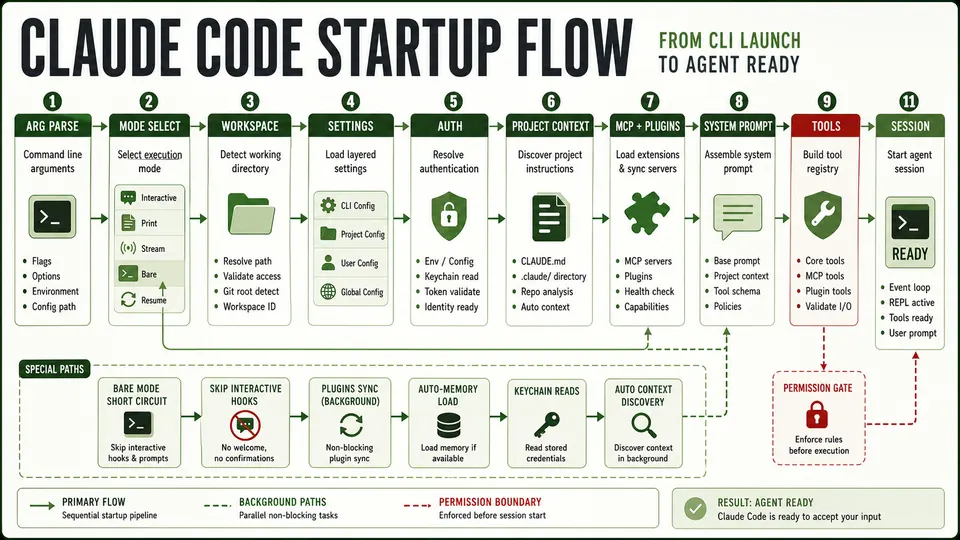
A typical startup flow looks like this:
- Claude Code parses command-line arguments.
- It decides whether the run is interactive, print-based, stream-based, remote-controlled, or a management command.
- It identifies the current workspace and working directory.
- It loads settings from user, project, local, and possibly managed policy sources.
- It resolves authentication.
- It discovers project context, including instruction files or memory when enabled.
- It loads MCP servers, plugins, hooks, agents, and subagents when configured.
- It assembles the system prompt and dynamic context.
- It registers available tools and permission rules.
- It starts the user-facing session or structured output stream.
That flow is why two Claude Code sessions can behave differently even when the user prompt is identical. The prompt is only one input. The runtime mode, settings, credentials, workspace files, project instructions, available tools, and permission rules all affect what the agent can see and do.
Normal Mode vs. Bare Mode
One especially important mode is bare mode.
Bare mode is a minimal startup profile. It avoids many convenience features that normal mode may use, such as hooks, plugin sync, auto-memory, background prefetches, keychain reads, and automatic project-instruction discovery.
For Anthropic authentication, bare mode is meant to rely only on an environment API key or a configured API-key helper. OAuth and keychain-backed credentials are not part of that minimal path.
Bare mode is useful when predictability matters more than convenience. It reduces automatic behavior and expects the caller to provide context explicitly. Normal mode is richer and easier for day-to-day development, but it has more moving parts.
The tradeoff is straightforward:
| Mode | Best for | What changes |
|---|---|---|
| Normal interactive mode | Day-to-day coding | Rich project context, settings, memory, plugins, hooks, and session behavior can participate |
| Print mode | Scripts and automation | One prompt in, response out, then process exit |
| Stream mode | SDKs and structured integrations | Emits structured events instead of only final text |
| Bare mode | Predictable, minimal execution | Avoids many automatic conveniences and relies on explicit context |
| Resume mode | Continuing prior work | Restores session state and transcript continuity |
| Remote-control mode | Controlled agent operation | Uses trusted-device/session-style credentials and reconnect behavior |
Authentication and Token Storage
Claude Code can authenticate in several ways depending on mode, account type, provider, and local configuration.
The simplest path is an environment API key. This is common in scripts, CI systems, or direct API-style usage. How that pricing compares to a subscription is covered in Claude Code pricing: subscription vs API. The process reads the key from the environment and uses it to authenticate model requests.
Another path is an API-key helper. Instead of storing a key directly in an environment variable or settings file, Claude Code can call a configured helper that returns a key dynamically. This is useful for organizations that issue short-lived credentials or centralize secret management.
OAuth is another major path. In account-login flows, Claude Code can use OAuth-derived credentials rather than a manually supplied API key. OAuth usually means there is an access token, a refresh mechanism, and local storage for credential material. The exact implementation can vary by platform and account type, but the operational idea is simple: the user signs in, the tool receives credentials, and it refreshes or reuses them when needed.
On macOS, Keychain-backed storage is an expected secure storage option. In that model, Claude Code stores credential material in the operating system credential store rather than in a plain text file. This is generally safer than local plaintext storage because access is mediated by the operating system.
There can also be plaintext fallback credential files under Claude configuration directories. These should be treated as sensitive even if file permissions are restrictive. Restrictive file permissions help against accidental exposure, but they do not protect against malware, a compromised user account, or a tool with overly broad filesystem access.
Third-party provider credentials are also relevant. Claude Code can be used with provider paths beyond first-party Anthropic access, such as cloud or gateway-based providers. In those cases, authentication may come from cloud-provider configuration, environment variables, local credential files, or enterprise-managed identity.
Remote Control uses a different credential model. Instead of only an API key or OAuth token, remote-control flows can involve trusted-device tokens, short-lived worker tokens, session identifiers, and reconnect logic. That should be treated as a remote administration channel for a local agent, not just another model request.
The security takeaway is straightforward: Claude Code may have access to valuable credentials. API keys, OAuth refresh material, cloud-provider credentials, trusted-device tokens, and local session data all need to be protected.
How the Agent SDK Fits In
The Agent SDK is best understood as a way to control Claude Code programmatically.
In a simple API client, an SDK usually wraps HTTP calls. You call a function, it sends a prompt to an endpoint, and it returns a response. Claude Code’s Agent SDK is richer than that. It exposes a query-style interface that can stream structured messages, configure tools, set permission behavior, attach hooks, define MCP servers, control sessions, configure subagents, and pass settings into the runtime.
That matters because an SDK-driven session can still behave like a Claude Code session. It can use Claude Code tools. It can honor permission modes. It can create transcripts. It can load MCP servers. It can run with sandbox settings. It can resume or manage sessions. It can carry SDK-specific process markers so the runtime and backend can distinguish SDK usage from a normal terminal session.
A typical SDK flow looks like this:
- A host application calls the SDK with a prompt and options.
- The SDK resolves how to run Claude Code.
- It starts Claude Code in a structured, automation-friendly mode.
- It passes settings, tool configuration, permission configuration, and environment markers.
- Claude Code handles model communication and tool mediation.
- Claude Code writes transcript or session state when persistence is enabled.
- The SDK streams structured events back to the host application.
In practice, this means the SDK is not only a model wrapper. It is a programmatic entry point into the Claude Code runtime.
The Agent Loop
The agent loop is the part that makes Claude Code feel agentic.
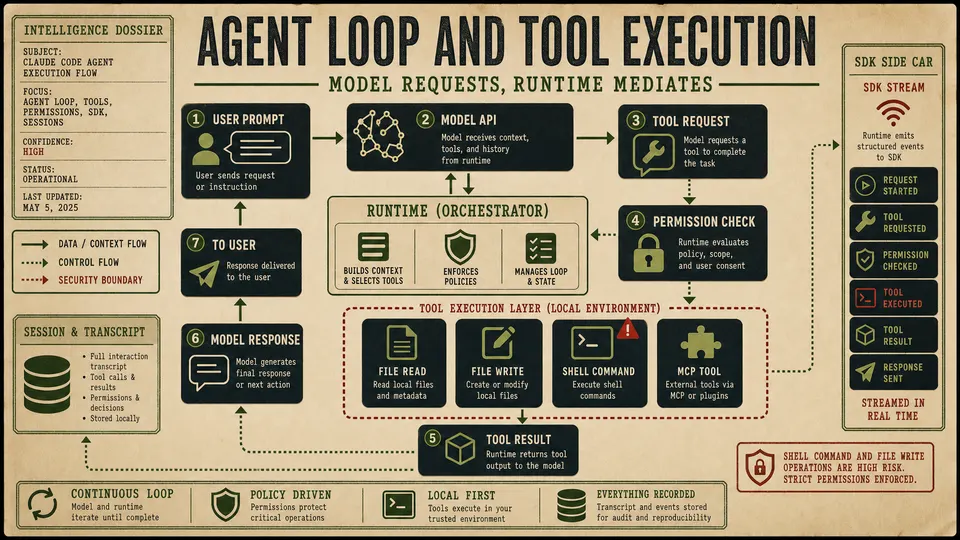
A simple chat program sends a user message and waits for text. Claude Code has to manage a loop:
- The user asks for work.
- Claude Code sends the model the prompt, context, available tools, and tool rules.
- The model replies with either text or a request to use a tool.
- Claude Code checks whether that tool is available and permitted.
- If permission is required, the user or policy layer must approve it.
- Claude Code executes the tool locally or through an extension point.
- The tool result is sent back into the model context.
- The model decides whether to continue, call another tool, edit files, run commands, or produce an answer.
- Transcript and session state are updated.
This loop can repeat many times. That is how a single request can turn into file inspection, code edits, terminal commands, test output analysis, and a final explanation. For the general mechanics behind that loop, see agent harness architecture: how coding agents run tools.
The model is not directly executing arbitrary local operations. It proposes or requests actions through the runtime. Claude Code is the mediator that decides what exists, what is allowed, what requires approval, and what result gets returned.
Tools, Permissions, and Sandboxing
The tool layer is where Claude Code becomes useful and risky at the same time.
Tools may include file reads, file writes, shell commands, search utilities, MCP tools, plugin-provided capabilities, hooks, and subagents. Each tool expands what the model can do. Each tool also expands what needs to be controlled.
That is why permissions matter. A file read is different from a file write. A harmless command is different from a destructive command. Reading a project file is different from reading a credential file. Running a test is different from running a deployment script.
Claude Code’s job is to keep those differences visible. The runtime can apply permission modes, sandbox rules, user approvals, project settings, managed policy, and tool-specific restrictions. The safest configuration is the one that gives the agent enough access to complete the task, but not broad access to every secret, account, or system on the machine.
Good operational boundaries include:
- Keep sensitive credentials out of project directories when possible.
- Avoid broad environment secrets in long-running sessions.
- Treat shell access as a high-impact capability.
- Use least-privilege API keys for automation.
- Be careful with plugins, hooks, and MCP servers because they extend the runtime.
- Prefer explicit context when running in automated or high-risk environments.
- Use minimal or bare-mode style execution when reproducibility matters.
The important point is not that tools are unsafe. Tools are what make Claude Code valuable. The point is that tools need boundaries.
Sessions, Transcripts, and Continuity
Persistent sessions are another reason Claude Code is more than a one-shot model client.
When a session is stored, Claude Code can preserve conversation history, tool activity, context, and work continuity. That makes resume flows possible. It also makes debugging easier because the transcript can show what the agent saw, what it did, and what it returned.
But persistent state is also sensitive. A transcript may contain filenames, snippets, terminal output, error logs, stack traces, project structure, or references to secrets. Even if no raw credential is intentionally stored, transcripts can still reveal operational details about a codebase or environment.
Session persistence should therefore be treated as part of the security model. Developers should understand where transcripts live, how long they are retained, who can access them, and whether automation should create persistent state at all.
MCP, Plugins, Hooks, and Subagents
Claude Code can be extended through MCP servers, plugins, hooks, agents, and subagents. These extension points are powerful because they allow Claude Code to reach beyond its built-in abilities.
MCP servers can expose external tools or data sources. Plugins can package capabilities. Hooks can run at specific lifecycle points. Subagents can split work into specialized flows. Together, these features turn Claude Code into an extensible local agent platform rather than a fixed terminal assistant.
The same power creates a trust question. Anything that expands tool access can change what the runtime is able to see or do. An MCP server that can read a database, a hook that runs shell commands, or a plugin that syncs external state should be reviewed with the same seriousness as any other privileged developer tool.
In a secure setup, extensions should be intentional, documented, and scoped.
Security Boundaries Developers Should Care About
Claude Code sits close to the developer’s source code and local machine. That makes its security boundary more important than a normal chat application.
The most important boundaries are:
| Boundary | Why it matters |
|---|---|
| Workspace files | The agent can inspect and potentially modify code and configuration |
| Shell execution | Commands can read files, run scripts, install packages, or affect the system |
| Credentials | API keys, OAuth material, cloud credentials, and local tokens may be reachable |
| Sessions and transcripts | Stored state can reveal sensitive project details |
| MCP and plugins | Extensions can widen the runtime’s reach |
| Remote control | Trusted-device and session channels behave like control surfaces |
| SDK automation | Programmatic usage can scale actions beyond a manual terminal session |
The practical rule is simple: configure Claude Code like a developer tool with meaningful local access, not like a browser tab with text input.
Why This Architecture Matters
Claude Code’s strength comes from the same architecture that makes it sensitive. It is useful because it can see the project, call tools, edit files, run commands, preserve context, and integrate with other systems. Those capabilities make it a real engineering assistant rather than a passive text generator. Raw capability alone hasn't flooded the world with new software, though: see the 100x coder paradox.
But that also means teams should think clearly about how they run it. Authentication, settings, sessions, permissions, hooks, plugins, MCP servers, and SDK automation are not side details. They are the runtime.
For individual developers, the takeaway is to understand what Claude Code can access before granting broad permissions. For teams, the takeaway is to treat agent configuration as part of engineering governance. For anyone using the SDK, the takeaway is that programmatic control of Claude Code is programmatic control of a local agent runtime. If you're weighing it against rivals, see Claude Code vs Codex CLI vs Antigravity CLI vs OpenCode.
Claude Code may look like a terminal chat. Internally, it is closer to a coordinated system for model-driven software work: a CLI, a settings loader, an authentication layer, a workspace context engine, a tool mediator, a permission system, a session recorder, and an extension platform wrapped around a language model.
That is why it works. It is also why it should be handled with care.