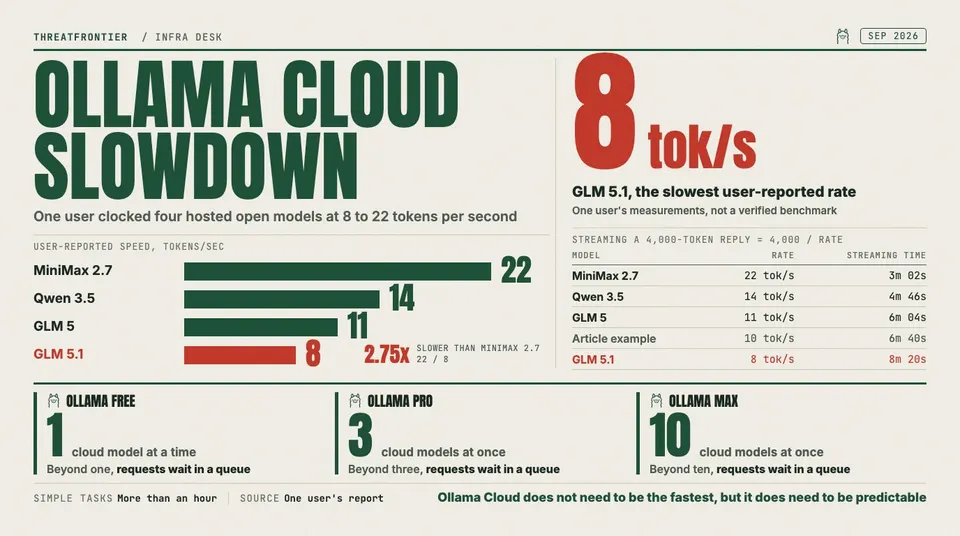
User-reported token rates as low as 8 tokens per second show why Ollama Cloud needs clearer performance metrics, queue visibility and paid-tier expectations.
Ollama Cloud is facing growing user frustration over slow inference speeds, with some paying users reporting single-digit or low double-digit token-per-second throughput on large hosted models and questioning whether the service is still viable for real work.
One recent user complaint captured the problem bluntly: GLM 5 at 11 tokens per second, GLM 5.1 at 8 tokens per second, Qwen 3.5 at 14 tokens per second, and MiniMax 2.7 at 22 tokens per second. The user said simple tasks were taking more than an hour and that the experience had become slow enough to justify canceling a subscription.
Those figures should be treated as user-reported measurements, not as a verified global benchmark. But they describe a real pain point for cloud AI services: when token throughput drops into that range, the difference between a promising open-model platform and an unusable workflow can be a matter of minutes.
Ollama Cloud sits in an unusual position. Ollama built its reputation around local model execution: install a model, run it on your own machine, keep data close, and avoid depending on a hosted provider. The cloud service extends that model by letting users run larger models without owning a high-end GPU. That convenience is the product's central appeal, but it also changes the contract. Once a local-first tool becomes a paid cloud runtime, users begin judging it like every other inference provider: speed, availability, queue time, limits, transparency and price.
The Reported Slowdown
The user's reported speeds cluster between 8 and 22 tokens per second:
| Model | User-reported speed |
|---|---|
| GLM 5 | 11 tokens/sec |
| GLM 5.1 | 8 tokens/sec |
| Qwen 3.5 | 14 tokens/sec |
| MiniMax 2.7 | 22 tokens/sec |
For casual chat, 20 tokens per second can be tolerable if time-to-first-token is low and the answer is short. For coding agents, document analysis, research loops, long-context summaries or tool-calling workflows, those numbers are much harder to accept. A 4,000-token response at 10 tokens per second takes nearly seven minutes after the model starts streaming. If there is also queue delay, model-loading delay, retries or tool-call round trips, a task can stretch far beyond what users expect from a paid AI subscription.
That is the core of the frustration. Users do not evaluate inference speed in isolation. They evaluate the entire workflow: prompt submission, queue time, first token, streaming speed, tool calls, final answer quality and whether the output arrived soon enough to be useful.
Why It Might Feel So Slow
Without internal telemetry from Ollama, no outsider can say exactly why a particular request is slow. But Ollama's public pricing and documentation point to several structural reasons cloud inference can vary.
First, Ollama Cloud is plan-limited by concurrency. Ollama says the Free plan runs one cloud model at a time, Pro runs three, and Max runs ten. Requests beyond a plan's concurrency limit are queued until a slot opens. That means a user's own long-running request can delay their next request, even if the service itself is not down.
Second, usage is measured by cloud infrastructure utilization, primarily GPU time, rather than a simple fixed token cap. Larger models and longer requests consume more of the available plan budget. If a platform is trying to balance fixed-price subscriptions against expensive GPU capacity, it has to manage contention somehow: limits, queues, routing, model availability, throttling or future usage-based pricing.
Third, Ollama says cloud resources are hosted primarily in the United States, with routing to Europe and Singapore for additional capacity. That kind of global routing can improve coverage, but it also introduces regional variability. A user far from the active capacity pool, or hitting a busy route, may see higher time-to-first-token and slower perceived delivery.
Fourth, model size matters. A heavyweight model that is attractive because it runs in the cloud is also harder to serve cheaply and consistently. If many subscribers converge on the same large models, GPU scheduling and memory pressure become visible to users as waiting, slow streaming or uneven performance.
The Bigger Product Problem
The complaint is not only about raw throughput. It is about trust.
Ollama's pitch is powerful because it lets developers keep one workflow across local and cloud models. The same CLI, API habits and model naming conventions can work whether the model runs on a laptop or on remote infrastructure. That lowers friction and makes Ollama Cloud feel like an extension of the local developer environment. Developers weighing whether to trust a hosted runtime at all can compare a self-hosted open-weight stack that runs entirely offline.
But that integration creates a sharper expectation: cloud should feel like an upgrade. If the cloud experience is slower than local hardware, or not predictably faster, the user starts asking why they are paying. A Mac Studio or local workstation may not run every frontier-sized open model, but it can feel more dependable if it produces steady output without queue uncertainty.
For developers building agents, the issue becomes worse. Agents often make repeated calls: plan, search, read, revise, summarize, execute, verify. A model that feels slow in a single chat can become painfully slow in an agent loop. Even modest latency compounds when a workflow requires dozens of turns.
That is where a simple tokens-per-second complaint becomes a product strategy warning. If Ollama Cloud wants to serve automation, coding and research workflows, it cannot rely only on model catalog breadth. It needs predictable service behavior.
What Users Need From Ollama
The most important missing piece is transparency. Ollama's pricing page explains concurrency, queueing and broad usage concepts, but users need more operational clarity when things slow down.
At minimum, a paid cloud inference service should expose:
- Time-to-first-token by request.
- Streaming tokens per second.
- Queue time before execution.
- Model-load or cold-start time where applicable.
- Region used for the request.
- Whether a request was throttled, queued or capacity-routed.
- Per-model expected speed ranges.
- A status page or performance dashboard for degraded service.
Without those signals, users are left to guess. Was the model slow? Was the account limited? Was a regional cluster overloaded? Did a previous request occupy a concurrency slot? Did the prompt consume too much GPU time? Was the selected model simply too large for interactive use on the current tier?
Those are different problems with different fixes. A product that does not separate them creates frustration even when the infrastructure is behaving exactly as designed.
What Users Can Do Now
Users who are seeing poor performance should benchmark before canceling or upgrading. A useful test should hold the prompt, output length and time window steady across models. Measure:
- Time to first token.
- Tokens per second after streaming begins.
- Total wall-clock time.
- Model name and cloud tag.
- Region, if visible.
- Account tier.
- Whether other cloud requests were running.
- Prompt size and requested output length.
Run the same test at different times of day. If performance changes dramatically, the issue may be load or regional capacity. If one model is consistently slow while another is acceptable, the issue may be model-specific. If every request waits before streaming, queueing or account concurrency may be the culprit.
For production or paid work, users should also compare Ollama Cloud against alternatives: local inference, dedicated GPU rentals, managed inference APIs, smaller local models, or hybrid routing where urgent work runs on a faster provider and privacy-sensitive work stays local.
The uncomfortable answer may be that no single provider is ideal for every workload. Ollama Cloud may still be valuable for occasional access to larger open models, but less suitable for latency-sensitive automation if the observed speeds persist.
What Ollama Should Fix
The obvious infrastructure answer is more capacity, but that is not the whole story. More GPUs help only if scheduling, model placement, batching, routing and user expectations are also handled well.
Ollama should consider publishing per-model performance ranges for each paid tier, even if they are framed as targets rather than guarantees. It should also expose request-level diagnostics so users can distinguish "the model is slow" from "your request was queued" from "this model is under heavy load."
If future priority tiers are planned, Ollama should explain what they mean in measurable terms: lower queue times, higher throughput, reserved concurrency, regional placement or stronger service-level objectives. Vague promises of faster performance will not satisfy users who are already timing tokens by hand.
The company should also clarify how usage limits interact with long-running agent workflows. A Pro user who pays for "day-to-day work" will reasonably expect coding, research and document tasks to complete without hour-long delays. If those workflows require Max, burst credits or future pay-as-you-go capacity, the product should say so directly.
The Bottom Line
The current frustration around Ollama Cloud is a warning about the economics of hosted open models. Users want the convenience of a cloud service, the privacy and flexibility associated with local-first tooling, access to large models, and a flat monthly price. Serving all of that at high speed is expensive.
That does not make the user's complaint unreasonable. A paid AI service that streams at 8 to 14 tokens per second on common workflows will feel broken to many developers, especially if requests also queue or tasks run for an hour. At that point, the issue is not only performance; it is whether the product has set expectations honestly enough for users to decide what they are buying.
Ollama Cloud does not need to be the fastest inference platform in the market to succeed. But it does need to be predictable. If users cannot tell whether a slow run is caused by model size, account limits, regional load or platform capacity, they will fill the silence with cancellation decisions.
Sources
- Ollama Pricing: https://ollama.com/pricing
- Ollama Cloud documentation: https://docs.ollama.com/cloud
- Ollama FAQ: https://docs.ollama.com/faq
- Reddit discussion, "Ollama Cloud has become unbearably slow": https://www.reddit.com/r/ollama/comments/1sm86dx/ollama_cloud_has_become_unbearably_slow/