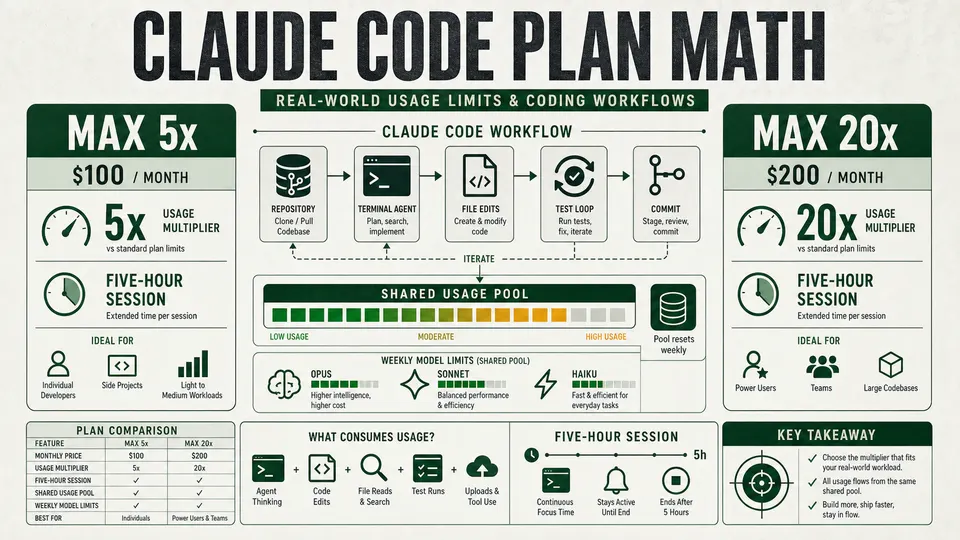
Claude Max 5x is the better-value plan for many solo developers, while Max 20x gives heavier Claude Code users more room for long sessions, large repositories and agentic workflows.
Anthropic’s Claude Max plans now sit at the center of a growing developer debate: whether the $100-a-month Max 5x plan is enough for serious Claude Code work, or whether heavy users need the $200-a-month Max 20x plan to avoid hitting limits during long coding sessions. Codex users face the same choice in ChatGPT Pro $100 vs $200 for OpenAI Codex.
The short answer is clear: Claude Max 5x is the better-value plan for most solo developers, while Claude Max 20x is the safer plan for developers who use Claude Code as a primary daily coding tool. Neither plan is unlimited, and neither can be reduced to a reliable “messages per day” count.
This guide was last checked against Anthropic’s pricing page, help center and Claude Code documentation on October 3, 2026, including Anthropic’s Opus 5.5 announcement and the Claude Code model-configuration docs.
Quick summary
Claude Max is Anthropic’s higher-usage individual subscription tier above Claude Pro. It is aimed at users who work with Claude frequently and need more capacity than the standard paid plan.
Claude’s individual paid tiers break down broadly like this:
- Claude Pro: the entry paid plan for everyday use, with Claude Code included. See how Pro compares now in Claude Pro vs Max after Opus 5.5.
- Claude Max 5x: $100 per month, with 5 times more usage per session than Pro.
- Claude Max 20x: $200 per month, with 20 times more usage per session than Pro.
Claude Code is included in both Pro and Max. That means developers can use Claude in the web, desktop and mobile apps, and also use Claude Code in the terminal, under the same subscription.
The key catch: Claude chat, Cowork and Claude Code all share the same usage pool. Work done in the normal Claude app, work done in Cowork, work done through Claude Code in the terminal and work done through the Claude Code integrations for VS Code, Cursor and JetBrains IDEs all count toward the same plan limits.
Anthropic does not publish a simple fixed public number such as “X messages per day” for Max plans. Usage depends on the model selected, prompt length, conversation history, files, screenshots, tool calls, generated output, repository size and task complexity.
Which models you are actually choosing between
As of October 2026, Claude’s lineup centers on Claude Fable 5.1, Claude Opus 5.5, Claude Sonnet 5.5 and Claude Haiku 4.5. Anthropic released Opus 5.5 on September 22, 2026. Sonnet 5.5 is what /model sonnet resolves to on the Anthropic API from Claude Code v2.1.284, per the model-config version history; the Opus 5.5 announcement said Haiku 5.5 was still to follow, so Haiku 4.5 remains the small model here. We have not re-verified context windows for the newer models, so check Anthropic’s model docs rather than relying on a figure here.
Opus 5.5 is now the default in Claude Code
Since Claude Code v2.1.280, Anthropic’s docs say default resolves to Opus 5.5 on Pro, Max, Team and Enterprise. Before that release it resolved to Sonnet 5 on Pro and Team Standard, and to Opus 5 on Max. So on Max 5x and Max 20x you stay on Opus by default, now Opus 5.5. Opus 5.5 starts at medium effort, one level below Opus 5’s high default, and Anthropic says that at default effort Opus 5.5 beats GPT-6 Astra at max effort for about a fifth of the cost per task.
At the Opus 5.5 launch Anthropic also said it is increasing five-hour usage limits on Pro, Max, Team and seat-based Enterprise plans. It gave no percentage in that post. Anthropic has not published how much of your limit an Opus 5.5 turn uses compared with a Sonnet turn. Its costs doc says Sonnet costs less than Opus and that lowering effort with /effort reduces cost. Our Claude Pro vs Max after Opus 5.5 guide covers the default change and its token pricing in more detail.
Anthropic’s pricing page lists Pro and Max model access as Opus, Sonnet, Haiku and Fable, with Fable available on a limited basis. Fable models always use extended thinking, which makes them the most quota-expensive option on the menu rather than simply the most capable. Thinking also cannot be turned off on Opus 5.5 or Sonnet 5.5, so on those models effort level is the main control over cost.
Model names and availability change often, so treat any published list as a snapshot. We map the official ladder plan by plan in Claude Max $100 vs $200 same features. Running /model inside Claude Code is the reliable way to see what your own account can reach today.
Plan comparison: Claude Max $100 vs Claude Max $200
| Plan name | Monthly price | Usage multiplier vs Claude Pro | Best for | Claude Code support | Session limits | Weekly limits | Usage credits | Priority access |
|---|---|---|---|---|---|---|---|---|
| Claude Max 5x | $100/month | 5x more usage per session than Pro | Frequent solo developers, daily but focused coding, moderate repositories, research, writing and debugging | Included | Rolling session limit that resets every five hours; Claude Code’s five-hour rate limits were doubled for paid users on May 6, 2026 | A single weekly limit that applies across all models, on top of the session limit, resetting at a fixed time assigned to your account | Available after included limits, billed separately at API rates when enabled | Yes |
| Claude Max 20x | $200/month | 20x more usage per session than Pro | Heavy Claude Code users, long coding days, large repositories, agentic workflows and users who cannot afford interruptions | Included | Same session-limit structure as Max 5x, but with far more per-session capacity | Same all-model weekly limit structure as Max 5x, with a larger allowance | Available after included limits, billed separately at API rates when enabled | Yes |
On May 6, 2026, Anthropic doubled Claude Code’s five-hour rate limits for Pro, Max, Team and seat-based Enterprise users. It also removed the peak-hours limit reduction for Claude Code on Pro and Max accounts. That change improved headroom for developers, but it did not make any of the plans unlimited.
The weekly limit is one pool, not a per-model pool
This is the detail developers most often get wrong. The weekly limit applies across all models. Hitting it is not something you can work around by switching from Opus to Sonnet with /model, because the ceiling you hit is the plan’s, not the model’s.
There are separate, narrower model-family caps as well, and those behave differently: a message naming a specific model, such as an Opus limit or a Sonnet limit, does leave you able to keep working by switching to a model outside that family. A message naming your session limit or your weekly limit does not. Our companion piece maps Claude Code Max session and weekly caps in detail. Reading which limit you actually hit is the difference between a useful /model switch and a wasted one.
The weekly limit moved on September 14, 2026
Anthropic ran a promotion that raised weekly Claude Code limits by 50% from May 13, 2026 through September 13, 2026, covering Pro, Max and Team plans plus legacy seat-based Enterprise users. Five-hour session limits were not affected by that promotion. The help center states that after September 13, 2026, weekly usage limits in Claude Code return to their standard levels.
Separately, Anthropic announced on X that starting September 14, 2026 it is permanently raising standard weekly limits in Claude Code by 25% for Pro, Max, Team and seat-based Enterprise plans, and later clarified that compared with the promotional level this works out to roughly a 17% reduction in weekly Claude Code limits. Those two figures come from Anthropic’s announcement post rather than from the help center, which does not carry them, so treat the exact percentages as company-stated rather than documented.
The practical takeaway for anyone budgeting a plan today: weekly headroom is higher than the pre-promotion baseline but lower than it was during the promotion, and the only authoritative number is the one on your own account.
How much can developers actually use?
There is no guaranteed public message number. That is the central frustration with Claude’s Max plans.
A short chat asking Claude to explain a function may consume very little usage. A Claude Code session that scans a large repository, reads multiple files, writes patches, runs tests, summarizes failures and loops through fixes can consume much more.
Lower-usage patterns include:
- Short prompts
- Small code edits
- Simple debugging
- Fresh chats
- Small files
- Focused questions with limited context
- Routine coding with Sonnet 5.5 or Haiku 4.5
Higher-usage patterns include:
- Large repositories
- Long conversations
- Many files in context
- Screenshots and attachments
- Long generated outputs
- Multiple Claude Code runs
- Extended thinking and high effort levels
- Tool-heavy workflows
- Research mode
- Opus 5.5 and especially Fable 5.1 usage
- Multi-agent, agent-team or agentic coding sessions
Claude Code’s own default is now Opus 5.5, but that does not make it the cheapest way to spend a Max allowance. Anthropic’s docs still say Sonnet handles most coding tasks well and costs less than Opus, so switching to Sonnet with /model sonnet for routine edits, tests and refactors is the practical way to stretch Max 5x, and opusplan (Opus for planning, Sonnet for execution) is a reasonable middle ground. Keep Opus 5.5 for harder planning, architecture or debugging tasks, and leave effort at medium unless a problem needs more. If you updated Claude Code and your Max sessions feel shorter, check /model and /effort first: on Max the default moved from Opus 5 at high to Opus 5.5 at medium. On Max 20x the same habits still apply, but you will feel the default change less. Fable is the most expensive tier of all, because it always uses extended thinking, so it belongs on genuinely hard problems rather than on routine work. Haiku remains the cheapest option for quick lookups, simple edits and high-volume scripted work.
Claude Code can burn through usage quickly because each turn may involve the current prompt, previous conversation history, project instructions, file contents, tool results, terminal output and generated diffs. The larger the session becomes, the more expensive each turn can feel in usage terms.
Two newer behaviors deserve a mention because they consume plan usage without any typing on your part. Agent teams spawn multiple Claude Code instances, each with its own context window, and use roughly seven times more tokens than a standard session when teammates run in plan mode. Scheduled tasks, goal check-ins and cross-session messages all start new turns that carry your full context, so a session left open can keep drawing usage while idle.
That is why Max 20x is much safer for full-day coding workflows. If you're weighing alternatives, we compare Claude Code, Codex CLI, Antigravity CLI and OpenCode. Max 5x is strong for serious solo developers, but heavy days involving large repositories, repeated test loops or broad refactors can still hit limits.
Claude Code-specific details
Claude Code can be authenticated with a Pro or Max subscription by logging in with the same Claude account used for the main Claude app. For what happens after that login, see how Claude Code works internally.
There is an important billing trap for developers: if an ANTHROPIC_API_KEY environment variable is set, Claude Code may authenticate through the API instead of the subscription plan. In that case, usage can be billed separately at API rates rather than using the included Pro or Max allocation.
For subscription users, the command to reach for is /usage. On a Pro, Max, Team or Enterprise plan it shows plan usage bars alongside a breakdown of what is consuming them: usage attributed to skills, subagents, plugins and individual MCP servers, behavior flags for patterns such as long context or cache misses that account for 10% or more of recent usage, and rows for the heaviest scheduled tasks. Press d or w to switch between the last 24 hours and the last 7 days. /cost is now simply an alias for /usage, and the session dollar figure at the top of the screen is aimed at API users rather than subscribers, whose usage is already included.
/status is a different command with a narrower job: it reports the current session’s model, effort level and working directory, not your plan allocation. Settings > Usage on claude.ai remains the authoritative dashboard, because the /usage breakdown is computed from local session history on that machine and does not include usage from other devices or from claude.ai.
Usage credits can be enabled for Pro, Max 5x and Max 20x. This is the feature previously described as extra usage; Anthropic now documents it as usage credits. Once included limits are reached, users can continue working with separately billed credits charged at standard API rates. Run /usage-credits in Claude Code to open the controls, which for an individual subscriber means the Usage credits section of Settings > Usage on claude.ai, where you can turn credits on or off and check your balance, this month’s spend and your monthly spend limit.
Spending controls and caps are available, but this still means a developer paying $100 or $200 per month can face additional charges during intense work. One detail worth knowing: the prompt cache lifetime is an hour on a subscription and drops to five minutes once you are drawing on usage credits, so overflow work can cost more per turn than the same work inside your included allowance.
Why users complain
The main complaint is that “5x” and “20x” sound precise but do not translate into predictable message counts, coding hours or completed tasks.
For ordinary chat, that ambiguity is annoying. For Claude Code, it can be disruptive. One heavy coding session can consume far more than many normal chat messages, especially if it involves large context, repeated file reads, Opus or Fable, long diffs or test/debug loops.
Some paid users say they still hit limits during serious development work. Others object to the idea of paying $100 or $200 monthly and then being asked to buy usage credits after exhausting included capacity. Some look instead at Ollama's free local tier versus its paid cloud capacity. The September 14, 2026 weekly-limit change sharpened that complaint, because the headline was a permanent increase while the lived experience for anyone who had been coding through the promotion was less weekly headroom than the week before.
Anthropic’s likely reasoning is straightforward: agentic coding is computationally expensive. A coding agent can repeatedly process long context, inspect files, call tools, write patches, run tests, read failures and generate large outputs. That makes “unlimited AI coding” unrealistic for heavy agent use at today’s inference costs.
$100 vs $200 recommendation
Choose Claude Max 5x / $100 if:
- You are a solo developer.
- You use Claude Code daily but not continuously all day.
- You work on moderate repositories.
- You mostly switch to Sonnet for routine work and keep Opus 5.5 for the hard parts.
- You want much better limits than Pro without paying $200.
- You are comfortable using usage credits for occasional intense sprints.
Choose Claude Max 20x / $200 if:
- You use Claude Code like a coding employee.
- You work on large repositories.
- You do long refactors or agentic sessions.
- You run multiple coding tasks or agent teams.
- You run Opus 5.5 as your everyday model, or frequently use Fable for hard problems.
- You cannot afford interruptions during the workday.
- You already hit Max 5x limits regularly.
If you mostly chat, write, research, debug small files or code casually, Pro or Max 5x may be enough. If Max 5x regularly interrupts real work, Max 20x is the correct upgrade.
Decision matrix
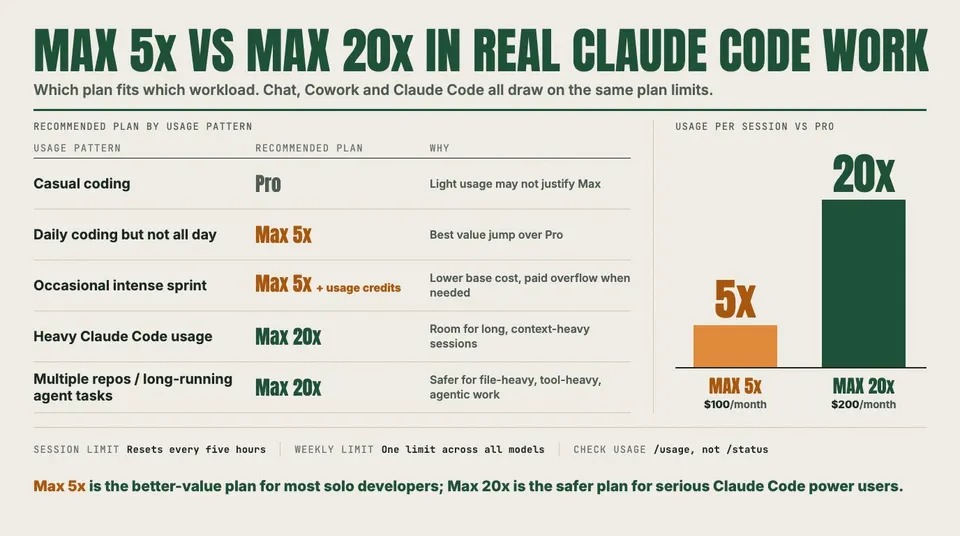
| Usage pattern | Recommended plan | Why |
|---|---|---|
| Casual coding | Pro | Claude Code is included and light usage may not justify Max. |
| Daily coding but not all day | Max 5x | Best value jump over Pro for frequent individual use. |
| Heavy Claude Code usage | Max 20x | More room for long, context-heavy coding sessions. |
| Multiple repos / long-running agent tasks | Max 20x | Safer for file-heavy, tool-heavy and agentic workflows. |
| Occasional intense sprint | Max 5x + usage credits | Lower base cost with paid overflow when needed. |
| Team/company usage | Team or Enterprise | Better suited for organizational billing, administration and multi-user controls. |
Final verdict
Claude Max $100 is the better-value plan for most solo developers. Claude Max $200 is the safer plan for serious Claude Code power users.
For developers doing daily agentic coding, the $200 plan gives much more breathing room and reduces the risk that a large repository session or long debugging loop cuts work short. For most solo developers, the sensible path is to start with Max 5x, switch to Sonnet for routine work, manage context aggressively and upgrade only if limits interrupt real work.
The one claim developers should avoid is the most tempting one: exact message counts. Anthropic does not publish a reliable fixed number, and real-world Claude Code usage depends too heavily on context, model choice, files, tools and task complexity. Check /usage and Settings > Usage against your own account rather than against anyone’s published estimate, including this one.