ChatGPT Pro 5x vs 20x for Codex: compare rate limits, token burn, and when Plus + API or $100/$200 Pro fits agentic coding, monorepos, and parallel agents.
If you have been searching for a “Codex 100” or “Codex 200” plan, stop. Those SKUs do not exist. Codex is OpenAI’s coding agent—write, review, ship—bundled into ChatGPT plans. The $100 and $200 prices are ChatGPT Pro tiers that multiply Plus-level Codex and agentic usage by 5× and 20×, and from 30 October 2026 the $200 tier drops to 10×. A third tier, Pro $500, launched on 29 September 2026. Same Pro feature set across the $100 and $200 tiers; the difference that matters for daily agentic coding is how much of the shared usage allowance you get.
Update — 2 October 2026: Pro $200 is open again, but it is being cut to 10×. If you came here for "Pro 20x", that allowance is ending: the $200 tier's 20× becomes 10× Plus on 30 October, and every 20× figure below is labelled as the legacy allowance. OpenAI paused new Pro $200 sign-ups and upgrades on 10 September, citing demand for GPT-6 Astra after its 3 September 2026 launch. At DevDay on 29 September it reopened the plan with a smaller allowance: from 30 October, Pro $200's included usage in Codex and ChatGPT Work falls from 20× to 10× Plus. Existing subscribers keep 20× until 29 October and, according to Engadget and The Next Web, get a one-time grant of usage credits worth $2,500 that expires at the end of 2026 (31 December); GPT-6 Pro chat messages on the $200 tier also fall from 200 to 100 a week. The same announcement added Pro $500, the highest-usage tier and the only one with Ultrafast, a faster GPT-6 Astra service tier for Codex. Pro $100 stays at 5×. So the real comparison from November is 5× versus 10×, with $500 above both. The timeline is below; plan details are in ChatGPT Pro 500: What $500 a Month Buys.
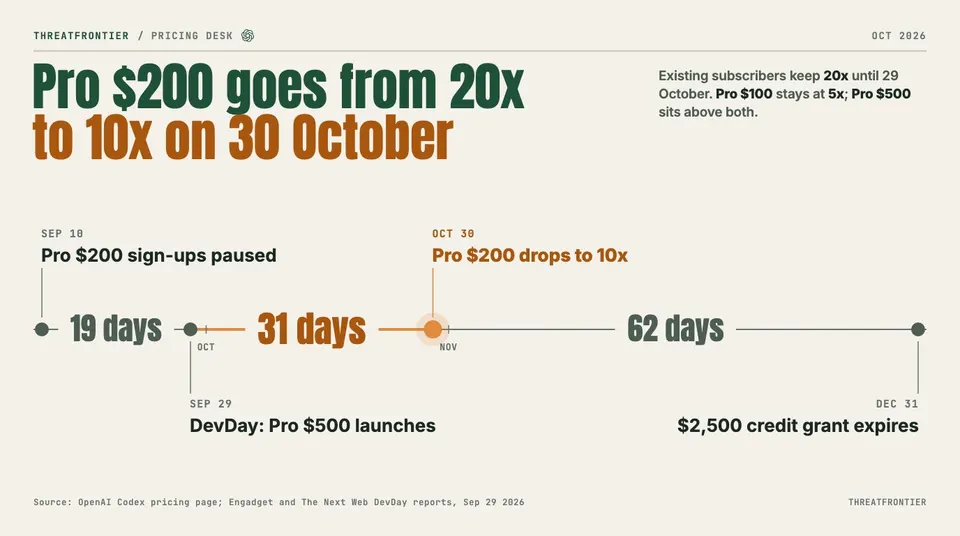
Pro $200 keeps 20x Plus for existing subscribers until 29 October, then drops to 10x. Sources: OpenAI Codex pricing page; Engadget and The Next Web DevDay reports.
That reframes the question engineers are actually making right now: whether ChatGPT Pro 5x vs 20x Codex coding spend (or 5× vs 10× from 30 October) is justified, when Plus is enough, and when the API is the cleaner overflow valve.
How Pro and Codex actually connect
Codex is not a separate product. Sign in with a ChatGPT account and the same plan pool powers:
- Codex CLI
- IDE extension (VS Code and forks)
- Codex cloud, ChatGPT Work on the web, and the ChatGPT desktop app for local chats
- Mobile surfaces where the plan card allows it
Usage from Codex and other agentic features (ChatGPT Work, ChatGPT for Excel, Workspace Agents where available) draws from one shared agentic usage and credit pool. Local messages and cloud chats share your plan’s usage allowance; weekly limits may also apply. Hitting the wall mid-session is a plan-pool problem, not a “CLI-only” problem.
The five-hour window deserves a precise statement, because the docs and the product disagree. OpenAI’s pricing tables publish every range as “local messages per five-hour period.” But OpenAI removed the rolling five-hour cap in July 2026 and reinstated it on 25–26 August 2026 for Plus accounts only, leaving it switched off on the Pro tiers, and OpenAI has said it will not bring the five-hour limit back for Pro. On Pro, the weekly limit is the ceiling that bites; on Plus, both apply.
Auth has two paths. ChatGPT sign-in gives the subscription allowance plus cloud integrations on eligible plans (GitHub review, Slack, and similar). An API key path runs CLI/SDK/IDE work on pure token billing—no subscription usage table, and no those cloud integrations.
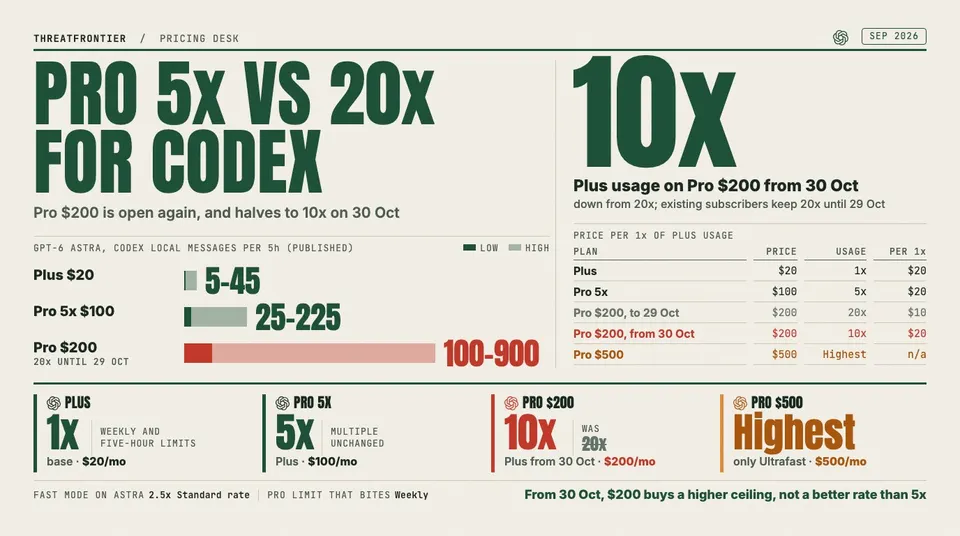
Pro’s official framing is multipliers against Plus, starting from $100/month: 5× on Pro $100, 20× until 29 October and 10× from 30 October on Pro $200, and the highest allowance on Pro $500. OpenAI's Codex pricing page does not put a multiple on Pro $500; some DevDay recaps cite 25×, which we could not confirm on an OpenAI page. The $100 and $200 tiers include the same core Pro capabilities, with one published exception—unlimited desktop ChatGPT Voice is $200-only (Plus gets roughly 30 minutes–1 hour, Pro 5× about 3–6 hours), and Voice-started tasks still draw on your Codex budget. Pro also still lists GPT-5.3-Codex-Spark (research preview) with a separate usage limit, but do not weight it: OpenAI announced on 11 September 2026 that Spark would be retired the following week, and the docs simply have not caught up. Pro $500 adds Ultrafast, up to 8× faster token generation on GPT-6 Astra in Codex, charged at 8× the Standard rate against your included allowance (6× when paid from purchased credits). You change tiers in Settings → My Plan; with the pause lifted, upgrades to Pro $200 are available again.
What 5×, 20× and 10× mean in practice
Plus is positioned for “a few focused coding sessions each week.” Pro multiplies those allowances. OpenAI publishes planning ranges—not hard message caps—for local messages per five-hour period. As of 2 October 2026 its Codex pricing page lists only Plus and Standard Business, on a new model lineup (GPT-6.1 Sol arrived at DevDay), and says Pro plans currently have no five-hour limit. The Pro columns below are therefore our arithmetic, Plus times the tier's multiple, and they describe relative size of the pool rather than a five-hour cap:
| Model | Plus (published) | Pro 5× ($100) | Pro $200, 20× (until 29 Oct) | Pro $200, 10× (from 30 Oct) |
|---|---|---|---|---|
| GPT-6 Astra | 5–45 | 25–225 | 100–900 | 50–450 |
| GPT-6.1 Sol | 15–160 | 75–800 | 300–3,200 | 150–1,600 |
| GPT-6 Sol | 15–150 | 75–750 | 300–3,000 | 150–1,500 |
| GPT-6 Luna | 350–3,000 | 1,750–15,000 | 7,000–60,000 | 3,500–30,000 |
5× is five times Plus on the same model row. The legacy $200 column is twenty times Plus, about four times the 5× tier, and it is the allowance existing subscribers keep until 29 October. From 30 October the $200 tier is 10×, twice the 5× column (for GPT-6 Astra, roughly 50–450). The "20x" in this guide's title and address is that legacy allowance; the address stays the same so existing links keep working, but for anyone subscribing or renewing from 30 October the comparison is 5× versus 10×. Temporary promo multipliers in spring 2026 confused community math, and the “10× on $100” framing expired on 31 May 2026; the current multiples are 5× on Pro $100 and 10× on Pro $200 (20× for existing subscribers until 29 October). Note the shape of the Astra row: OpenAI’s most capable model is also the one that empties an allowance fastest. For the wider plan picture, see ChatGPT Pro $100 vs $200 usage explained.
Metering is token- and credit-based; OpenAI replaced per-message metering with API-aligned credits on 2 April 2026, and all but a small subset of Enterprise customers have been migrated off the legacy per-message rate card. Credits scale by model for input, cached input, and output. Rates per 1M tokens:
| Model | Input | Cached input | Output |
|---|---|---|---|
| GPT-6 Astra | 250 | 25 | 1,250 |
| GPT-6.1 Sol | 50 | 2.5 | 250 |
| GPT-6 Sol | 50 | 5 | 250 |
| GPT-6 Luna | 2.5 | 0.25 | 12.5 |
| GPT-5.6 Sol | 100 | 10 | 500 |
| GPT-5.6 Terra | 50 | 5 | 300 |
| GPT-5.6 Luna | 5 | 0.5 | 30 |
Two footnotes matter for budgeting. GPT-5.6 Sol’s rate is promotional at least through 21 November 2026, so do not treat 100/10/500 as permanent. And Fast mode costs more: against included plan usage it is charged at 2.5× the Standard rate (2× on purchased credits). GPT-5.5 also retires from ChatGPT and Codex on all plans on 14 October 2026.
Output costs far more than input; fast mode burns faster. Small scripts sit at the high end of a range; monorepo loops, big context, tool use, and long outputs sit at the low end—context load at session start counts, so a nominal five-hour bucket can feel like roughly an hour of serious large-repo work. OpenAI puts a typical GPT-5.6 Sol Codex task at 2–15 credits, with large variance by model, context, tool use and fast mode. When you hit the limit, the in-flight turn may finish under fair use; then wait for reset, buy credits (eligible Plus/Pro), switch to a smaller model, or continue local work with an API key.
When Pro 5× still throttles
5× is not “unlimited agenting.” It multiplies Plus—and Plus was never designed for multi-agent monorepo days. If you are weighing a switch, compare Claude Code vs OpenAI Codex limits at $100 and $200.
Parallel agents. The pool is account-level, not per-agent. Concurrent CLI + IDE + cloud, or multi-agent orchestration, compete for the same weekly budget. Three Astra or Sol agents on fast mode can empty a 5× allowance that would feel comfortable for one disciplined session.
Big repositories. Large context, heavy retrieval, and fat project instructions raise credits per turn. You get fewer “messages” and more burn per message. Trimming AGENTS.md and disabling unused MCP servers is real money. Cached input is billed at a tenth of the input rate, which is why prompt caching for agent costs matters.
Extended / all-day sessions. Weekly pressure is the constraint on Pro today, and it does not reset at lunchtime. Output-heavy scaffolding, full-suite loops, and multi-file refactors hit the expensive side of the rate card. GPT-6 Luna buys volume at 2.5 credits per 1M input; Astra and Sol buy depth at a steeply higher rate.
Before paying for a bigger tier, pull the cheap levers:
- Serialize agents instead of running many in parallel
- Downshift model for bulk work; reserve Astra and Sol for deep tasks
- Narrow scope and lean agent instructions; nest AGENTS.md rather than bloating one file
- Disable MCP servers you are not using
- Avoid full test suites every turn
- Leave Fast mode off unless the latency is worth 2.5× (and Ultrafast, on Pro $500, unless it is worth 8×)
- Top up credits for spikes
Plus + API: the control alternative
Staying on Plus ($20) with an API key for overflow is a common pro pattern—subscription for interactive Codex and cloud glue, tokens for CI, automation, and bursts. It is also the way to buy headroom in exact amounts rather than in plan-sized steps. The ChatGPT API vs Plus break-even math shows where token billing starts to win.
| Dimension | Plus / Pro (ChatGPT sign-in) | API key |
|---|---|---|
| Cap model | Shared plan allowance—weekly on Pro, weekly plus five-hour on Plus—then credits | Pay per token; no those subscription windows |
| Cloud features | Integrations on eligible plans | None of those cloud glue features |
| Cost shape | Fixed sub + optional credits | Variable, usage-linear |
| Best fit | Interactive agentic coding with integrations | CI, automation, shared runners, burst overflow |
Standard Business seats publish Plus-class Codex ranges per seat, while Business ($100) seats use the Pro 5× estimates, and Enterprise/Edu workspaces on flexible pricing have no fixed rate limits at all—usage scales with credits. Every plan's allowance is compared in Codex and GPT-6 usage limits by ChatGPT plan. Teams buy admin, SSO, and workspace controls, not a personal Pro multiplier.
Check live usage—ignore invented credit packs
Do not plan from forum screenshots or fixed “you get N credits” myths. Allowance is live and workload-dependent.
- Codex Settings → Usage — remaining allowance, credits, auto-reload where your role allows
- Product limit banners near the wall
- In an active CLI session,
/statusfor a plan/window snapshot - Historical spend on the OpenAI usage dashboard (lags; not a live meter)
Watch your weekly remaining first on Pro, the five-hour remaining too if you are on Plus, then the model, and whether fast mode is on. Pricing-page message ranges are planning estimates only, and they still describe five-hour buckets even where Pro is not currently metered that way.
Who should pick what
| Profile | Intensity signals | Choice |
|---|---|---|
| Occasional agentic | A few focused sessions/week; small PRs | Plus (+ credits/API for rare spikes) |
| Daily single-thread heavy | Full-time one main agent; Plus interrupts mid-week | Pro 5× ($100) |
| Parallel / multi-repo / all-day | Multiple agents, monorepos, frequent 5× exhaustion | Pro $200 (10× from 30 October), or Pro 5× plus credits or API overflow |
| Already on Pro $200 | Continuous Codex, large repos, parallel agents | Re-measure after 30 October — the allowance halves to 10×; check whether 5× plus credits now covers you |
| Watching every token stream | Interactive Codex where generation time is the bottleneck | Pro $500 for Ultrafast, if a trial month shows real time saved |
| CI / automation / cost control | Scripted jobs, predictable token bills | API key (± Plus for interactive) |
| Team / compliance | SSO, admin, no-training defaults | Business / Enterprise |
Upgrade ladder: Measure one to two weeks with Usage and /status. If Plus interrupts real work several times a week, move to 5×. If 5× still trips on normal parallel or big-repo days—not experimental thrashing—weigh Pro $200 at 10× against credits, model downshift, or hybrid API overflow. Optimize workflow before you spend: model downshift, narrower tasks, leaner agent instructions.
Until 29 October, 20× costs twice 5× but delivers about four times the 5× allowance. From 30 October that advantage is gone: 10× costs twice 5× and delivers twice the allowance, the same $20 per multiple of Plus. The $200 tier then buys a higher ceiling, not a better rate. Holders deciding whether to keep it can weigh ChatGPT Pro vs Claude Max at $200.
Bottom line
Size the tier against how hard you actually push parallel agents, large repos, and long sessions, then check the current ladder: Plus, Pro 5×, Pro $200 at 10× from 30 October 2026, and Pro $500 with Ultrafast, plus credits and API keys. Use official planning ranges and token burn drivers—the current ones, with GPT-6 Astra at the top and GPT-6 Luna at 2.5 credits per 1M input—then verify with Usage and /status, not folklore.
Sources
- OpenAI: Codex pricing and usage limits
- OpenAI: Codex speed, Fast and Ultrafast modes
- OpenAI Help Center: About ChatGPT Pro plans
- Engadget: OpenAI adds a $500 Pro subscription, nerfs its existing $200 tier
- The Next Web: OpenAI halves Pro 200 usage and launches a $500 ChatGPT plan at DevDay
Related reading
- ChatGPT Pro 500: What $500 a Month Buys
- ChatGPT Pro $100 vs $200: Which OpenAI Codex Plan Gives Developers More Real-World Usage?
- How to Monitor AI Rate Limits Across ChatGPT, Claude, and Cursor: A Practical Playbook
- Google AI Ultra vs Claude Max vs ChatGPT Pro: Which $100 or $200 Plan for Developers?