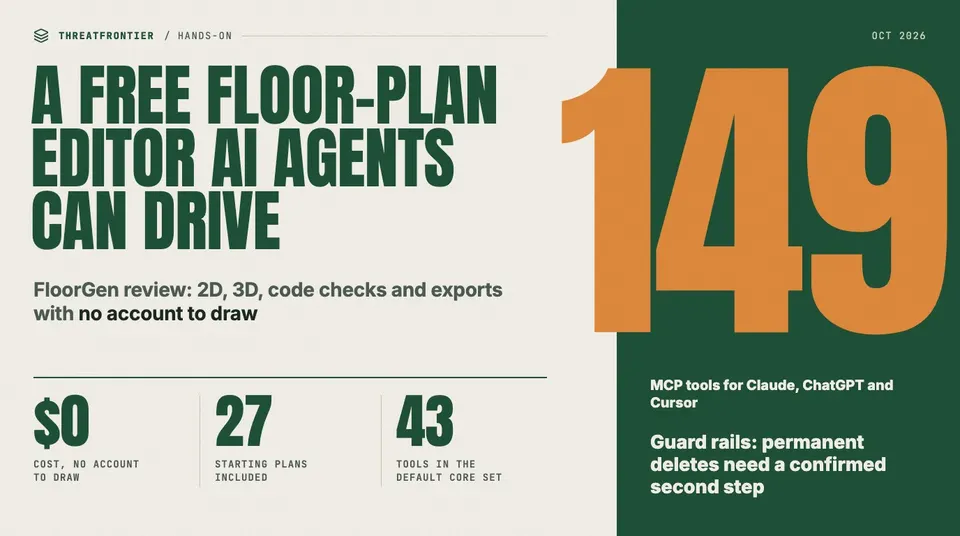
FloorGen is a free floor plan maker with no sign-up: 2D, 3D, code checks and exports, plus an MCP server that lets Claude or ChatGPT edit plans safely.
Most free floor-plan apps make the same trade: you get to draw for nothing, and they get your email, your account and, increasingly, a paywall the moment you try to export. FloorGen skips that. It is a free floor plan maker that runs in the browser, draws in 2D and 3D, needs no sign-up, keeps projects in the browser, and puts exports and code checks in the free tier. It also ships something most consumer design tools don't have: a Model Context Protocol server with 149 tools, which lets Claude, ChatGPT or Cursor draw and edit a plan directly.
The MCP server is why it's on our radar. An agent that can write to your files is exactly the kind of integration we keep covering when it goes wrong. So we spent time with both halves: the editor a person uses, and the tool surface an AI agent gets.
What you get without signing in
Opening the editor drops you straight into a drawing. There's no sign-up form and no trial clock. The landing page's pricing section reads "$0 — Everything is free right now. No trial, no card, no watermark," and the FAQ spells out the scope: "The editor, 3D, video, exports and code checks are free, with no watermark and no limit on projects."
What that covers in practice:
- 2D drafting. You draw walls that snap to each other, and rooms are detected from them. You can add doors, windows and dimensions in imperial or metric units, on multiple floors including basements, with undo history.
- A 3D view of the same model, with a walk mode and an exportable walkthrough video. You don't build a separate scene.
- Templates. There are 27 editable floor plans to start from: US ranch and two-story houses, a duplex, a fourplex, an 800 sq ft ADU, a garage ADU, Canadian basement and garden suites, kitchen and bath layouts, and UK, EU and Mexican homes.
- A furniture library of about 3,000 models in 14 categories.
- Building-code checks against several profiles. The US profile flags IRC issues such as minimum room size (R304), ceiling height (R305.1), emergency egress (R310), stair geometry (R311.7) and guards (R312.1.2). Canadian, UK, German and Mexico City profiles sit alongside it.
- Exports: PNG, PDF, a multi-sheet print set from Letter up to ARCH D, SVG, DXF for CAD, glTF for 3D tools, a self-contained HTML viewer, CSV and MP4/WebM video.
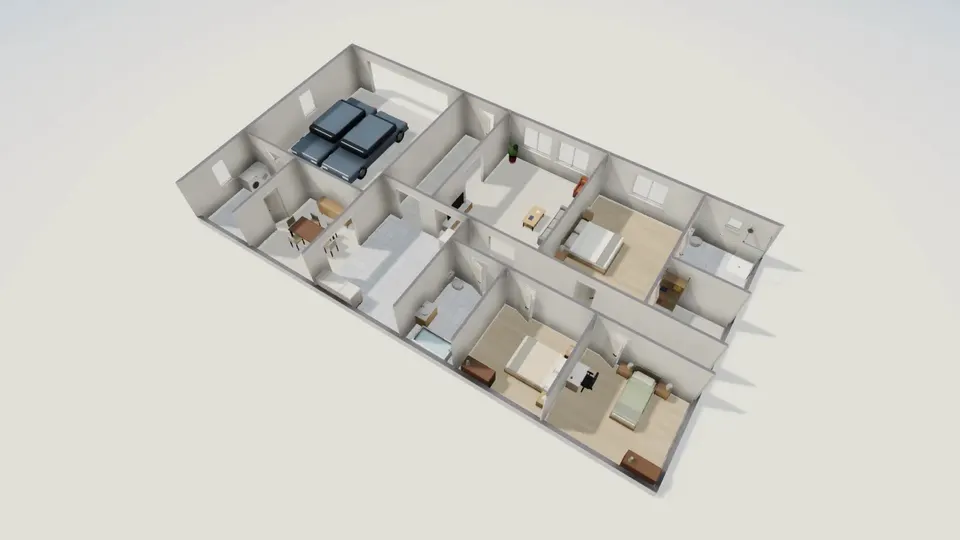
FloorGen's 3D view of its US three-bedroom ranch template, rendered from the same model as the 2D plan.
There are gaps, and FloorGen lists them itself. Its FAQ says there's no DWG or IFC export, so anyone who works in a BIM pipeline will be converting from DXF or glTF. Sign-in is Google only. The in-editor AI chat is labeled BETA and needs that free sign-in. By default, a signed-in user gets 30 AI turns an hour and 200 a day.
The part an AI agent sees
Every action in the editor goes through one engine, and that same engine is exposed as an MCP server at floorgen.app/mcp. It uses Streamable HTTP and is stateless, with two ways to authenticate:
- API keys (
fg_live_…), created under the account's Agents & MCP page and sent as a Bearer token. The server stores only a SHA-256 hash of each key. - OAuth 2.1 for claude.ai and ChatGPT, with dynamic client registration, PKCE (S256) and rotating refresh tokens. The protected-resource metadata lives at the standard
/.well-known/oauth-protected-resource/mcppath.
The 149 tools are grouped into seven toolsets. An agent gets only the core set of 43 tools unless it asks for more, which keeps the context small and the blast radius smaller. Each tool carries MCP's read-only and destructive hints, so a client can tell a describe_project from an empty_trash before calling it. Edits are rate-limited to 60 per minute per caller, and reads to 300. The server also publishes 15 resources, among them the project schema, the catalogue and a conventions guide, plus 12 prompt playbooks such as design_home and audit_and_fix_plan. Drawing a floor plan with Claude goes through this server, and ChatGPT, Cursor and the other clients connect the same way.
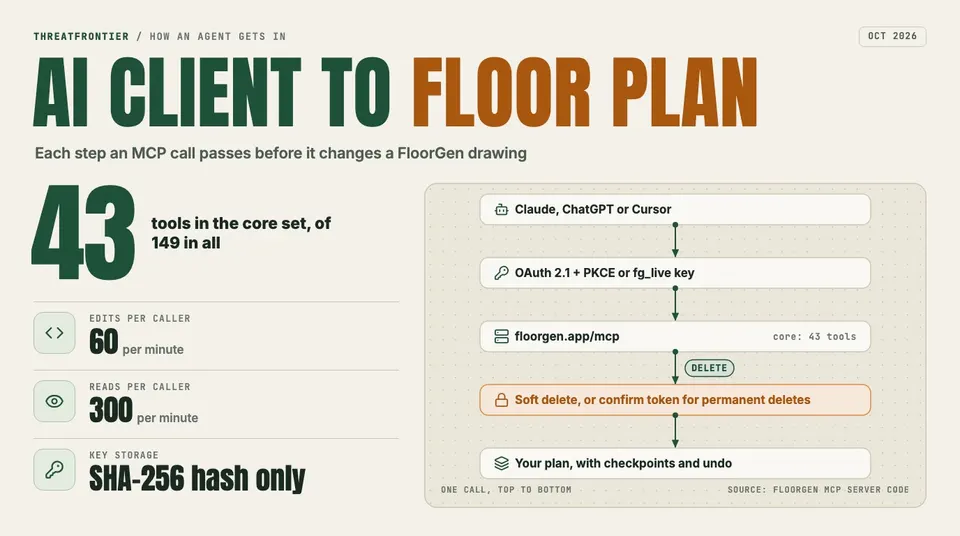
How an MCP call reaches a FloorGen drawing, and where the guard rails sit.
Guard rails for an agent that edits your drawings
What decides whether a write-capable MCP server is safe is what happens when the model gets it wrong. FloorGen's answer comes in layers:
- Soft delete by default. Removing a wall or a sofa moves it to a per-design trash. The agent needs no permission for that, and you lose nothing.
- A second step for anything permanent. Emptying the trash, clearing a design or deleting a floor, design or project first returns
CONFIRMATION_REQUIREDwith a one-time token. The agent is told to ask you, then repeat the call with that token. A model can't wipe a project in a single call. - Dry runs. The batch-edit tool can preview a change set without applying it.
- Checkpoints and undo. The agent can checkpoint before a large change. Checkpoints are kept for 30 days, up to 20 per project, and
undoworks on agent edits just as it does on yours. Projects deleted through the API can be restored for 30 days.
That isn't a guarantee: a confused agent can still make a mess of a plan within one design. But every irreversible operation sits behind a step a human can see.
What we'd flag
Guests aren't invisible. Using FloorGen without an account doesn't mean the server never hears from you. The browser generates a random guest ID and reports it when the app opens, and again when you return after 15 minutes. With the ID it sends your device type and browser language, and each project's name, its dates, its floor area and counts of its floors, rooms, walls and items. The drawing itself is never sent. The privacy policy discloses this, and the analytics set no cookies; the main tool is self-hosted, alongside Cloudflare Web Analytics. Still, "no account" here means "no identity," not "no telemetry." If a project name is sensitive, keep it out of the title.
"Free right now" is a choice the company could change. The code has an admin-managed plan model, and the landing page's "right now" is honest about that. For the moment no one is charged online, and nothing is locked behind a card.
It's a hosted service. It isn't open source and you can't self-host it. Signed-in projects sync to the vendor's cloud. Guest projects stay in your browser's IndexedDB, which is private but also fragile: clear your site data and they're gone. Export a .floorgen.json backup if you're working as a guest.
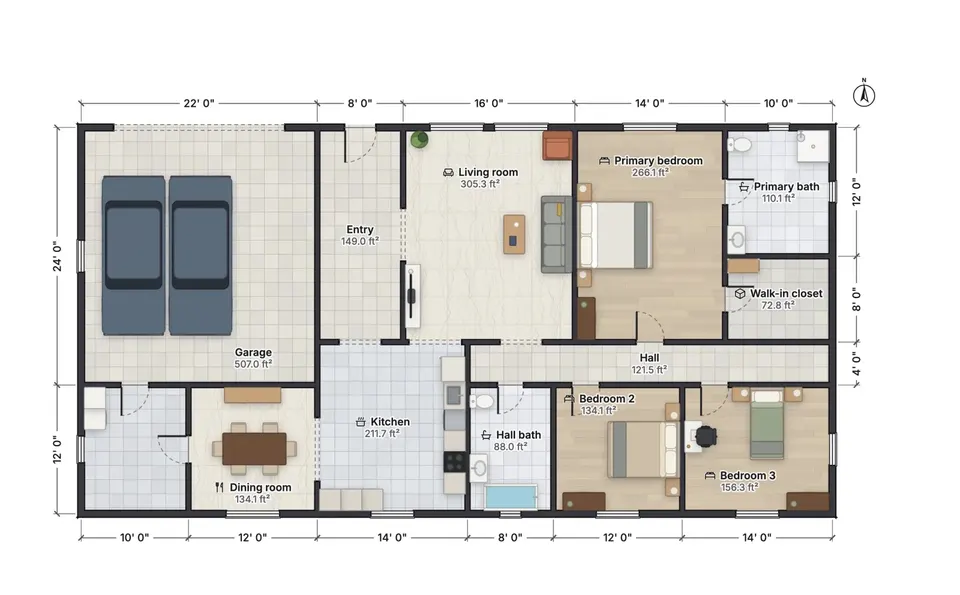
The same ranch house in 2D, with wall dimensions in feet and inches and each room's net area.
Verdict
For a homeowner sketching a renovation, a builder roughing out an ADU or a developer who wants to see what a well-built write-capable MCP server looks like, FloorGen is the most complete free floor plan maker we've used. The full editor, 3D, a code-check pass and CAD-friendly exports cost nothing and need no account. The agent integration treats destructive actions with more care than most. Its limits are real: no DWG or IFC, Google-only sign-in, a beta AI chat, and the guest telemetry above. None of them is hidden.
Disclosure: FloorGen is built by ThreatFrontier's publisher. The features described here were checked against the app's code and its live site on 10 October 2026.
Sources
- FloorGen home page and FAQ: https://floorgen.app
- FloorGen MCP documentation: https://floorgen.app/docs/mcp
- FloorGen privacy policy: https://floorgen.app/privacy
- Model Context Protocol, authorization specification: https://modelcontextprotocol.io/specification/2025-06-18/basic/authorization