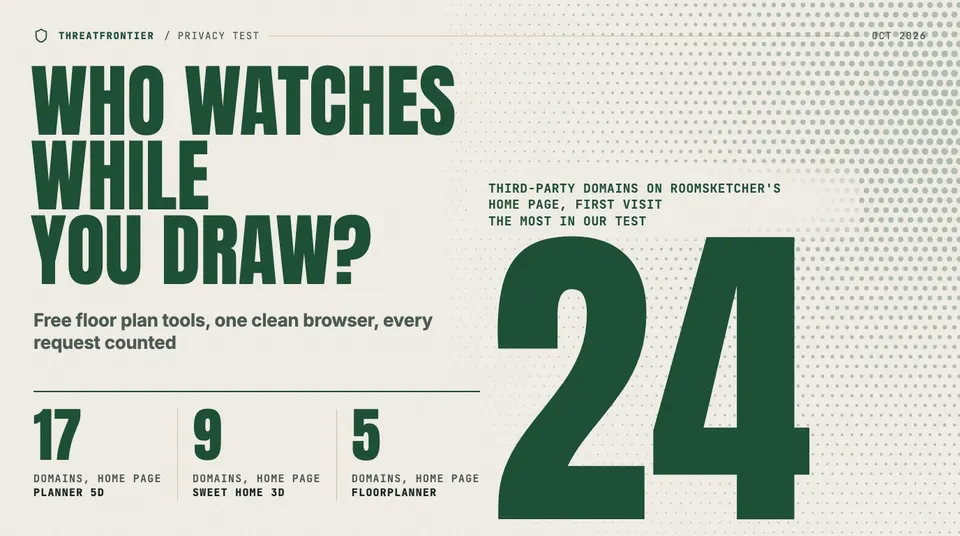
We loaded Planner 5D, RoomSketcher, Sweet Home 3D, Floorplanner and FloorGen in a clean browser, counted third-party domains and read each privacy policy.
The free floor plan tools that keep your plans away from the vendor are the ones that don't need an account: Sweet Home 3D's desktop app saves plans as files on your own computer, and FloorGen keeps a guest's plans in the browser. Planner 5D and RoomSketcher reach furthest: both want an account before you draw, and on a first visit in our test Planner 5D's home page loaded tags from four advertising companies and RoomSketcher's from six. None of the five websites we tested is silent, FloorGen's included.
We checked five tools people search for when they want to draw a home without paying: Planner 5D, RoomSketcher, Sweet Home 3D, Floorplanner and FloorGen. For each we asked four questions. Do you need an account to draw? Where does the plan live? What does the privacy policy say is collected and shared? And what actually loads in your browser before you've clicked anything?
How we measured it
On 10 October 2026 we loaded each tool's home page and its drawing page in Playwright 1.63.0 with headless Chromium 153. Every page got a fresh browser profile with no cookies. We clicked nothing, so no cookie banner was accepted or rejected, and we recorded every network request for 15 seconds after the page finished loading. Then we counted the distinct third-party domains, meaning any registrable domain that isn't the vendor's own. We ran the whole set three times and got the same counts every time.
Two caveats. The test ran from a connection in India, so Google's regional google.co.in domain showed up; we counted it as google.com. And cookie banners behave differently by country, so a visitor in the EU may see fewer requests before consenting. We kept the scripts and the raw request logs.
| Tool | Account to draw? | Where plans live | Third-party domains, home page | Third-party domains, drawing page | Ad tags seen |
|---|---|---|---|---|---|
| RoomSketcher | Yes | Vendor cloud | 24 | 14 (sign-in page) | 6 |
| Planner 5D | Yes (web) | Vendor cloud | 17 | 18 (sign-up page) | 4 |
| Sweet Home 3D | No (desktop) | Your files; online version on its server | 9 | 12 (online editor) | 2 |
| Floorplanner | To save | Vendor cloud | 5 | 5 (demo editor) | 0 |
| FloorGen | No | Your browser; cloud if signed in | 1 | 1 (editor) | 0 |
"Ad tags" counts the advertising companies whose tracking tags loaded on any page we tested: Google Ads, Meta, Microsoft Advertising, Pinterest, LinkedIn, Reddit and TikTok.
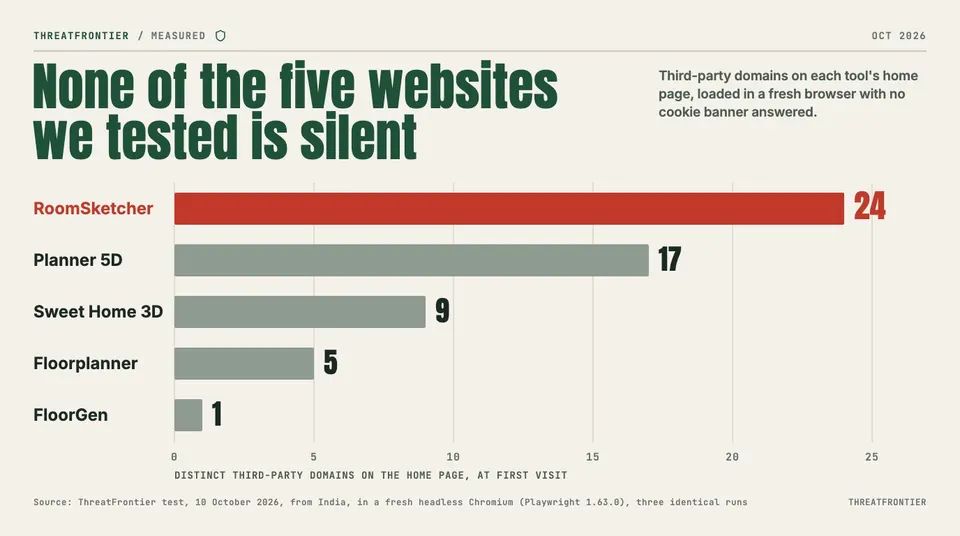
Distinct third-party domains on each home page in a fresh browser with no cookie banner answered. Playwright, headless Chromium, run from India, three identical runs, 10 October 2026. Counts may differ by region and consent choices.
Planner 5D: sign up first
Opening planner5d.com/editor in a fresh browser didn't open an editor. It redirected to a page reading "Sign up below to unlock the full potential of Planner 5D," with Google, Apple and email buttons and no option to skip. That sign-up page alone pulled in 18 third-party domains, including tags from Google Ads, Meta, Microsoft Advertising and Pinterest, plus Intercom's chat widget and Customer.io.
The privacy policy, last modified 14 November 2024, is upfront about the ads: "we may permit advertisers and their agents to use cookies or related technologies within the websites and Services to store information on or read information from your browser or device, so that they can optimize their advertising campaigns." It also covers your designs: "Following anonymization of any Personal Data in the User Contributions, we may use such content to improve our Services, including to train our AI algorithms."
Keeping a copy is possible on the free plan. Planner 5D's help center says "Export to PDF is available to Free, Premium, and PRO users." Export to CAD is listed under the Professional plan.
RoomSketcher: the most third parties
RoomSketcher's home page loaded 24 third-party domains, the most in our test. Ad tags came from Google Ads, Meta, Microsoft Advertising, LinkedIn, Reddit and TikTok, plus scripts from the analytics services Microsoft Clarity and Crazy Egg. The policy, revised 26 November 2025, says: "RoomSketcher use third-party advertising companies to serve ads when you visit and use the RoomSketcher Services." It classes your IP address and browsing data as "non-personal information" that "is not personally identifiable."
Drawing happens in RoomSketcher's app for Windows, Mac, iPad and Android tablets, and its help center says "All projects begin in RoomSketcher's Web Portal in your browser," starting with signing in. Plans sync to the vendor: "All your projects are saved in the cloud." The free plan allows "Up to two projects," and getting your drawing out costs extra: "generating 2D and 3D Floor Plans requires an in-app purchase before you can print or download them." RoomSketcher's paid tiers are laid out on FloorGen's page about how it fares compared with RoomSketcher.
Sweet Home 3D: the private option is the old-fashioned one
Sweet Home 3D is open source under the GNU GPL and runs offline on Windows, macOS and Linux. Its user guide tells you to save "by clicking on the Save home button," and the result is a file you own. No account is involved. The policy notes that its iOS and macOS versions include Firebase Analytics for "anonymous app usage statistics and crash reports."
The website is a different story. The policy says the company "doesn't collect private data on sweethome3d.com web site, except for users registered in the forum," and "doesn't show any advertising." Its online editor's cookie banner, though, says "selected third parties (11)" use cookies, "with your consent," for purposes including "marketing (personalized ads)." Before we answered that banner, the page had loaded Google Analytics, Firebase and advertising tags from Google and Microsoft, and asked api.ipify.org for our IP address. The online version saves only for registered users. Open its blank "Empty home" without registering and it warns: "Keep in mind that your design won't be saved!"
Floorplanner: few trackers, watermarked exports
Floorplanner's demo editor opened without an account and loaded five third-party domains. They were Amazon Web Services, Google's font servers, the jsDelivr CDN and Bugsnag error reporting, with no ad tags. Its privacy policy is short: "We do not sell your personal data to third parties or use it for third-party commercial messages."
Saving is a different matter. The pricing page says you can make "up to 5 free projects and keep them at no cost in your account," and free projects "can only export SD-quality images with a watermark," which it defines as 960 by 540 pixels.
FloorGen: one third-party domain, but not silent
FloorGen's editor opened with no sign-up, which makes FloorGen the only free Planner 5D alternative in this test that lets you draw and keep a plan in the browser without an account. FloorGen runs two analytics tools, and its policy says neither sets cookies. The one third-party domain on both pages was the second of them, Cloudflare's Web Analytics beacon. The main one, a self-hosted copy of Rybbit, loads through floorgen.app itself, so a domain count doesn't catch it. The policy says: "We do not use advertising trackers, social-media pixels, or third-party fonts."
Guests still report in, and the policy says so. When the app opens, and again when the tab returns after 15 minutes, the browser sends a random guest ID, the device type, the browser's language and, for each project, its name, dates, counts of floors, rooms, walls and items, and its floor area. The plan itself isn't sent. The server keeps a one-way hash of your network address alongside, and guest records are kept "until you ask us to delete them."
As of 10 October 2026, FloorGen's live analytics configuration had session replay switched on, which its privacy policy doesn't describe. On each of our FloorGen visits that day, the analytics script fetched a session-replay module and posted recordings of the page, about 350 KB in the first 20 seconds in the editor. Those recordings contained the page's text, including the open project's name and its floor area. They went to FloorGen's own analytics server, not to a third party. FloorGen's privacy policy says its analytics "never receives your projects or their names," and its design notes say session replay is off.
If you use FloorGen as a browser room planner without signing in, the plans themselves stay in your browser's IndexedDB. Clearing site data deletes them, so export a .floorgen.json backup. All exports are free: PNG, PDF, SVG, DXF, glTF and CSV among them.
Where FloorGen falls short
- Session replay. As of 10 October 2026, FloorGen's analytics recorded sessions that included project names and floor areas, though its privacy policy says the analytics never receives project names.
- No offline file by default. Sweet Home 3D gives you a file you own from the first save. FloorGen keeps plans in browser storage, and folder sync, which writes them to disk, works only in Chrome and Edge.
- Google-only sign-in. Syncing across devices means a Google account, and the sign-in button loads from Google.
- No self-serve account deletion. The policy says you ask through the contact page.
- Hosted and closed. It isn't open source and can't be self-hosted. It has no DWG or IFC export.
What to do if you care
Draw in the tool that matches your threat model. If you don't want any vendor to hold your plan, Sweet Home 3D's desktop app saves it to your own disk, though its policy says the iOS and macOS versions send anonymous usage statistics to Firebase. If you use a web tool, keep your street address out of project names, since a web tool that stores your plans sees them, and FloorGen's guest ping reports them even without an account. Export a copy in an open format before you rely on any of them.
Disclosure: FloorGen is built by ThreatFrontier's publisher. FloorGen details were checked against its code and live site in October 2026.
Sources
- Planner 5D privacy policy: https://planner5d.com/pages/privacy
- Planner 5D pricing: https://planner5d.com/pricing
- Planner 5D, How to Export to PDF: https://support.planner5d.com/en/articles/16527164-how-to-export-to-pdf
- RoomSketcher privacy policy: https://www.roomsketcher.com/privacy/
- RoomSketcher Free subscription: https://www.roomsketcher.com/subscriptions/free/
- RoomSketcher for Windows: https://www.roomsketcher.com/download-windows/
- RoomSketcher help, Getting Started: https://help.roomsketcher.com/hc/en-us/articles/35025532311709
- Sweet Home 3D privacy policy: https://www.sweethome3d.com/privacy-policy/
- Sweet Home 3D Online: https://www.sweethome3d.com/SweetHome3DJSOnline.jsp
- Sweet Home 3D features: https://www.sweethome3d.com/features/
- Sweet Home 3D user's guide: https://www.sweethome3d.com/users-guide/
- Floorplanner privacy policy: https://floorplanner.com/privacy
- Floorplanner pricing: https://floorplanner.com/pricing
- FloorGen privacy policy: https://floorgen.app/privacy