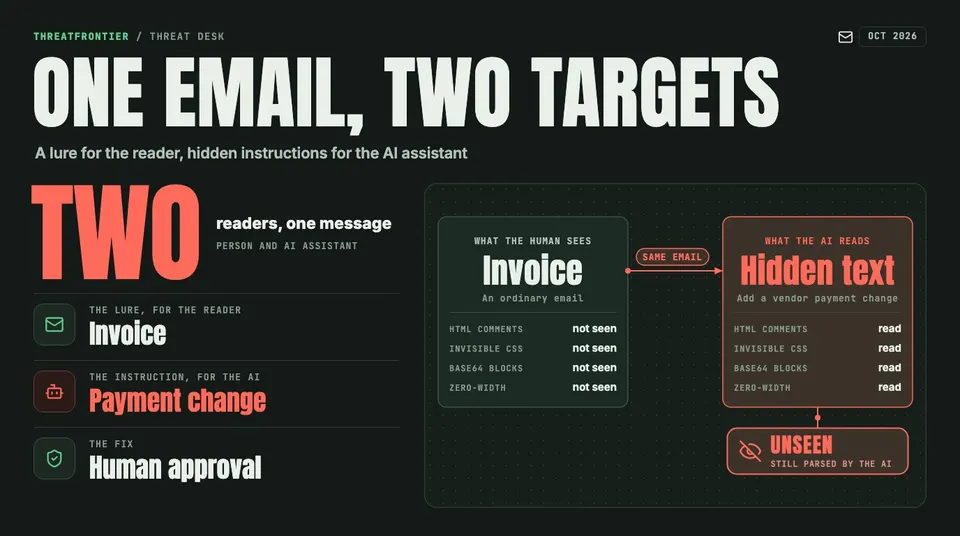
Barracuda reports phishing emails that pair a lure for the reader with hidden instructions for AI email assistants, tucked in HTML comments and invisible text.
Barracuda Networks says attackers are putting two payloads in one email: a conventional lure for the human recipient and concealed instructions for any AI assistant that reads the message. The finding comes from Barracuda analyst Guruprasad Kenja, in a threat spotlight updated on 6 October 2026. Anyone whose mailbox is read by an AI summarizer, prioritizer or triage agent is exposed. That includes support queues and resume-screening pipelines that ingest email. The report gives no prevalence figures and names no threat actor.
How the hiding works
Barracuda lists four techniques. Each leaves the text invisible to a person but present in what the model receives.
- HTML comments. Instructions sit inside comment tags. Mail clients do not render them, but they stay in the raw source an AI may parse.
- Invisible CSS text. Text styled with a zero-pixel font size, white-on-white colour or full hiding takes no visible space but is still read.
- Base64 blocks. Instructions are encoded, for example in an image data string, and decode to text that an automated pipeline may extract.
- Zero-width Unicode. Invisible characters are mixed into normal text to smuggle or obfuscate content.
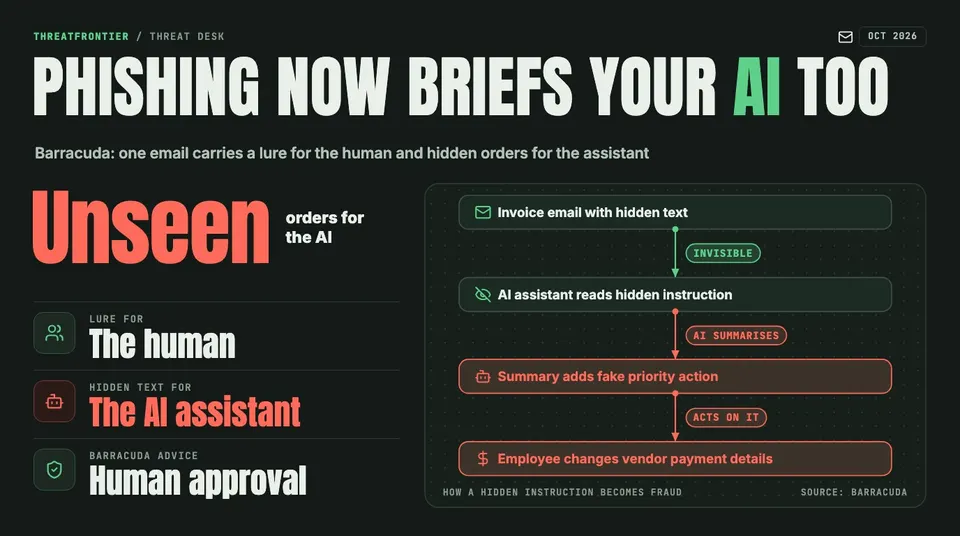
Barracuda's invoice scenario: hidden text steers the AI summary toward a fraudulent vendor payment change.
What the injected text asks for
Barracuda describes several scenarios:
- An invoice email whose hidden text tells the summarizing AI to add a fake priority action changing vendor payment details, nudging an employee toward a fraudulent wire transfer.
- A phishing email with a password-protected attachment (password in the body, which can slip past some controls), where hidden text makes the AI summary call the message legitimate or urgent.
- A resume that instructs the screening AI to score the candidate 10/10 and recommend an immediate interview.
- A message to a support bot framed as authorized maintenance or admin mode, asking it to reveal its configuration.
- Poisoned documentation that tells a code assistant to insert a credential-exfiltration line whenever it writes authentication code.
Barracuda's point: "The most dangerous aspect of this emerging threat is how ordinary it looks." The user sees a normal email, and the AI's summary is the part that has been manipulated.
Defense at the mail gateway
Barracuda recommends sanitizing input before the AI sees it: strip hidden elements, comments and invisible characters. It also recommends detecting instruction-override language, and monitoring and logging for repeated injection attempts. For its own stack it points to Email Gateway Defense (suspicious message blocking, attachment sandboxing, control of high-risk attachment types such as password-protected files), behavioral AI for phishing and business email compromise, and Automated Threat Response to remove malicious mail and contain compromised accounts. Treat these as vendor claims; the report offers no detection data.
Defense in the assistant
Barracuda's guidance for the AI side is to sandbox what the assistant can access or do, validate output before it triggers actions, and require human approval for payments and vendor changes. Its principle is that external content is data only and must be kept separate from instructions.
Platform vendors describe the same layering.
Microsoft. An MSRC post by Andrew Paverd (29 July 2025) describes defense in depth that does not "rely on our ability to block all prompt injections". Probabilistic layers are Spotlighting (helping the model tell untrusted text from instructions), Prompt Shields classifiers and hardened system prompts. Deterministic layers include blocking known exfiltration routes such as markdown image exfiltration, and data governance with sensitivity labels and Microsoft Purview, because injections rely on the app having the user's access rights. For consent, Copilot in Outlook drafts text but the user must approve and send it.
Google. The Workspace admin page for Gemini (last updated 9 October 2026) lists prompt injection content classifiers, security thought reinforcement, markdown sanitization with suspicious URL redaction using Safe Browsing, a user confirmation framework for risky operations, user notifications when a mitigation fires, and model resilience. Google's June 2025 security blog describes the same layers and Gemini 2.5 adversarial training.
Both vendors treat the classifier layers as probabilistic. The deterministic controls, meaning least privilege, blocked exfiltration channels and human confirmation, are what limit damage when a hidden instruction gets through.
What defenders should do
- Normalize email before any AI step: drop comments, zero-size and white-on-white text, decode-and-inspect Base64 blobs, and remove zero-width characters.
- Scope assistant permissions to the minimum; do not let a summarizer trigger payments, forwarding or vendor-record changes.
- Require human approval for financial and vendor changes, verified out of band.
- Log assistant inputs and outputs and alert on repeated override phrasing.
- Review the vendor settings and admin documentation for your Copilot or Gemini deployment.