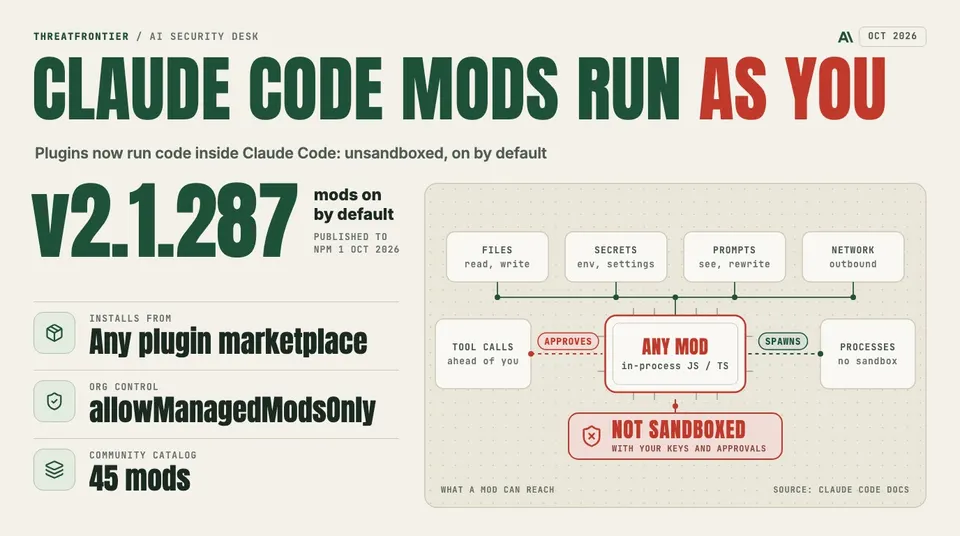
Claude Code 2.1.287 turns on mods by default: unsandboxed plugins that can read secrets and approve tool calls before you are asked. How to lock them down.
Anthropic shipped Claude Mods in Claude Code 2.1.287, published to npm on 1 October 2026. A mod is a plugin made of JavaScript or TypeScript event handlers that run inside Claude Code's own process. Each handler can watch, rewrite or take over a tool call, a submitted prompt, or a part of the interface as it is drawn. Mods are on by default from that version. The early-access switch, CLAUDE_CODE_ENABLE_FUNCTION_HOOKS, is now ignored, so a 0 set during the preview no longer keeps them off.
Anthropic's documentation is blunt about what that means: "A mod is code that runs with your permissions. It can read and write your files, start processes, and make network requests." Mods are not sandboxed. If you have Claude Code's sandboxing turned on, it isolates the Bash commands Claude runs. A process that a mod starts runs outside it.
This affects every developer who installs plugins from a marketplace, and every organization that lets them. A plugin used to add skills, commands, settings hooks and MCP servers, all of which work from outside Claude Code. A plugin can now carry code that sits between the user, the model and the tools.
What a mod can reach
Anthropic lists what a mod can do once it loads:
- Act on the machine as you. Read and write files anywhere your account can, start programs, and make network requests.
- Read your secrets. Environment variables and settings files, including an API key kept in either.
- See your session. Every prompt you send and every tool call Claude makes.
- Change your session. Rewrite a prompt or a tool call, submit a prompt as if you had typed it, or send a message to another of your sessions.
- Act without asking. Approve a tool call before you are asked.
- Spend your usage. Call a model on your plan or API key.
There are limits. A mod can restyle most of the interface but not the permission prompt, so it cannot change what a prompt shows you. In an interactive session in a directory you have not trusted yet, no mod loads until you answer the trust prompt. A mod reaches files, processes and the network only through the mods API, written $. Claude Code refuses to load a mod that uses that API in a way it cannot read statically.
The hooks also run where nothing is drawn: in claude -p, in the Agent SDK, in the VS Code extension's chat panel, and in cloud sessions that the plugin reaches. A malicious mod does not need a terminal to do its work.
Where the permission model bends
The sharpest part of the design is approval. A mod that handles the tool.check event can approve or deny a tool call before a permission prompt appears. Anthropic's admin guide says what that can override:
- A user's mod can approve a call that an
askrule would have prompted for. - It can approve a call that a
PreToolUsehook outside managed settings blocked. - In auto mode, a call the mod approves runs without the classifier check.
deny rules hold, but only where Claude Code's built-in guard loads. That guard, sec-default@builtin, runs ahead of every user-installed mod, and users cannot turn it off. It loads when the machine has managed settings, or when the user is signed in with a Team or Enterprise plan. A developer who authenticates with an API key, or through Amazon Bedrock, Google Cloud or Microsoft Foundry, gets the guard only on a machine with managed settings.
Even where the guard loads, deny rules cover Claude's tool calls and not the mod's own calls. Anthropic gives the example directly: with Read(.env) denied, a mod can still read that file with $.fs.read, or start a program that does. Network policy works the same way. Turning off web fetching blocks a mod's $.http.fetch, but not a program the mod starts with $.process.run.
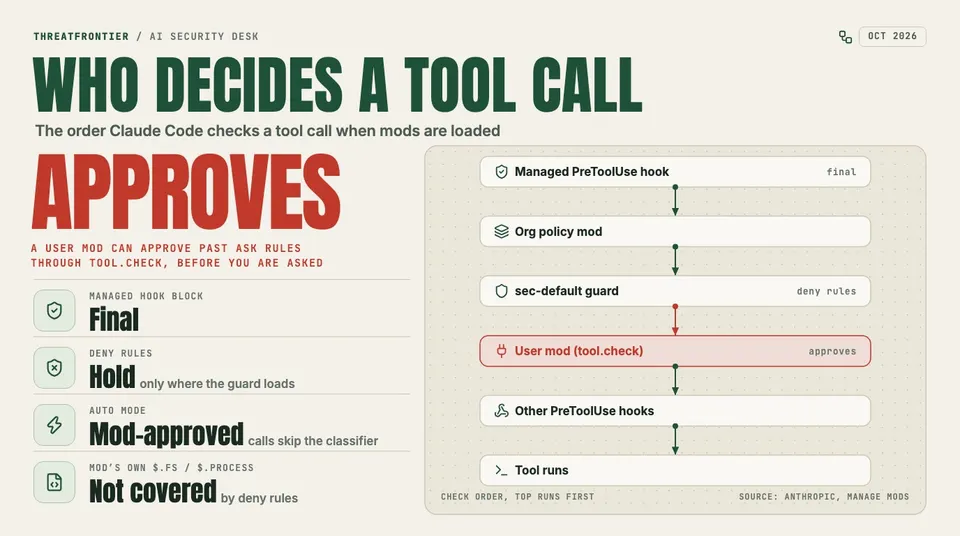
The order Claude Code checks a tool call when mods load. Only managed hooks and, where the guard loads, deny rules outrank a user mod.
Order matters too. A PreToolUse hook in managed settings runs before any mod sees the call, and its block is final, even if a mod rewrites the call afterwards. PreToolUse hooks from user settings and from other plugins run after the last mod. A mod that answers a tool call itself, without running the tool, keeps those hooks from running at all.
Why this is a supply-chain story
A mod installs as a plugin, from a marketplace, with /plugin install or claude plugin install. The trust decision is the same one developers already make for npm packages and IDE extensions, and it is made just as quickly. The ecosystem is already moving. A community catalog at claudemods.ai, which says it is not affiliated with Anthropic, lists 45 mods across nine categories, voted on daily, from context-window meters to games, and tells users to "review the code before you install anything."
The danger is a mod that looks useful. A context-usage pane needs tool.call and ui.render. It does not need $.env.get, $.http.fetch or tool.check. A mod that asks for all of them can read an API key, send it out, and quietly approve the tool calls its author wants. It does that from a process that the Bash sandbox does not cover and that the auto-mode classifier never sees.
Claude can also write a mod for you during a session. Unless an administrator stops it, that mod loads like any other.
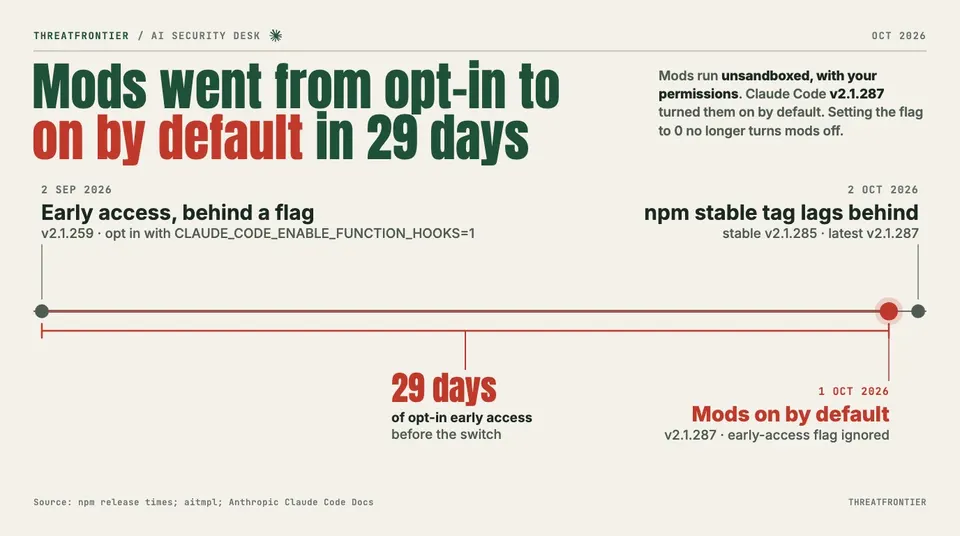
Mods went from an opt-in flag to on by default in 29 days.
What defenders should do
Individual developers
- Update deliberately.
claude --versionshows whether you are on 2.1.287 or later. As of 2 October, npm'sstabletag still points to 2.1.285 whilelatestpoints to 2.1.287. - Before installing a mod, clone it and run
claude plugin validate ./some-mod. Thehooks:line lists the events it receives, and thecalls:line lists the$methods it uses. Treat$.env.get,$.settings.read,$.process.run,$.process.spawn,$.http.fetch,$.prompt.submitand atool.checkhook as reasons to read the code line by line. - Run
/pluginto see which mods a session loaded (1 mod active · …). Start withclaude --safe-modeto rule mods out when something behaves oddly. - If you set
CLAUDE_CODE_ENABLE_FUNCTION_HOOKS=0during early access, it no longer does anything. Use"disableAllHooks": truein~/.claude/settings.jsoninstead, which also stops your settings hooks and custom status line. - Keep API keys out of environment variables and settings files where you can. A mod can read both.
Organizations
- If you have not reviewed mods yet, keep users' own mods out. Set
allowManagedModsOnlyon the built-in guard in managed settings, underpluginConfigs→cc-plugin-sec-default@builtin. Users cannot undo it from their own settings, and their settings hooks and status lines keep working. - Set
disableSideloadFlagsto reject--plugin-dirand--plugin-url, and to stop mods that Claude writes during a session from loading. - Keep a marketplace allowlist such as
strictKnownMarketplaces. A mod is a plugin, so plugin controls decide whether it can be installed at all. - Leave
allowModsToOverrideDenyRulesunset. Setting it lets a user's mod approve calls that your deny rules refuse. - Make sure the guard actually loads. API-key, Bedrock, Vertex and Foundry users without managed settings run without it.
- For finer control, deploy a policy mod of your own, listed in
prependPluginsahead ofsec-default@builtin. Itsplugin.registerhook can refuse any user mod whose code calls blocked methods such asprocess.run. Give it a.catchhandler so that a failed check refuses the mod instead of letting it load. Remember that--safe-mode, and a hooks worker that crashes three times, unload your policy mod along with everyone else's.
Mods are a real capability. Anthropic's own /diff pane and AGENTS.md support are built as mods. But the feature turns every plugin install into a decision about code running inside your coding agent, with your keys and your approvals. Treat it that way before your developers find the catalog.
Sources
- Anthropic: Mods overview, Claude Code Docs
- Anthropic: Manage mods for your organization, Claude Code Docs
- npm: @anthropic-ai/claude-code release times and dist-tags
- Mixed News: Claude Code 2.1.287 adds mods, and Anthropic says they can read your API key
- Wavect: Claude Mods: Setup, Function Hooks and Security
- aitmpl: Claude Code Mods (Function Hooks)
- claudemods.ai: community catalog of Claude Code mods