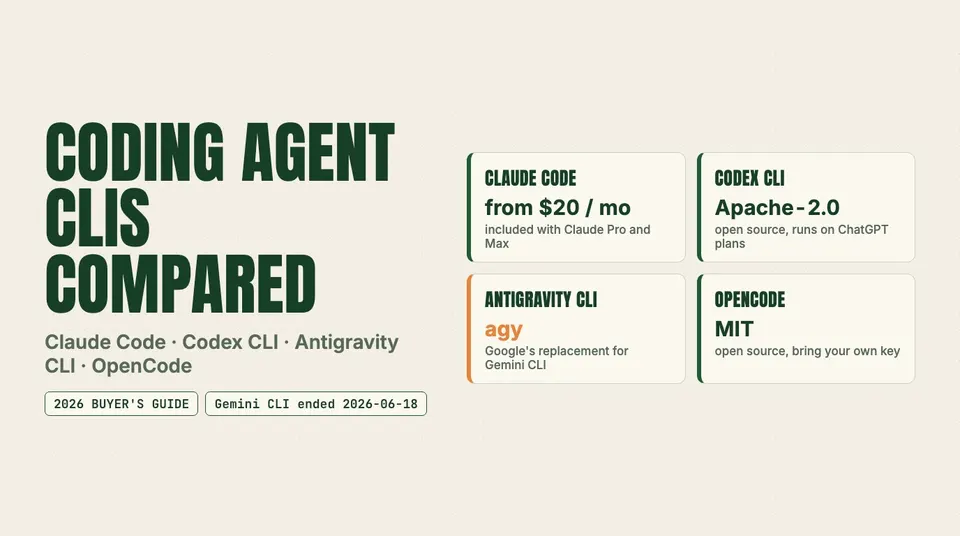
Gemini CLI is gone for consumer plans. We compare Claude Code, Codex CLI, Google's agy and OpenCode on price, models, license, sandboxing and MCP.
The short answer: pick Claude Code if you already pay for Claude and want the most configurable permission and sandbox controls, Codex CLI if you pay for ChatGPT and want an open-source (Apache-2.0) agent that is sandboxed by default, Antigravity CLI (agy) if you live in Google's ecosystem and were using Gemini CLI, and OpenCode if you want an MIT-licensed agent that runs any model you bring. Gemini CLI is no longer an option for most individuals: Google stopped serving free, Google AI Pro and Google AI Ultra users on it on June 18, 2026.
This guide compares the four on documented facts: price and plan access, models, license, sandboxing and permissions, MCP, instruction files, IDE and CI support. We did not run our own benchmarks, and no scores appear here. It was last checked against the vendors' official docs, pricing pages, changelogs and GitHub repositories on September 24, 2026.
Quick summary
- Claude Code comes with Claude Pro ($20/month) and Max. The Free plan does not include it. Since v2.1.280 (September 22, 2026) the default Opus model is Claude Opus 5.5. The CLI is closed source.
- Codex CLI is open source (Apache-2.0, written in Rust). Every ChatGPT plan includes Codex, from Free and Go ($8) through Plus ($20), Pro, Business and Enterprise, and you can also pay per token with an API key.
- Antigravity CLI (
agy) is Google's replacement for Gemini CLI. It is closed source, built in Go, and works on the free individual tier, Google AI Pro, Google AI Ultra and Gemini Enterprise. - OpenCode is MIT-licensed and model-agnostic (75+ providers). You bring your own keys or subscribe to OpenCode Go ($10/month) for a list of open models.
- Security: Codex and
agysandbox shell commands out of the box. In Claude Code the OS-level sandbox is opt-in through/sandbox. OpenCode has an approval system but no documented OS sandbox, and by default it allows edits and bash without asking.
The four at a glance
| Claude Code | Codex CLI | Antigravity CLI (agy) | OpenCode | |
|---|---|---|---|---|
| Vendor | Anthropic | OpenAI | Anomaly (formerly SST) | |
| License | Proprietary (Anthropic Commercial Terms) | Apache-2.0 | Closed source | MIT |
| Language | TypeScript | Rust | Go | TypeScript |
| Cheapest way in | Claude Pro, $20/mo | ChatGPT Free (limited) or Go, $8/mo | Free individual tier | Free app + your own API key |
| Free tier | No | Yes, limited | Yes, weekly quota | App is free; models cost what your provider charges |
| Models | Claude only (Opus 5.5 is the default Opus) | OpenAI only (GPT-6 Astra, Sol, Luna and older) | Gemini; third-party models on Ultra | Any provider, including local models |
| Instruction file | CLAUDE.md; reads AGENTS.md when there is no CLAUDE.md (v2.1.277+) | AGENTS.md | GEMINI.md and AGENTS.md | AGENTS.md |
| MCP | Yes | Yes | Yes (/mcp, mcp_config.json) | Yes (opencode.json) |
| Headless / CI | claude -p | codex exec | agy -p | opencode run, opencode serve |
Sources: vendor docs and GitHub repositories; licenses and languages read from each repo's GitHub metadata.
Pricing and plan access
All four look cheap to start with. The real cost is the usage ceiling on the plan behind them.
| Tool | Entry plan | What you get | Where usage runs out |
|---|---|---|---|
| Claude Code | Claude Pro, $20/mo (US) | Claude Code in the terminal, IDE and desktop | One usage pool shared with Claude web, desktop and mobile; Max gives 5x or 20x Pro's usage |
| Codex CLI | ChatGPT Free ($0), Go ($8), Plus ($20) | Codex on every plan | Per-model message limits that vary a lot by plan; Pro ($100+) raises them 5x or 20x over Plus |
| Antigravity CLI | Free individual tier | Gemini models and all product features | Free quota refreshes weekly; Pro and Ultra refresh every five hours up to a weekly cap, and can buy AI credits |
| OpenCode | Free, bring your own key | Whatever your provider bills | Your API budget, or OpenCode Go's per-model dollar caps |
Claude Code has no free tier. Anthropic's help center lists Claude Code for Pro and Max, not Free. Claude Code also shares one usage pool with your chats, so a long agent session can use up what you had planned for the web app. Our sibling piece on Claude Pro vs Max for Claude Code after Opus 5.5 covers the per-plan numbers.
Codex is on every ChatGPT plan, including Free. OpenAI's Codex pricing page lists Free for "basic exploration," Go at $8, Plus at $20, Pro from $100 (5x or 20x Plus limits), and Business at $20 per user per month billed annually ($25 monthly). How much you get depends on the model: the page quotes a range from 5–45 GPT-6 Astra messages on Plus up to 7,000–56,000 GPT-6 Luna messages on Pro 20x. See Codex and GPT-6 usage limits by ChatGPT plan for the full table.
Antigravity's free tier is real, but small. Google's plans page covers free individual accounts, Google AI Pro, Google AI Ultra and Gemini Enterprise. All plans get Gemini models. Ultra gets "the highest, most generous quota" and access to third-party models. Bring-your-own-key is listed as not supported for the plan quotas, although the CLI accepts a GEMINI_API_KEY sign-in.
OpenCode costs nothing until you pick a model. You can point it at an Anthropic, OpenAI or Google API key, a local model, or OpenCode Go. Go is $10/month. Its official docs set usage caps as monthly dollar amounts per model (between $15 and $60 depending on the model), with a 5-hour cap at 20% of the monthly amount and a weekly cap at 50%. A model with a $60 monthly cap therefore allows $12 per five hours and $30 per week. Third-party posts give different model counts for Go. The official list had about 33 models when we checked, and OpenCode says the list changes. Our OpenCode Go $10 plan review goes deeper.
Models: what each CLI actually runs
- Claude Code runs Anthropic models only. v2.1.280 (September 22) made Claude Opus 5.5 (
claude-opus-5-5, 1M context) the default Opus model. See GPT-6 Astra vs Claude Fable 5.1 vs Opus 5.5 for coding. - Codex CLI runs OpenAI models: GPT-6 Astra, Sol, Luna and older GPT-5.x (for example
codex -m gpt-6-astra). The default depends on your plan. - Antigravity CLI runs Gemini models, and Ultra adds third-party models. Community guides list Claude and GPT-OSS entries in
/model, but Google does not publish a per-plan list, so treat those as reported. - OpenCode runs anything with a supported provider, so one harness can use a frontier model for hard tasks and a cheap open model for routine edits.
Security: sandbox, permissions and secrets
Coding agents run shell commands on your machine using your credentials. Two separate controls decide how much damage a mistake or a prompt injection can do. The permission system decides whether the agent asks you first. The sandbox decides what a command can reach even after it has been approved. You want both. (For how agent harnesses dispatch tools under the hood, see agent harness architecture explained.)
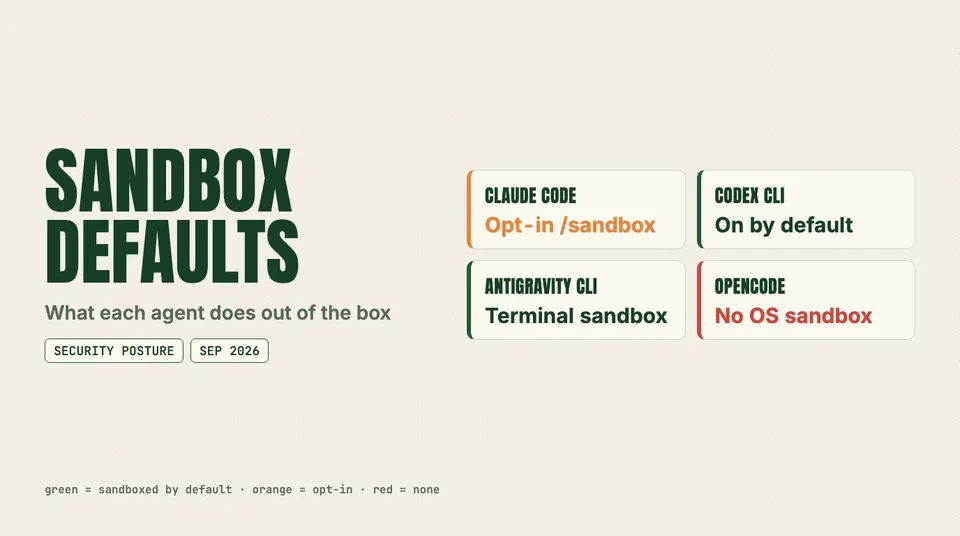
What each agent does out of the box
| Claude Code | Codex CLI | Antigravity CLI | OpenCode | |
|---|---|---|---|---|
| OS sandbox | Opt-in via /sandbox: Seatbelt on macOS, bubblewrap + socat on Linux/WSL2; not on native Windows | On by default: Seatbelt on macOS, bwrap + seccomp on Linux, WSL2 or an elevation-based sandbox on native Windows | Terminal Sandbox: sandbox-exec on macOS, nsjail on Linux, AppContainer on Windows | None documented |
| Default network | Sandboxed commands prompt the first time they reach a new domain | Off in workspace-write unless you enable it | Web actions default to Ask | Not restricted |
| Permission modes | default, acceptEdits, plan, auto, dontAsk, bypassPermissions | Sandbox read-only / workspace-write / danger-full-access plus approval on-request / never / granular | Presets: request-review (default), strict, always-proceed; allow/ask/deny rules | allow / ask / deny per tool, per agent |
| Out-of-workspace files | Configurable read/write deny lists; blockReadsOutsideWorkingDirectories | Writes outside workspace need approval | Non-workspace files need approval | external_directory defaults to ask |
| Secret handling | sandbox.credentials can deny or mask credential files and scrub env vars | .git, .agents, .codex stay read-only in writable sandboxes | Tokens stored in the OS keyring | .env files blocked by default |
| "Skip everything" switch | bypassPermissions | --dangerously-bypass-approvals-and-sandbox (--yolo) | --dangerously-skip-permissions | Set permissions to allow |
Claude Code
Claude Code's sandbox is off until you turn it on with /sandbox. Once it is on, the OS enforces filesystem and network limits on every Bash command and its child processes. macOS needs nothing extra. Linux and WSL2 need bubblewrap and socat. On Pro, Max and Team, sessions start in auto mode, where a second classifier model reviews actions in place of prompting you. Anthropic's docs describe that as convenience, and say a sandbox or container adds defense in depth.
Two settings are worth knowing. The first: when a sandboxed command fails, Claude can retry it with dangerouslyDisableSandbox, and that retry goes back through the normal permission flow. Setting "allowUnsandboxedCommands": false removes this escape hatch ("Strict sandbox mode"). The second is sandbox.credentials (v2.1.187+), which lets you deny or mask credential files and scrub named environment variables. Administrators can lock both through managed settings. For locked-down CI, claude -p --permission-mode dontAsk --allowedTools ... refuses anything not on the allowlist.
Codex CLI
Codex has the safest defaults of the four. The Auto preset is workspace-write with on-request approvals, so it can edit and run commands inside the repo, but network access and writes outside the workspace need your approval. .git, .agents and .codex stay read-only even in writable mode. Inside Docker, the Linux sandbox's namespace calls can be blocked, and OpenAI's own workaround is danger-full-access. If you do that, the container is your only boundary. OpenAI also retired approval_policy = "untrusted", and an old config that still sets it can stop Codex from starting.
Antigravity CLI
agy has a native Terminal Sandbox (enableTerminalSandbox in settings.json) and a rule engine that evaluates deny, then ask, then allow. File reads and writes inside the workspace are allowed without a prompt. Files outside it need approval. Web actions default to Ask. In headless mode, tools that need approval are soft-denied unless you add permissions.allow rules or pass --dangerously-skip-permissions. Since the binary is closed source, you rely on Google's documentation for what the sandbox actually enforces. v1.2.10's changelog notes the agent now asks to bypass the sandbox less often.
OpenCode
OpenCode's permission system is flexible: allow, ask or deny per tool, with per-agent overrides and a doom-loop guard that asks after three identical tool calls. The defaults are permissive, though. Edits and bash are allowed without asking. Only external_directory, doom_loop and .env reads are gated. The docs describe no OS-level sandbox. If you run OpenCode on a machine that holds real credentials, set bash and edit to ask, or run it in a container or VM.
MCP applies to all four
All four load MCP servers, and an MCP server runs with the agent's own privileges. A poisoned tool description can bypass everything above. Claude Code v2.1.280 added CLAUDE_CODE_MAX_MCP_DESCRIPTION_LENGTH to adjust its 2,048-character cap on MCP tool descriptions, and a cap like that limits how much text a hostile server can inject into the context. Read zero trust for MCP before connecting a server you did not write.
Config files, IDEs and CI
Instruction files. AGENTS.md is now the common format. Codex and OpenCode read it natively. agy reads both GEMINI.md and AGENTS.md. Since v2.1.277, Claude Code reads AGENTS.md when there is no CLAUDE.md, .claude/CLAUDE.md or CLAUDE.local.md in the working directory or above it. If you want both files, put @AGENTS.md at the top of your CLAUDE.md. One AGENTS.md can then drive all four tools, with Claude-specific lines added after the import.
IDEs. Claude Code ships VS Code and JetBrains integrations. Codex has an IDE extension alongside its CLI and desktop app. Google lists Antigravity extensions for VS Code, Visual Studio, JetBrains, Zed and Xcode, and the CLI can export a session to the Antigravity 2.0 desktop app. OpenCode's main interface is its terminal UI, and opencode serve exposes the agent to other clients.
Headless and CI.
claude -p "run the test suite" --permission-mode dontAsk --allowedTools "Bash(npm test)" "Read"
codex exec "fix the failing lint errors"
agy -p "summarize this diff" --output-format json
opencode run "update the changelog"
agy headless runs use cached credentials from an earlier interactive login, and they exit with code 3 and print an AGY_ERROR JSON line when a model or agent call fails. That is useful for pipeline alerting. agy -p has no default timeout. Set --print-timeout in CI so a stuck run cannot hold a runner indefinitely.
Migrating off Gemini CLI
What changed, from Google's announcement and the linked GitHub discussion:
- Cut-off: Gemini CLI and the Gemini Code Assist IDE extensions stopped serving free, Google AI Pro, Google AI Ultra and Code Assist for individuals users on June 18, 2026. New installs of Code Assist for GitHub were blocked the same day.
- Not affected: Gemini Code Assist Standard and Enterprise licenses, Google Cloud access, and paid Gemini API keys. Gemini CLI itself stays on GitHub under Apache 2.0, and Google keeps it updated for enterprise customers.
- Replacement: Antigravity CLI, launched May 19, 2026. It is built in Go and closed source, and it shares its engine and settings with the Antigravity 2.0 desktop app.
The move is mostly mechanical:
- Install with
curl -fsSL https://antigravity.google/cli/install.sh | bash(PowerShell and CMD installers exist for Windows) and runagy. The first launch detects Gemini CLI config and offers a checklist of what to migrate. Session tokens go into the OS keyring. - Convert extensions to plugins with
agy plugin import gemini. Legacy commands become skills, and MCP definitions move into their own config files. - Rename workspace skills from
.gemini/skills/to.agents/skills/. Global skills move to~/.gemini/antigravity-cli/skills/. - Move MCP servers into
~/.gemini/config/mcp_config.json(global) or.agents/mcp_config.json(workspace), and renameurl/httpUrlkeys toserverUrl. - Leave
GEMINI.mdandAGENTS.mdas they are. Google says they work unchanged.
Check the new permission settings before running your old scripts. Gemini CLI's --yolo habits carry over as --dangerously-skip-permissions in agy. Headless runs soft-deny tools that need approval, so a pipeline that used to "just work" may now stall without saying why.
If you want to stay open source, keep Gemini CLI on a paid API key (still supported) or move to OpenCode with a Gemini API key.
Which should you pick?
- You already pay for Claude Pro or Max: Claude Code. Opus 5.5 is the default Opus, and Claude Code has the most detailed sandbox and credential controls. Turn on
/sandboxon day one. - You already pay for ChatGPT, or want a free start: Codex CLI. It is on every plan including Free, it is Apache-2.0 so you can audit it, and it is sandboxed by default.
- You were a Gemini CLI user on a consumer plan: Antigravity CLI. Migration is scripted and your context files carry over. Stay on Gemini CLI only if you have an enterprise license or a paid API key.
- You want one agent for every model, or to run local models: OpenCode, paired with OpenCode Go or your own keys. Tighten the permission defaults first.
- You are choosing a whole stack, IDE included: see our best AI coding stack for 2026. Many teams use one terminal agent plus Cursor or Copilot in the editor. If you are weighing Claude and ChatGPT at the top tier, Claude Code vs Codex at $100 and $200 compares the limits directly.
Caveats
- Plans, quotas and default models change often. Everything here reflects the official pages on September 24, 2026.
- A sandbox limits what a bad command can do. It does not make an agent trustworthy. Review diffs and scope tokens. For the internals behind Claude Code's permission flow, see how Claude Code works internally.
FAQ
Codex CLI vs Claude Code: which is better in 2026?
It depends mostly on which subscription you already have. Codex CLI is open source, sandboxed by default, and included on every ChatGPT plan including Free. Claude Code needs Claude Pro ($20/month) or higher, defaults to Opus 5.5, and has more detailed permission modes and credential masking, but its OS sandbox is opt-in. We have not run head-to-head benchmarks, so we do not claim either one writes better code.
Gemini CLI vs Antigravity CLI: what is the difference?
Gemini CLI is Google's open-source (Apache 2.0) agent. Since June 18, 2026 it serves only enterprise Code Assist, Google Cloud and paid API-key users. Antigravity CLI (agy) is the closed-source Go replacement for everyone else. It adds plugins, background subagents, a native terminal sandbox and a shared engine with the Antigravity desktop app, and it still reads GEMINI.md and AGENTS.md.
Is Antigravity CLI (agy) free?
Yes, within limits. Google's free individual tier includes Gemini models with a quota that refreshes weekly. Google AI Pro and Ultra get larger quotas that refresh every five hours up to a weekly cap, and they can buy AI credits for overage.
Claude Code vs OpenCode: why would I use OpenCode?
Choose OpenCode for model freedom and an MIT license. It can drive Claude, GPT, Gemini, open models through OpenCode Go ($10/month) or local models from one interface. Choose Claude Code for Anthropic's first-party integration and its stronger security defaults. OpenCode allows edits and shell commands without asking unless you change its config.
OpenCode vs Codex: which is safer out of the box?
Codex. It starts in workspace-write with network access off and protected .git and .codex paths, enforced by Seatbelt or bubblewrap. OpenCode has no documented OS sandbox and permissive defaults, so give it ask rules or a container before letting it touch real credentials.
Claude Code vs Cursor vs Codex vs Antigravity: can I use them together?
Yes. Cursor is an editor; the other three are agents with IDE extensions. One shared AGENTS.md works across Codex, Antigravity, OpenCode and Claude Code.