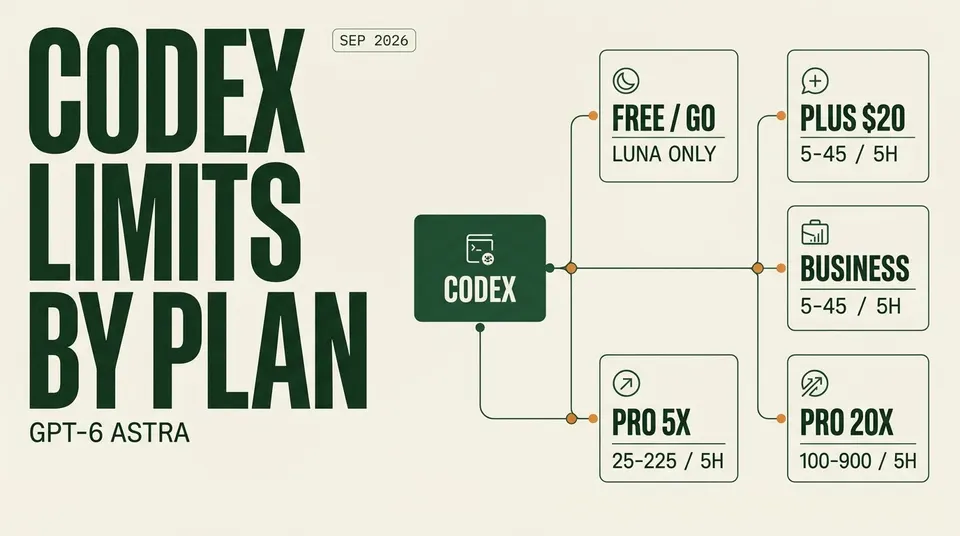
Every ChatGPT plan's Codex allowance in one table: GPT-6 Astra, Sol and Luna messages per five hours, GPT-6 Pro weekly caps, resets and what to do at the limit.
The short answer: in Codex, ChatGPT Plus ($20) gets roughly 5–45 GPT-6 Astra messages, 15–150 GPT-6 Sol messages or 350–3,000 GPT-6 Luna messages per five-hour window, and every paid tier above it is a multiple of that. Free ($0) and Go ($8) get GPT-6 Luna only. Pro buys 5x or 20x the Plus allowance, and a Business Standard seat gets exactly what Plus gets, plus admin and privacy controls.
The part most people miss is that Codex and ChatGPT Work run on one shared allowance with two separate meters: a five-hour window and a weekly cap. Which model you pick decides how fast you drain both. Astra can burn through a Plus window in a handful of heavy agent turns, while Luna will rarely hit the ceiling at all.
This guide was last checked against OpenAI's Codex pricing page (learn.chatgpt.com/docs/pricing), the OpenAI Help Center articles on GPT-6 Pro, weekly resets and Astra usage, and OpenAI's September 22 GPT-6 Sol and Luna announcement on September 24, 2026.
Quick summary
- Free and Go: GPT-6 Luna in the Codex desktop app at Standard speed, "subject to rollout." No Sol, no Astra. OpenAI does not publish a message number for these tiers.
- Plus ($20/month): Codex on web, CLI, IDE extension and iOS. Astra 5–45, Sol 15–150, Luna 350–3,000 local messages per five hours.
- Pro (from $100/month): the same models at 5x ($100) or 20x ($200) the Plus limits. New $200 sign-ups are paused.
- Business ($20/seat annual, $25 monthly): Standard seats match Plus limits. Premium seats ($100 annual, $125 monthly) are reported at 5x Standard with no five-hour window.
- Hit the cap? Buy credits, switch to a cheaper model, or plug in an API key and pay standard API rates.
The master table: GPT-6 access and Codex limits by ChatGPT plan
All message figures are local Codex messages per five-hour window, from OpenAI's official Codex pricing page. Local messages and cloud chats draw from the same pool, and weekly limits may apply on top.
| Plan | Price | GPT-6 Astra | GPT-6 Sol | GPT-6 Luna | GPT-6 Pro in Chat | Where Codex runs |
|---|---|---|---|---|---|---|
| Free | $0 | No | No | Yes (limit not published) | No | Desktop app |
| Go | $8/mo | No | No | Yes (limit not published) | No | Desktop app |
| Plus | $20/mo | 5–45 | 15–150 | 350–3,000 | No (Astra in Work and Codex only) | Web, CLI, IDE, iOS |
| Business Standard | $20/seat/mo annual ($25 monthly) | 5–45 | 15–150 | 350–3,000 | Reported 15/month | Desktop and mobile listed; workspace-managed |
| Pro 5x | $100/mo | 25–225 | 70–700 | 1,750–14,000 | 50/week, shared with GPT-5.6 Sol Pro | Web, CLI, IDE, iOS |
| Pro 20x | $200/mo (new sign-ups paused) | 100–900 | 300–3,000 | 7,000–56,000 | 200/week | Web, CLI, IDE, iOS |
| Enterprise / Edu | Contact sales | Credit-based | Credit-based | Credit-based | Yes | All surfaces, priority processing |
| API key | Pay per token | Usage-based | Usage-based | Usage-based | n/a | CLI, SDK, IDE (no cloud tasks) |
A few notes on reading that table:
- The ranges are wide on purpose. OpenAI meters tokens, not messages. A one-line fix at low reasoning effort sits at the top of the range. A long agentic refactor with a big repo in context sits at the bottom.
- Business Standard mirrors Plus exactly. The official table lists identical numbers for both. You are paying for SSO, MFA, a shared workspace and no default training on business data, not extra headroom.
- The Business Premium and GPT-6 Pro figures for Business come from reporting on OpenAI's Business announcements (The Decoder and several pricing trackers), not from the Codex pricing page itself. Treat them as likely but check your admin console.
Older models are still on the menu
If you are wondering why a blog post quoted you different numbers, it is probably citing GPT-5.6. Those limits are still live alongside GPT-6:
| Model (Codex, per 5h) | Plus / Business | Pro 5x | Pro 20x |
|---|---|---|---|
| GPT-5.6 Sol | 10–100 | 50–500 | 200–2,000 |
| GPT-5.6 Terra | 25–200 | 125–1,000 | 500–4,000 |
| GPT-5.6 Luna | 250–2,000 | 1,250–10,000 | 5,000–40,000 |
| GPT-5.5 (retires Oct 14, 2026) | 15–80 | 75–400 | 300–1,600 |
GPT-6 Sol gives you more messages per window than GPT-5.6 Sol on every plan, and it is also half the credit rate. Unless a specific workflow regressed for you, there is little reason to stay on the 5.6 family in Codex.
Where GPT-6 Astra actually shows up on each plan
This is the source of most of the confusion around the September rollout. Astra, OpenAI's flagship, reached ChatGPT on September 3, 2026. GPT-6 Sol and Luna followed on September 22 (we covered that launch in GPT-6 Sol and Luna at half the price).
Where each model lives depends on the surface:
- Codex and ChatGPT Work: Plus, Pro, Business, Enterprise and Edu get Astra, Sol and Luna. This is the only place a Plus subscriber can use Astra.
- Regular Chat: OpenAI's announcement said GPT-6 Sol and Luna were not yet available in Chat at launch. GPT-6 Pro, which is powered by Astra, is available in Chat on Pro $100, Pro $200, Business and Enterprise.
- Everyday text chat stays unlimited on every plan, including Free and Go, using the GPT-5.6 models. Files, image generation, voice and data analysis carry their own limits.
So "does ChatGPT Plus have GPT-6 Astra?" has a two-part answer. Yes in Codex and Work, at 5–45 messages per five hours. No in the normal chat window.
GPT-6 Pro weekly caps
GPT-6 Pro is the high-compute Astra mode, and it is metered weekly rather than per five hours:
| Plan | GPT-6 Pro allowance |
|---|---|
| Plus, Go, Free | Not available |
| Business Standard | Reported 15 per month, shared with GPT-5.6 Sol Pro |
| Business Premium | Reported 50 per week, shared |
| Pro $100 (5x) | 50 per week, shared with GPT-5.6 Sol Pro |
| Pro $200 (20x) | 200 per week |
If GPT-6 Pro is the main reason you are upgrading, the jump from $100 to $200 is a 4x increase in Pro messages for 2x the price. That comparison has its own page: ChatGPT Pro $100 vs $200.
How the Codex limits reset
There are two meters, and both have to have room for a request to go through.
The five-hour window. It is not a fixed clock. A new window opens with the first message you send in Codex or Work after the previous window ends. If you start at 9:40, your window runs to 14:40. You can hit the five-hour limit well before five hours pass, especially on Astra.
The weekly limit. It resets roughly seven days after the weekly period opened. OpenAI's help article on paid weekly resets adds a detail that matters after any manual reset: the new weekly period starts with your first request after the reset, and the next automatic reset is scheduled seven days after that request.
They are checked separately. A fresh five-hour window does not mean your weekly allowance refilled. If Codex keeps refusing work after the window rolls over, you are almost certainly out of weekly budget.
You can see both meters, plus the exact reset times, under Settings → Usage in ChatGPT.
What drains the allowance fastest
The same Plus subscription can feel generous or stingy depending on four settings:
| Setting | Effect on your allowance |
|---|---|
| Model | Astra uses allowance faster than Sol; Luna is the cheapest by a wide margin |
| Reasoning effort | Higher effort uses more and does not always help. OpenAI notes Astra at Low effort can beat Sol at High |
| Fast mode | 2.5x the Standard rate for GPT-6 Astra, Sol and Luna |
| Image generation | Uses limits 3–5x faster than a normal turn |
GitHub code reviews (tagging @codex on a pull request, or automatic reviews) are metered as Code Review usage. Reviews you run locally count against your general limit.
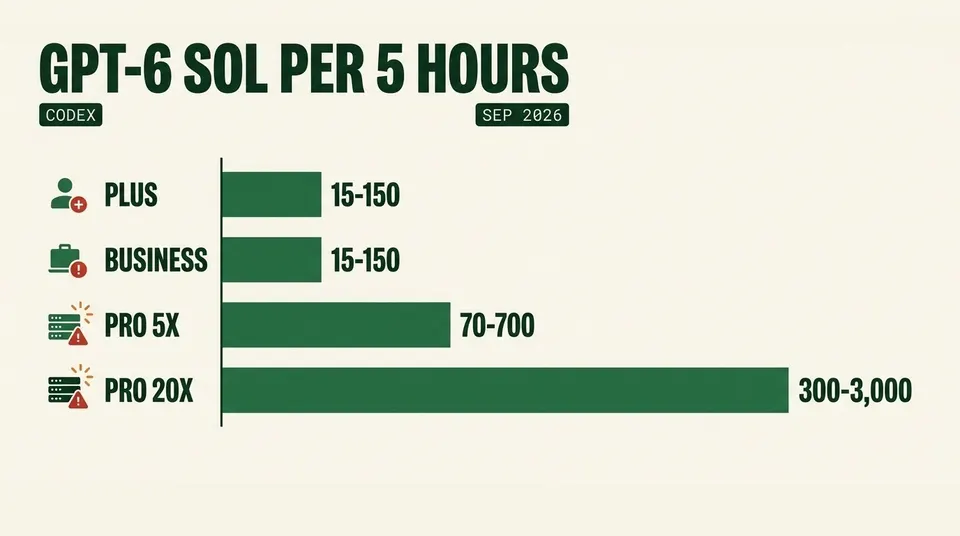
GPT-6 Sol local Codex messages per five-hour window by plan, from OpenAI's pricing page.
What happens when you hit the cap
Codex does not cut you off mid-thought. If you hit a limit during an active turn, OpenAI lets that turn finish, subject to fair-use limits. After that you have three options.
1. Buy credits. Plus and Pro users can buy extra credits and keep working. Business and Enterprise workspaces on flexible pricing buy workspace credits instead. Credit burn is published per million tokens:
| Model | Input | Cached input | Output |
|---|---|---|---|
| GPT-6 Astra | 250 credits | 25 | 1,250 |
| GPT-6 Sol | 50 | 5 | 250 |
| GPT-6 Luna | 2.5 | 0.25 | 12.5 |
Those rates line up with the API list prices at 25 credits per dollar, so a credit is worth about 4 cents of API usage.
2. Switch to an API key. Anyone can run extra local Codex sessions with an API key and pay standard API rates. There are no cloud tasks on this path. Current prices per 1M tokens are $10 input / $50 output for Astra, $2 / $10 for Sol and $0.10 / $0.50 for Luna. Our ChatGPT API vs Plus break-even math walks through when this is cheaper than a subscription.
3. Drop a model tier. Moving from Astra to Sol for routine edits, or from Sol to Luna for boilerplate and tests, often stretches a window further than paying for credits would.
Which plan fits which Codex user
You write code a few evenings a week. Plus. 15–150 Sol messages per window is plenty for bug fixes and small features, and you still get a taste of Astra for the hard problems. Keep Luna as the default for chores.
You are a student or just trying Codex out. Go at $8, or Free. You get GPT-6 Luna in the desktop app, which is good at scaffolding, tests and explanations. You do not get the CLI, IDE extension or Sol, so this is not a daily-driver setup for real projects.
You use Codex as your main tool for a full workday. Pro 5x at $100. The Plus window is the bottleneck for anyone running agents for hours, and 70–700 Sol messages per window removes most of the friction. Our breakdown of Pro 5x vs 20x for Codex coding covers where the 5x tier runs out.
You run parallel agents or live on Astra. Pro 20x at $200, with 100–900 Astra messages per window. The catch: OpenAI paused new $200 sign-ups and upgrades around September 10, citing Astra demand. Existing $200 subscribers are unaffected and the $100 tier is still open, but you cannot buy 20x today. Start on $100 and add credits for heavy weeks.
You are buying for a team. Business Standard at $20 per seat (annual) gives each developer Plus-level Codex limits with SSO and no default training on your code. For a few power users, mix in Premium seats instead of moving the whole team up. OpenAI's Business materials, as reported by several pricing trackers, say admins can mix and reassign seat types in one workspace.
Your company needs audit logs, data residency or SCIM. Enterprise or Edu. Usage is credit-based with priority processing, and pricing goes through sales.
ChatGPT Business vs Pro for Codex
This is a common question because the prices overlap.
| Business Standard | Business Premium | Pro 5x | Pro 20x | |
|---|---|---|---|---|
| Price | $20/seat annual, $25 monthly | $100/seat annual, $125 monthly (reported) | $100/mo | $200/mo |
| Codex headroom | Same as Plus | Reported 5x Standard, weekly limit only | 5x Plus | 20x Plus |
| Five-hour window | Yes | Reported: no | Yes | Yes |
| Minimum | 2 users | Business workspace | 1 user | 1 user |
| Admin, SSO, no training by default | Yes | Yes | No | No |
For a solo developer, Pro wins on headroom per dollar. For anyone whose employer cares about where code goes, Business is the only realistic option, and Premium seats close most of the gap with Pro 5x.
ChatGPT Go vs Plus limits
Go at $8 is a chat plan first. For Codex it gets exactly what Free gets: GPT-6 Luna in the desktop app at Standard speed. Everyday text chat is unlimited on both. Plus is the entry point for real Codex work, because it adds the CLI, IDE extension, cloud tasks, Sol and Astra. If Codex is why you are paying, skip Go.
Caveats worth knowing
- Ranges, not guarantees. OpenAI publishes ranges, and the real number depends on context size, reasoning effort and task complexity.
- "Subject to rollout." Free and Go access to Codex was still rolling out at the time of writing. If you do not see it, it may not have reached your account yet.
- The $200 pause has no end date. OpenAI has called it temporary and has not said when it lifts.
- Business Premium numbers are reported, not on the Codex pricing page. We could not confirm them against an OpenAI page we could load, so verify in your workspace settings before buying.
- Compare across vendors carefully. Anthropic meters Claude Code differently. For that comparison, see Claude Code vs OpenAI Codex limits and our new Claude Pro vs Max for Claude Code after Opus 5.5.
FAQ
What are the ChatGPT Plus Codex limits?
Per five-hour window: 5–45 GPT-6 Astra messages, 15–150 GPT-6 Sol messages, or 350–3,000 GPT-6 Luna messages. Local messages and cloud chats share the same allowance, and a weekly limit applies on top.
What are the GPT-6 Astra limits on each plan?
In Codex, per five hours: Plus 5–45, Business Standard 5–45, Pro 5x 25–225, Pro 20x 100–900. Free and Go do not get Astra. In regular chat, GPT-6 Pro (Astra-powered) is capped at 50 per week on Pro $100 and 200 per week on Pro $200.
What are the GPT-6 Pro usage limits?
Pro $200 gets 200 GPT-6 Pro messages per week. Pro $100 gets 50 per week, shared with GPT-5.6 Sol Pro. Business Premium is reported at 50 per week and Business Standard at 15 per month. Plus, Go and Free do not get GPT-6 Pro.
Does ChatGPT Go include Codex?
Yes, in a limited form. Go ($8) and Free both get GPT-6 Luna at Standard speed in the Codex desktop app, subject to rollout. OpenAI does not publish a message count for either, and neither plan includes Sol, Astra, the CLI or cloud tasks.
When do Codex usage limits reset?
The five-hour window starts with your first message after the previous window ends, so it follows your activity rather than the clock. The weekly limit resets about seven days after the weekly period opened. Check Settings → Usage for exact times.
Is ChatGPT Business or Pro better for Codex?
For a solo developer, Pro, since 5x or 20x the Plus limits beats a Business Standard seat that only matches Plus. For a team that needs SSO, admin controls and no default training on its code, Business, with Premium seats for the heaviest users.
For how Codex stacks up against other terminal agents, see our comparison of Claude Code vs Codex CLI vs Antigravity CLI vs OpenCode.