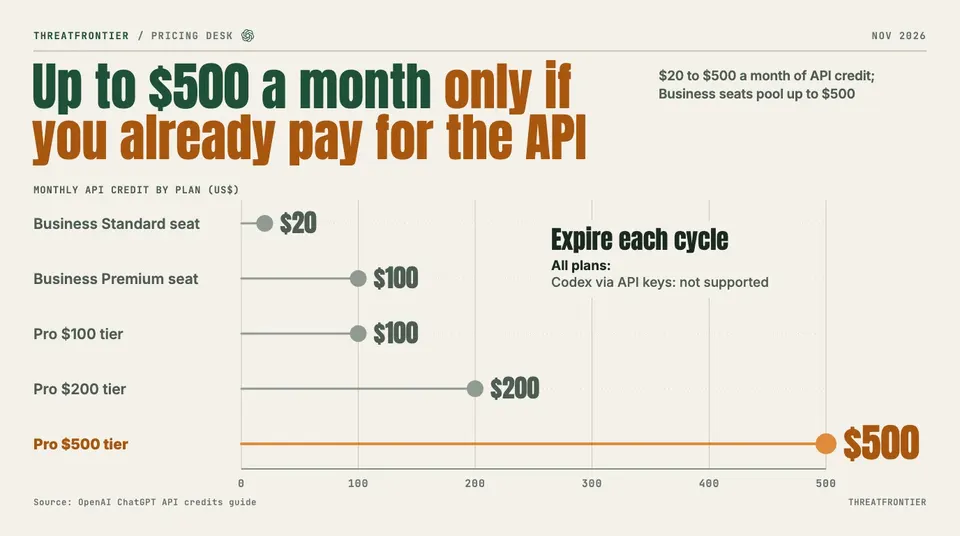
OpenAI now gives ChatGPT Pro and Business subscribers $20 to $500 a month in API credits. They expire each cycle, exclude Codex API keys and raise no limits.
OpenAI announced on 28 October 2026 that eligible ChatGPT Pro and Business subscribers can claim free monthly credits for the OpenAI API. The benefit helps people who already pay for both a ChatGPT plan and API usage. It does nothing for Plus, Go, Free or Enterprise users, and it does not raise any ChatGPT or Codex limit. If you are weighing the Pro tiers for coding, our ChatGPT Pro $500 explainer covers the usage limits, which this change leaves alone.
What each plan gets
OpenAI's credit guide sets these monthly amounts:
| Plan | Monthly API credit |
|---|---|
| Pro, $100 tier | $100 |
| Pro, $200 tier | $200 |
| Pro, $500 tier | $500 |
| Business, Standard seat | $20 per paid seat |
| Business, Premium seat | $100 per paid seat |
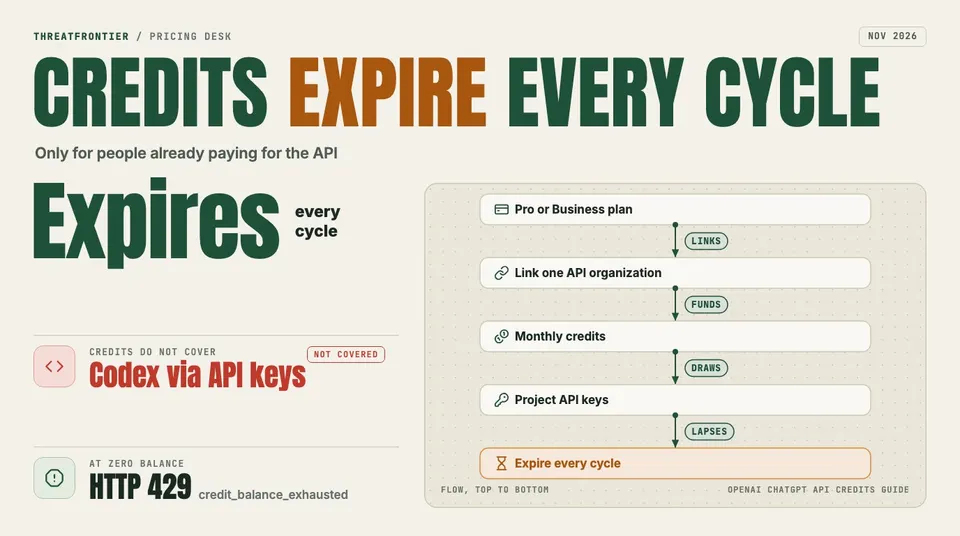
The credits flow to one linked API organization and expire at the end of each billing cycle.
Business credits are pooled across the workspace and capped at $500 per month. Workspaces that pay annually get a shared cap of $6,000 per annual billing cycle and receive the whole year's grant in one issuance. The first grant is prorated to the rest of the current billing cycle. The changelog's headline, "up to $500 per month", matches the guide's maximum; the $6,000 annual figure appears only in the guide.
Who qualifies
The subscription must be an active paid Pro or Business plan at least seven days old. Free trials and complimentary subscriptions do not count, and Enterprise, Plus, Go and Free are ineligible. The same person must own both the ChatGPT subscription (or Business workspace) and the API organization that receives the credits, and both accounts must use the same email address.
Activation is a one-time step in ChatGPT billing settings, the Business Admin Console, or API Platform billing. After that, credits are issued automatically at each renewal while the account stays eligible.
The limits that matter
- Credits expire. Unused credits vanish at the end of the billing cycle (the annual cycle for annual Business grants) and do not roll over.
- No Codex through API keys. The guide says Codex usage through API keys is not supported, and the credits do not raise ChatGPT or signed-in Codex usage limits.
- One organization. Grants apply only to the linked API organization, and requests must use a project API key from it. Normal API terms and rate limits still apply.
- Hard stop. Free credits are spent before purchased ones. When the balance reaches zero, requests fail with HTTP 429 and the error code
credit_balance_exhaustedunless you add paid credits or turn on Auto Recharge.
The credits cover most of the API Platform: Responses, Agents (including hosted sandbox charges), Decisions, GPT-Live and Realtime, Images, and built-in tools such as web search, file search and Code Interpreter.
Who actually gains
The clear winners are developers and small teams who already hold a Pro or Business plan and also pay for API usage. For them the credit is a straight offset against a bill they already have. A solo subscriber on the $500 Pro tier can offset up to $500 a month of API spend. A Business workspace reaches the $500 pool cap with 25 Standard seats or 5 Premium seats, which follows from the per-seat figures above.
People who subscribe to ChatGPT only for chat gain nothing unless they start building. Because the credits expire each cycle and cannot be used for Codex, they are not a way to run coding agents on a flat fee. Teams on Enterprise, Plus, Go or Free are excluded entirely.
What happens when your plan changes
Cancelling does not revoke credits already issued: they stay usable until they expire, but new grants stop. Downgrading to an ineligible plan removes the API link at the end of the cycle, and so does moving from Business to Enterprise. Moving from Pro to Business ends the Pro link; a Business owner can create a new link once the workspace's paid subscription has been active for seven days. Seat reductions take effect next cycle, and reassigning a seat creates no extra credits.
What to do
- Check that one email owns both the ChatGPT plan and the API organization, then activate the link.
- Treat the credit as a monthly use-it-or-lose-it budget and plan spend around the billing date.
- Turn on Auto Recharge or a billing alert so that
credit_balance_exhaustederrors do not reach production. - Do not plan Codex-via-API-key workloads around it.