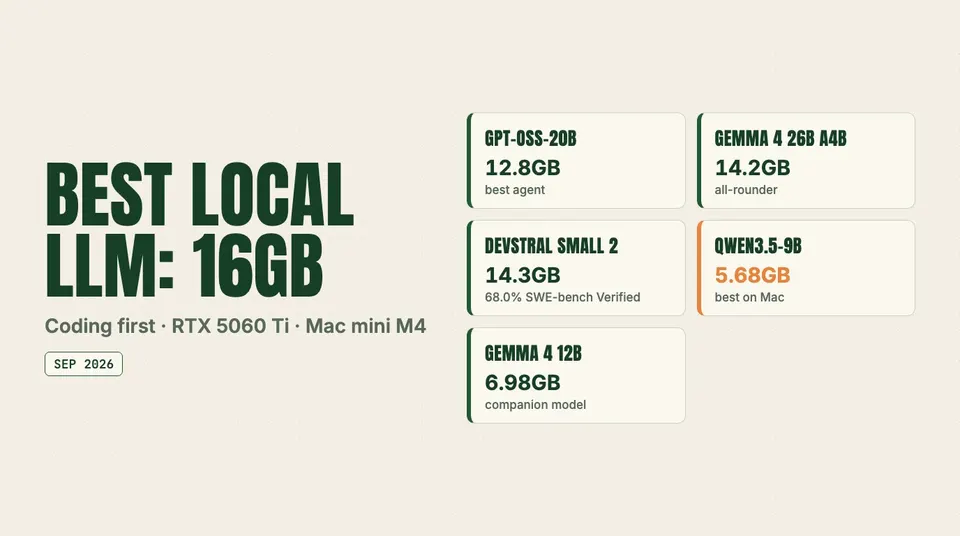
gpt-oss-20b and Gemma 4 26B A4B lead on 16GB NVIDIA cards, while a 16GB Mac mini M4 is better served by Qwen3.5-9B. File sizes, context limits and VRAM math.
The short answer: on a 16GB NVIDIA card (RTX 5060 Ti 16GB, RTX 4060 Ti 16GB, RTX 4080-class), the best local LLM for coding is gpt-oss-20b for agent work and Gemma 4 26B A4B as the all-rounder, with Devstral Small 2 24B as the highest-scoring coder that still squeezes in. On a 16GB Mac mini M4 or MacBook Air, run Qwen3.5-9B in 4-bit MLX, with Gemma 4 12B as the companion. Macs lose about a third of their memory to macOS and its default GPU limit, so the models that are comfortable on a 16GB GPU mostly do not fit there.
Most "best LLM for 16GB VRAM" pages still recommend Qwen 3 14B or Qwen 2.5 Coder 14B. Those models run fine, but they are two generations behind. The picks below are what actually fits in September 2026, with file sizes taken from the model cards and every speed figure credited to whoever measured it.
This guide was last checked against the Hugging Face model cards for each model, OpenAI's gpt-oss model card, Mistral's docs, Unsloth's Gemma 4 QAT docs, the Ollama library and blog, and Apple's Mac mini announcement on September 24, 2026. We did not benchmark anything ourselves. Where you see tokens per second, the source is named.
Quick summary
- Best coding agent on a 16GB GPU: gpt-oss-20b (MXFP4, 12.8GB checkpoint). 60.7% on SWE-bench Verified at high reasoning, per OpenAI's model card. It leaves room for a long context because its KV cache is unusually small.
- Best all-rounder on a 16GB GPU: Gemma 4 26B A4B. It is a Mixture-of-Experts model with 3.8B active parameters, 77.1 on LiveCodeBench v6, and a 14.2GB QAT build that Unsloth says fits 16GB cards.
- Highest SWE-bench score that fits: Devstral Small 2 24B at 68.0% SWE-bench Verified, 14.3GB at Q4_K_M. Expect to work with about 8K of context, and note that Mistral retired its hosted endpoint on March 31, 2026.
- Best on a 16GB Mac: Qwen3.5-9B at 4-bit MLX (about 5.6GB). It supports tool calling and a 262,144-token native context, and has been measured at 25 to 35 tok/s on a MacBook Air M4.
- Does not fit: Qwen3.8-27B (16.8GB at Q4_K_M), Meta Muse Glimmer 30B, Poolside Laguna XS 2.1 (20.3GB at Q4_K_M) and Qwen3.6-35B-A3B, unless you offload to system RAM and accept the speed cost.
The 16GB GPU table (RTX 5060 Ti, 4060 Ti, 4080-class)
The budget on a 16GB card is roughly 15GB for weights plus KV cache, once you subtract the CUDA context and your desktop. A 14GB model is technically loaded, but it has very little room left to work.
| Model | Params (total / active) | Quant | File size | Practical context on 16GB | Best for | Source |
|---|---|---|---|---|---|---|
| gpt-oss-20b | 21B / 3.6B (MoE) | MXFP4 (native) | 12.8GB (Ollama tag: 14GB) | 32K–64K comfortable | Coding agents, tool calls, fast reasoning | OpenAI model card; Ollama library |
| Gemma 4 26B A4B | 25.2B / 3.8B (MoE) | QAT UD-Q4_K_XL | 14.2GB | 8K–16K at Q4; up to 256K at IQ3_XXS (11.2GB) | General coding, RAG, vision | Google model card; Unsloth QAT docs; njannasch.dev |
| Devstral Small 2 24B | 24B dense | Q4_K_M / IQ4_XS | 14.3GB / 12.8GB | 4K–8K at Q4_K_M, with KV quantized | Highest SWE-bench score in this tier | Mistral; Unsloth GGUF |
| Qwen3.5-9B | 9B (hybrid attention) | Q4_K_M | 5.68GB | 128K+ without strain | Long context, cheap tool calls, vision | Qwen model card; Unsloth GGUF |
| Gemma 4 12B | 11.95B dense | QAT Q4_0 | 6.98GB | 128K+ | Fast companion; only pick with audio input | Google QAT GGUF card |
| Laguna XS 2.1 (stretch) | 33B / 3B (MoE) | Q4_K_M | 20.3GB | Only with expert offload to system RAM | Agentic coding if you have 64GB+ system RAM | Poolside model card |
Speeds people have published for the RTX 5060 Ti 16GB:
- gpt-oss-20b: 82 to 111 tok/s, according to RunAIHome's August 2026 16GB guide. Other pages quote higher numbers without naming the GPU, so treat those with caution.
- Gemma 4 26B A4B: 99 tok/s sustained at a 256K context using the 11.2GB IQ3_XXS quant with a q4_0 KV cache, per a May 2026 write-up on njannasch.dev. The same author measured the dense Gemma 4 31B at 26 tok/s on the same card.
- Devstral Small 2: "high teens" tok/s, per RunAIHome. Dense 24B models pay full price for every parameter on every token.
The RTX 4060 Ti 16GB has the same capacity but only 288GB/s of memory bandwidth, against 448GB/s on the 5060 Ti. Token generation on a single card is mostly bandwidth-bound, so expect the 4060 Ti to be meaningfully slower on the same model. An RTX 4080 or 5070 Ti has much more bandwidth but still only 16GB, so it runs the same models faster and does not change which ones fit.
The 16GB Mac table (Mac mini M4, MacBook Air)
A 16GB Mac does not give you 16GB for the model. By default macOS caps GPU-wired memory at about two-thirds of RAM on machines with 36GB or less, which works out to roughly 10.7GB on a 16GB Mac. Will It Run AI puts the practical budget at around 11GB for weights once the runtime and KV cache are counted.
| Model | Params | Quant | File size | Practical context on 16GB Mac | Best for | Source |
|---|---|---|---|---|---|---|
| Qwen3.5-9B | 9B | 4-bit MLX | ~5.6GB | 32K comfortably | Default coding and chat model | mlx-community; Qwen model card |
| Gemma 4 12B | 11.95B | QAT Q4_0 | 6.98GB | 16K–32K | Documents, images, audio | Google QAT GGUF card |
| Gemma 4 E4B | ~4B effective | QAT | 4.22GB | 32K+ | Fast autocomplete and quick edits | Unsloth QAT docs |
| Qwen3.8-9B-Distill (experimental) | 9B | BF16 source; community quants | varies | As Qwen3.5-9B | Trying Qwen3.8-style reasoning at 9B | empero-ai model card |
| gpt-oss-20b (not advised) | 21B / 3.6B | MXFP4 | 12.8GB | Short, and only with a raised GPU limit | Only if nothing else is open | OpenAI model card |
For speed, Will It Run AI reports 25 to 35 tok/s for Qwen3.5-9B at 4-bit MLX on a 16GB MacBook Air M4. The M4 Mac mini's 120GB/s of memory bandwidth is less than a third of an RTX 5060 Ti's, so the same model runs much slower on the Mac than on the card, and larger models fall off faster.
About Qwen3.8: the official Qwen3.8 release has no small sibling. The 27B is the smallest official model. Qwen3.8-9B-Distill is an unofficial Apache 2.0 distillation by Empero, built on Qwen3.5-9B. Its card reports a large MMLU gain and a slight GSM8K regression, and publishes no coding-agent scores. Treat it as an experiment, not a default.
VRAM math: why 14GB of weights is not "fits"
Two numbers decide whether a model is usable: the weight file and the KV cache. The KV cache grows linearly with context, and it is where most 16GB builds actually break. Our KV cache explainer walks through the formula. The short version is:
KV bytes per token = 2 × layers × KV heads × head_dim × bytes per element
Plugging in the published configs:
- Devstral Small 2 24B: 40 layers, 8 KV heads, head_dim 128. That is 160KB per token at FP16. 8K tokens cost about 1.25GB, and 32K tokens cost about 5GB. Add 1.25GB to the 14.3GB Q4_K_M file and you are at 15.5GB before the CUDA context. That is why every serious guide says 4K–8K with the KV cache quantized to q8_0, which roughly halves it.
- gpt-oss-20b: 24 layers, 8 KV heads, head_dim 64, and half the layers use a 128-token sliding window. Only the 12 full-attention layers grow with context, so it costs about 24KB per token. 32K costs about 0.75GB and the full 131,072 tokens about 3GB. That is why a 12.8GB model is the comfortable one here.
- Gemma 4 26B A4B: interleaved sliding-window attention, with only a handful of global layers holding full-context KV. That lets an 11.2GB IQ3_XXS build reach 256K on a 16GB card. One trap: do not copy
--swa-fullfrom a Qwen config, because it forces full-length KV on every layer and runs out of memory.
The general rule on 16GB: file size + KV cache + about 1GB overhead must stay under 16GB. On a Mac, the ceiling is 10.7GB. For per-format arithmetic, use our VRAM calculator across quantization formats. For why MXFP4 and NVFP4 differ from Q4_K_M, see NVFP4 vs FP8 vs MXFP4.
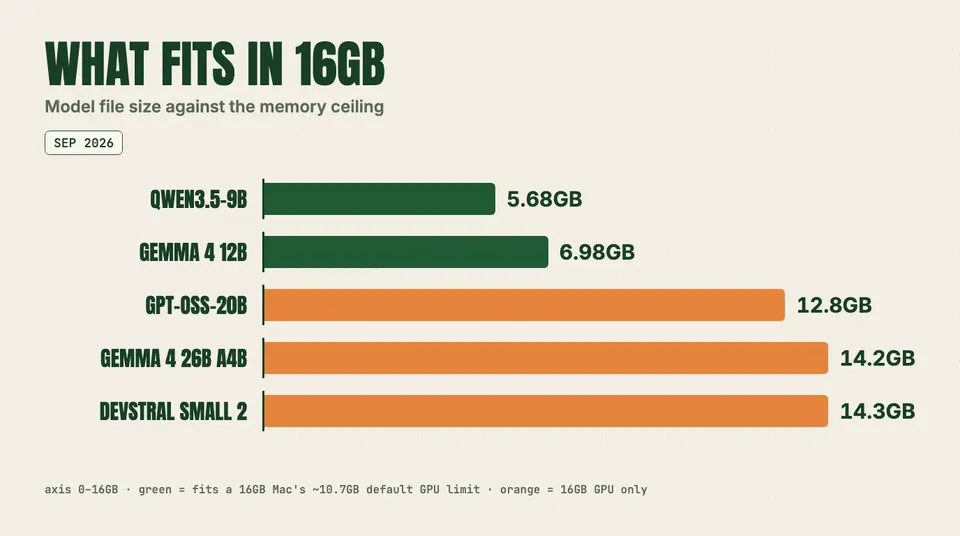
Model file size against the memory ceiling
Which should you pick?
You have an RTX 5060 Ti 16GB and want a local coding agent. Start with gpt-oss:20b. It is the only model in this tier that combines a strong SWE-bench Verified score (60.7%), native function calling and enough context headroom for an agent's system prompt, tool schemas and file reads. Set reasoning to medium for interactive work and high for hard bugs.
You want the best single model on a 16GB card. Use Gemma 4 26B A4B at QAT Q4 if 8K–16K context is enough. If you need long context, drop to IQ3_XXS and quantize the KV cache. It is multimodal, has native function calling and scores 77.1 on LiveCodeBench v6.
You care most about benchmark ceiling and can live with short context. Devstral Small 2 at 68.0% SWE-bench Verified is still the highest-scoring coder that fits a 16GB card. Two caveats apply. Mistral deprecated it on February 27, 2026 and retired the hosted model on March 31, 2026, so there will be no updates. And its context budget is tight. The IQ4_XS build at 12.8GB buys back about 1.5GB for context.
You have an RTX 4060 Ti 16GB. The picks are the same, but favor the MoE models (gpt-oss-20b, Gemma 4 26B A4B). With 3.6B–3.8B active parameters they read far less memory per token than a dense 24B, which matters most on the slowest bus in this group.
You have a Mac mini M4 or MacBook Air with 16GB. Run Qwen3.5-9B in 4-bit MLX as the main model and keep Gemma 4 E4B for quick completions. You can raise the GPU limit with sudo sysctl iogpu.wired_limit_mb=12288 to squeeze in gpt-oss-20b. Guides on the setting warn to leave at least 4GB–8GB for macOS, so on 16GB that leaves no margin. It works for a demo but is not something to run every day.
You are buying a Mac for local AI now. The M6 Mac mini announced on August 25, 2026 still starts at 16GB ($899, shipping September 22), with up to 170GB/s of bandwidth, per Apple. Configure 24GB or more if local models are the reason you are buying it.
Runners: Ollama, LM Studio and MLX on 16GB
On NVIDIA, llama.cpp, Ollama and LM Studio all work. Use llama.cpp directly when you need MoE offload flags like --n-cpu-moe, KV-cache types, or --swa-full control.
On a Mac, Ollama switched its Apple Silicon backend to MLX in the v0.19 preview on March 30, 2026. That preview's own blog post asked for "a Mac with more than 32GB of unified memory." Community write-ups of the stable v0.30 release (May 13, 2026) report that 16GB Macs still fall back to the llama.cpp Metal path. Ollama itself has not stated the current threshold, so check before you assume you are getting MLX speeds. On a 16GB Mac, the dependable way to run MLX is LM Studio's MLX engine or mlx-lm directly with an mlx-community 4-bit build. Our MLX vs llama.cpp comparison covers the trade-offs.
Coding-agent caveats at small sizes
Benchmarks for these models are measured in clean harnesses. Your agent is not one. Three problems show up repeatedly at the 9B–24B scale:
- Tool-call formatting breaks before reasoning does. Small models emit malformed JSON, call tools that do not exist, or stop mid-plan. Qwen3.5-9B's card reports 66.1 on BFCL-V4 and 79.1 on TAU2-Bench, and gpt-oss-20b's card reports 54.8% on Tau-Bench Retail. Both are decent, but neither is frontier-level reliability. Keep tool lists short and schemas strict.
- The chat template matters. gpt-oss was trained on OpenAI's harmony response format and needs it to work properly. A runner with an outdated template silently degrades tool calls. Update the runner before blaming the model.
- Context gets eaten quickly. An agent's system prompt, tool definitions and a few file reads can use a large share of an 8K window. That is the practical reason gpt-oss-20b beats Devstral Small 2 for agent loops on 16GB, despite its lower SWE-bench score.
If you pair a local model with a coding CLI, our comparison of Claude Code, Codex CLI, Antigravity CLI and OpenCode notes which ones accept a local OpenAI-compatible endpoint. For hard tasks, many people route to a hosted open model instead. See Ollama Cloud vs OpenRouter vs OpenCode Go for what that costs.
When to upgrade to 24GB or more
Move up a tier when any of these is true:
- You want Qwen3.8-27B or Muse Glimmer 30B. Their Q4 builds run 16.1GB–17GB before any context. They are the current picks in our 24GB Apple Silicon guide, and neither fits 16GB without quality-costly 3-bit quants.
- You want Laguna XS 2.1 at full speed. Poolside reports 70.9% on SWE-bench Verified and specifies a 36GB Mac. On a 16GB GPU it only runs with most experts offloaded to system RAM. We found no published 16GB measurement, so budget for it to be much slower.
- Your agent needs 32K+ context on a dense model. On 16GB you get that from gpt-oss-20b or Gemma 4 MoE. For anything dense and larger, you need more memory.
A used RTX 3090 or 4090 (24GB) is the usual next step on PC. On Mac, 24GB is a paid option on the M6 Mac mini. For whole-desk machines, see DGX Spark vs Mac Studio vs Ryzen AI Max+ 395 and our 128GB Apple Silicon guide.
FAQ
What is the best LLM for 16GB VRAM in 2026?
For coding and agents, gpt-oss-20b. It is a 12.8GB MXFP4 checkpoint with 60.7% on SWE-bench Verified and a KV cache small enough for 32K–64K context. For a general-purpose model with vision, Gemma 4 26B A4B in its 14.2GB QAT build. Both are Mixture-of-Experts models, which is why they run fast on 16GB cards.
What is the best local LLM for coding on 16GB VRAM?
It depends on how you code. For agentic loops with tools, gpt-oss-20b. For the highest published SWE-bench Verified score that fits, Devstral Small 2 24B (68.0%), with about 8K of context and no further updates from Mistral. For autocomplete and quick edits, Qwen3.5-9B at 5.68GB.
What is the best local LLM for a Mac mini M4 with 16GB?
Qwen3.5-9B at 4-bit MLX, about 5.6GB, run through LM Studio's MLX engine or mlx-lm. Gemma 4 12B (6.98GB QAT) is the alternative if you work with documents, images or audio. macOS limits GPU memory to about 10.7GB by default, so skip anything over 10GB.
Is Qwen 2.5 Coder 14B or Qwen 3 14B still worth running?
They still work, but they are no longer the right default. Qwen3.5-9B is smaller, takes images and has a 262,144-token native context. gpt-oss-20b and Gemma 4 26B A4B are newer, ship native function calling and publish current coding scores within the same 16GB budget. Neither Qwen3.5 nor Qwen3.8 ships an official 14B, which is why older guides still list Qwen 3 14B.
Can I run gpt-oss-20b on a 16GB Mac?
Only by raising iogpu.wired_limit_mb above the roughly 10.7GB default, which leaves macOS very little memory. It loads, but with short context and other apps closed. On a 16GB Mac, Qwen3.5-9B is the better everyday choice.
Is the RTX 5060 Ti 16GB good enough for local LLMs?
Yes. It is the value card for this tier: 16GB of GDDR7 at 448GB/s, about 55% more bandwidth than the RTX 4060 Ti 16GB. Published tests put gpt-oss-20b at 82–111 tok/s and Gemma 4 26B A4B at up to 99 tok/s on it. Its limit is capacity, not speed.