SonicWall CVE-2024-40766 patches alone won't stop Akira ransomware. Learn how attackers bypass MFA, exploit LDAP defaults, and how to properly secure SSLVPN.
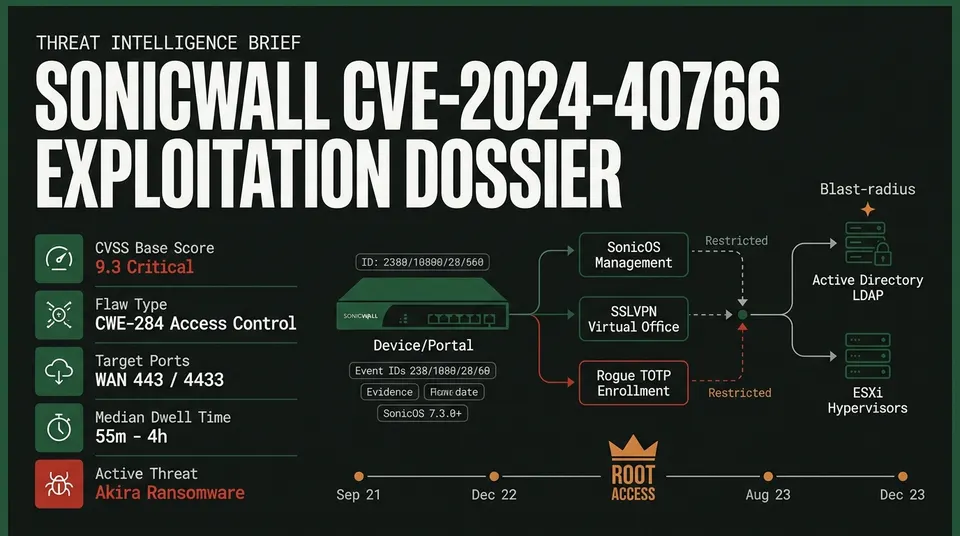
Incident response teams are warning organizations that deploying the official SonicWall CVE-2024-40766 Akira ransomware mitigation patch is insufficient on its own to halt ongoing network intrusions. The critical vulnerability allows unauthenticated remote attackers to compromise edge firewalls, bypass multi-factor authentication (MFA), and execute enterprise-wide ransomware deployments within a median dwell time of 55 minutes to four hours.
Despite rapid firmware patching across enterprise perimeters, intrusions have recurred on fully updated appliances. Forensic investigations reveal threat actors exploiting pre-harvested credentials, default LDAP permission oversights, and exposed self-service portals to retain persistent administrative access, creating the illusion of a zero-day bypass on patched systems. That pattern fits a wider shift: compromised credentials have overtaken vulnerabilities as ransomware's primary entry point.
Vulnerability Mechanics and Affected Architectures
Assigned a CVSS 9.3 (Critical) rating, CVE-2024-40766 stems from improper access control (CWE-284) in the SonicOS management interface handler and SSLVPN services (httpd daemon). Sending crafted HTTP or HTTPS requests across the wide area network (WAN) allows unauthenticated remote actors to bypass authorization boundaries, access runtime memory buffers containing plaintext or hashed credentials, exfiltrate system configurations, or trigger kernel panics and hardware watchdog resets.
The flaw affects multiple hardware generations running both legacy and modern SonicOS firmware:
| Hardware Generation | Model Families | Vulnerable Firmware | Patched Baseline | Lifecycle Status |
|---|---|---|---|---|
| Gen 5 (Legacy) | SOHO | $\le$ 5.9.2.14-12o | 5.9.2.14-13o (or WAN isolation) | End-of-Life (EOL) |
| Gen 6 | TZ series, NSA, SuperMassive | $\le$ 6.5.4.14-109n | 6.5.4.14-110n / 6.5.4.15-116n | End-of-Life |
| Gen 7 | TZ (TZ270–TZ670), NSA (2700–6700) | $\le$ 7.0.1-5035 | SonicOS 7.3.0+ (or 7.0.1-5051 / 7.1.1-7051) | Active / Supported |
The addition of the vulnerability to the Known Exploited Vulnerabilities catalog accelerated patch adoption. However, applying firmware without executing comprehensive credential purges and permission reconfigurations leaves perimeters vulnerable to immediate re-entry. SonicWall's SMA1000 line hit the same wall later, where patching two exploited zero-days alone was not enough.
Threat Actor TTPs: From Credential Theft to MFA Hijacking
Akira ransomware operators and secondary affiliates, including Fog ransomware, execute an accelerated kill chain targeting exposed SSLVPN interfaces:
The intrusion lifecycle relies on three compounding configuration weaknesses:
1. Multi-Source Credential Acquisition
Threat actors leverage secrets harvested from appliance memory prior to patching, credentials exposed in unencrypted backup preference files, and legacy local accounts preserved during Gen 6 to Gen 7 hardware migrations.
2. Virtual Office Portal TOTP Hijacking
SonicOS appliances host an external Virtual Office Portal on default ports 443 or 4433 for user self-service. If an account has MFA enabled globally but has not completed initial setup, or if an administrator resets MFA without forcing immediate internal enrollment, SonicOS presents the TOTP registration QR code upon the first successful password login. Attackers with valid credentials connect over the WAN, scan the secret seed into an attacker-controlled authenticator application, and bind their own MFA token to the legitimate account. MFA enrollment abuse is one bypass route; real-time deepfake voice and video fraud defeats conventional MFA too.
3. Default LDAP User Group Privilege Creep
When integrating SonicOS with Active Directory via LDAP, incoming directory accounts automatically inherit membership in the Default LDAP User Group. In vulnerable environments, this group is mapped directly to SSLVPN Services. Consequently, every domain user—including service accounts, contractors, and low-privilege profiles—is granted remote network ingress by default, circumventing intended directory-level access restrictions.
Following ingress, operators dump LSASS memory from domain controllers, erase volume shadow copies, and execute Linux and Windows ransomware binaries across VMware ESXi hypervisors and endpoints.
Appliance Triage: Telemetry, Event IDs, and Log Artifacts
Security operations teams triaging SonicWall appliances must inspect SonicOS audit logs and telemetry for the following forensic indicators:
| Event ID | Log Definition | Forensic Significance |
|---|---|---|
| Event ID 238 | SSL VPN user login failed | Password-spraying patterns against local or directory accounts. |
| Event ID 1080 | SSL VPN user login succeed | Successful tunnel authentication; cross-reference against hosting ASNs. |
| Event ID 28 | Admin login allowed | Management session established from external WAN addresses. |
| Event ID 60 | Web login failed | Probing attempts targeting the Virtual Office portal. |
| Audit Logs | User TOTP key generated | High Fidelity: MFA enrollment originating from untrusted external IPs. |
| System | Watchdog Reboot / Core Dump Created | Exploit payload buffer corruptions or unhandled httpd daemon crashes. |
SOC analysts should focus triage on three high-confidence behavioral anomalies:
- Session Type Transitions: Automated credential validation scripts interface via command-line endpoints, logging with
sess="CLI". When human operators assume control for interactive lateral movement, logs recordsess="GMS"or interactive web SSLVPN tokens. Any transition fromsess="CLI"tosess="GMS"indicates active hands-on-keyboard intrusion. - Hosting ASN Ingress: Legitimate remote users connect through residential or enterprise ISPs. Akira operators consistently route traffic through virtual private server (VPS) hosting providers, including DigitalOcean, OVH, Hetzner, Linode, and AWS.
- Abnormal Session Persistence: While typical employee VPN sessions terminate within 8 to 12 hours, threat actor tunnels frequently persist continuously for 40 to 70 hours to facilitate sustained reconnaissance and staging.
Immediate Compensating Controls
Organizations unable to apply firmware updates within emergency maintenance windows must enforce immediate perimeter containment:
# Emergency CLI mitigation: Disable WAN management and restrict lockout
configure
 interface X1
 no management http
 no management https
 exit
 user-lockout
 enable
 threshold 5
 lockout-time 30
 exit
commit
- Disable WAN Management: Uncheck
HTTPandHTTPSmanagement on all external WAN interfaces (Network > Interfaces), restricting management traffic strictly to dedicated internal subnets. - Isolate Virtual Office Portals: Restrict public WAN access to port
4433by scoping firewall access rules to trusted administrative IP pools, or terminate external portal access entirely. - Enforce Account Lockouts: Enable strict lockout policies (
Device > Users > Settings > Account Lockout) to lock accounts after a maximum of 5 failed attempts for at least 30 minutes. - Terminate Active Sessions: Sever all active SSLVPN tunnels to disconnect active unauthorized background connections.
Post-Patch Remediation and Hardening Protocol
Firmware upgrades patch the software vulnerability but do not revoke compromised tokens or fix insecure access permissions. The same standard-patching gap let Interlock ransomware keep working after a critical Cisco FMC flaw was weaponized. Administrators must execute this five-step remediation sequence immediately following a firmware update:
- Audit Accounts and Rotate Passwords: Delete orphaned, test, and legacy vendor accounts under
Device > Users > Local Users & Groups. Mandate complex, 20-character randomized passwords across all remaining administrator profiles. - Purge and Re-Enroll MFA Tokens: Flush all active TOTP bindings across local and directory accounts. Mandate that initial MFA token enrollment occur exclusively from trusted internal networks or corporate-managed endpoints.
- Reconfigure Default LDAP User Groups: Create a restrictive local user group named
Restricted_No_Accesswith zero assigned network services (Device > Users > Settings > Authentication > Configure LDAP > Directory / Groups). Set this container as the Default LDAP User Group, and explicitly restrict SSLVPN access to designated Active Directory security groups. - Rotate Active Directory Bind Credentials: Reset the LDAP bind service account password within Active Directory and update directory authentication settings on the firewall to prevent exploitation of previously exposed memory secrets.
- Rebuild Legacy Gen 6 Directory Settings: For legacy Gen 6 appliances pending hardware replacement, delete existing LDAP configurations referencing
userPrincipalName, purge local user caches, remove the SSLVPN User Domain, reboot the device, recreate directory authentication withoutuserPrincipalName, and export a fresh configuration backup.
Long-Term Perimeter Strategy: Identity Federation and Zero Trust
The systemic exploitation of edge network appliances underscores the inherent operational risks of exposing stateful VPN listening ports directly to the internet. Organizations must transition away from appliance-bound authentication databases toward centralized identity providers via SAML 2.0 federation (such as Microsoft Entra ID or Okta). Appliance-bound admin access remains a live risk elsewhere too: a CVSS 10.0 unauthenticated admin access flaw in Cisco ISE. Centralized identity integration enables continuous conditional access evaluation, device compliance verification, and phishing-resistant FIDO2/WebAuthn MFA, neutralizing the self-enrollment attack vector entirely.
Ultimately, network security architectures must evolve from inbound SSLVPN perimeters to Zero Trust Network Access (ZTNA) models. By deploying lightweight, outbound-only application connectors inside private subnets, organizations eliminate open inbound listening ports (such as 443 and 4433) on WAN interfaces. This removes the internet-facing attack surface entirely, ensuring that perimeter edge vulnerabilities cannot be leveraged for unauthorized network ingress.