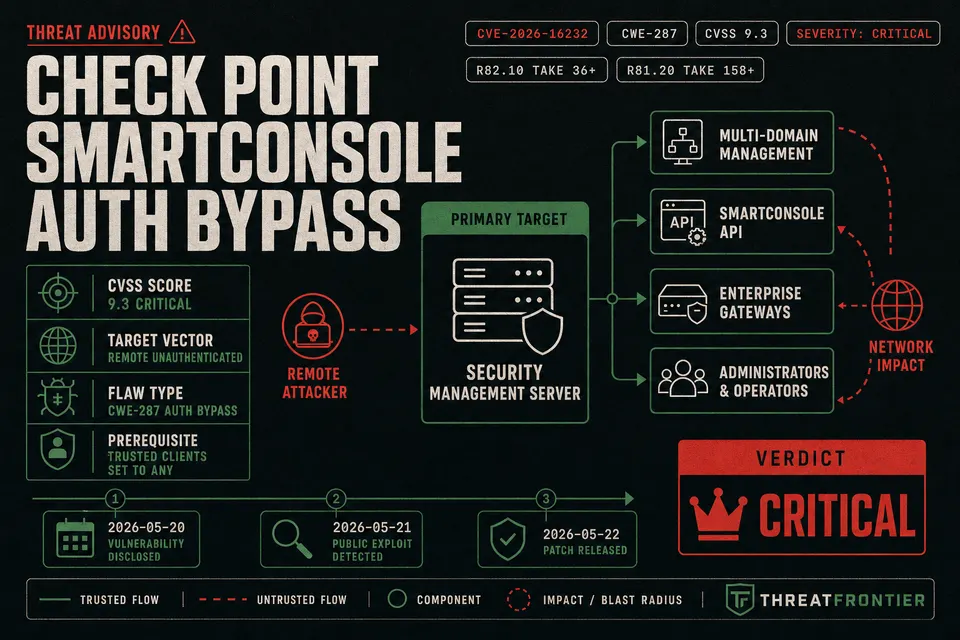
Threat actors are actively exploiting CVE-2026-16232, a critical authentication bypass in Check Point SmartConsole. Learn detection IOCs and hardening steps.
Threat actors are actively exploiting a critical authentication bypass flaw in Check Point management servers, giving unauthenticated attackers remote administrative control over enterprise firewall fleets. Tracked as CVE-2026-16232, the flaw carries a severity rating of CVSS 9.1 (Critical) from national vulnerability databases and CVSS 9.3 (Critical) from vendor assessments.
The vulnerability resides within the login authentication flow of Check Point SmartConsole, the primary management interface for enterprise firewall policies. When exposed to untrusted networks without explicit IP access restrictions, vulnerable Security Management Servers and Multi-Domain Security Management (MDS) installations allow adversaries to bypass authentication controls entirely. Federal authorities have added the flaw to the CISA Known Exploited Vulnerabilities (KEV) catalog following confirmed in-the-wild exploitation.
Technical Breakdown of CVE-2026-16232 Token Bypass
Categorized under CWE-287 (Improper Authentication), CVE-2026-16232 represents a failure in how management servers validate incoming administrative sessions. Under vulnerable configurations, an unauthenticated remote attacker sending crafted network requests to an exposed management interface bypasses credential validation entirely.
The server erroneously validates the connection and issues an administrative application login token. With this token, the attacker establishes a fully authenticated SmartConsole session operating with Super User privileges. This allows adversaries to modify security policies, disable threat prevention rules, create unauthorized administrator accounts, and reconfigure VPN gateways across managed enforcement points. A similar token-forgery path drove GitHub Enterprise Server's SAML signature-wrapping flaw to full admin takeover last year.
| Vulnerability Attribute | Details & Technical Specifications |
|---|---|
| CVE Identifier | CVE-2026-16232 |
| Common Weakness Enumeration | CWE-287 (Improper Authentication) |
| Severity Rating | CVSS 9.1 / 9.3 (Critical) |
| Target Components | Security Management Server, Multi-Domain Security Management (MDS) |
| Affected Software Versions | R77.30, R80.x, R81, R81.10, R81.20, R82, R82.10 |
| Prerequisites for Exploitation | Management IP reachable over network/internet AND Trusted Clients set to Any |
| Remediation Hotfix Takes | R82.10 Take 36+, R82 Take 118+, R81.20 Take 158+ (Older releases require upgrade) |
Exploitation requires two conditions: the management server IP must be network-reachable, and the deployment must lack restrictive Trusted Clients rules. Systems insulated behind strict perimeter controls remain protected from direct remote exploitation, though internal exposure still poses severe lateral movement risks. A comparable workflow appears in the SonicWall SMA 1000 zero-day attack chain triage and defense guide.
Incident Detection: Indicators of Compromise in Audit Logs
Security teams investigating potential exploitation must focus forensic analysis directly on SmartConsole audit telemetry and connection logs. Because attackers leverage validly structured application tokens post-bypass, standard credential brute-force alerts will not fire.
The primary forensic artifact of an attempted or successful token takeover is recorded within native SmartConsole audit telemetry. Analysts should query the Logs & Monitor interface—specifically the Audit Logs View—for anomalous authentication methods:
Authentication method: application token
Under normal operations, administrators authenticate via standard password, public key, or centralized identity provider mechanisms. An unexpected volume or unfamiliar origin IP associated with an application token authentication event indicates potential exploitation.
Additionally, investigators should cross-reference network connection telemetry against identified threat actor infrastructure. Check Point and security researchers at Rapid7 have highlighted inbound connections from the following IP addresses (with 194.213.18.137 identified specifically by Rapid7):
151.241.99.207
151.241.99.233
158.62.198.182
192.142.10.99
139.28.37.250
194.213.18.137
To hunt for these indicators across historical gateway telemetry, administrators can execute a targeted SmartConsole search query:
(src:151.241.99.207 OR dst:151.241.99.207 OR src:151.241.99.233 OR dst:151.241.99.233 OR src:158.62.198.182 OR dst:158.62.198.182 OR src:192.142.10.99 OR dst:192.142.10.99 OR src:139.28.37.250 OR dst:139.28.37.250 OR src:194.213.18.137 OR dst:194.213.18.137)
Forensic Warning: Absence of these specific IP addresses does not guarantee safety, as threat actors regularly rotate infrastructure. Security teams must conduct comprehensive reviews of all administrative session activity and policy modifications.
Hardening Playbook: Restricting Trusted Clients and Gateway Interfaces
While applying vendor Jumbo Hotfix Accumulator packages represents the ultimate fix, restricting administrative network access provides immediate structural mitigation. Standard patching alone has proven insufficient elsewhere too, a lesson from how Interlock ransomware weaponized a critical Cisco FMC flaw.
The primary defense mechanism is the Trusted Clients configuration. Unhardened deployments often permit connections from Any host. Administrators must enforce strict IP subnet restrictions to eliminate this exposure.
Trusted Clients Configuration Steps
- Log into SmartConsole using Super User credentials.
- Navigate to Manage & Settings > Permissions & Administrators > Trusted Clients.
- Modify the default entry if configured as Any.
- Change client Type from
Anyto IPv4 Netmask or IPv4 Address. - Specify the allowed IP address or administrative netmask (e.g.,
10.20.4.0with netmask255.255.255.0). - Click OK, save, and publish the session changes.
In headless environments, Trusted Clients can be configured directly from the server CLI using the Check Point Configuration Tool (cpconfig):
# Launch configuration tool on Management Server
cpconfig

# Select option 6: "GUI Clients"
# Select "Modify" or "Delete" to remove 'Any' wildcard access
# Add explicit management IP subnets (e.g., 192.168.10.0 / 255.255.255.0)
Enforcing Firewall Implied Rules
Security teams must also ensure management interface access is blocked at the gateway layer. Administrators should navigate to Global Properties > Firewall in SmartConsole to verify control connections are restricted to authorized management interfaces, while gateway Access Control policies drop untrusted management traffic.
Strategic Takeaways for Management Plane Defense
Compromise of a management server undermines the trust model of the entire perimeter architecture. Arista customers are living the same lesson with a VeloCloud Orchestrator zero-day that demands active threat hunting and management isolation. Security operations teams must establish automated monitoring to prevent post-bypass persistence and enforce out-of-band architecture.
Preventing Post-Bypass Persistence
If an attacker achieves initial token bypass, they will attempt to maintain access post-patching. SOC teams should monitor for:
- Unauthorized Accounts: Detect new administrator profiles created outside change windows.
- Privilege Escalation: Track role modifications elevating read-only users to Super User status.
- API Key Generation: Audit new API tokens or certificates issued for automated access.
- Log Suppression: Inspect policy settings to ensure gateways have not been configured to suppress or redirect log trails.
Out-of-Band Management Architecture
Organizations should isolate administrative interfaces behind non-routable management VLANs and jump boxes:
- Out-of-Band (OOB) Isolation: Place SmartConsole management interfaces on dedicated VLANs accessible only via administrative jump boxes.
- Bastion MFA Layering: Route administrative traffic through hardened bastion hosts requiring multi-factor authentication, ensuring remote attackers cannot reach listening services.
- Break-Glass Vault Accounts: Store emergency credentials in encrypted PAM vaults tied to static management IPs in the Trusted Clients table, maintaining emergency access without exposing management interfaces.
By restricting Trusted Clients, isolating management planes, and auditing audit logs for anomalous token logins, organizations can secure their core security infrastructure against active exploitation campaigns.