
Duet is free in the preview, but its briefs and check-ins spend the same 5-hour and weekly limits as chat, and Anthropic has not said how much.
Anthropic announced Claude Duet on 21 October 2026, a research preview of an app in which Claude works as a proactive agent. It is available to Pro and Max subscribers in the US through a waitlist. It uses the same five-hour and weekly limits as chat, and Anthropic has not published how much of those limits its background work consumes on any plan.
What it is
Anthropic describes Duet as an app that surfaces items that need attention, completes tasks you assign, keeps working while you are away and checks with you before acting on your behalf. The launch page aims it at professionals and small business owners. You message it by typing or voice. It runs on its own cloud computer, works inside your connected apps, and is built around Claude Opus 5.5. You cannot choose the model, and Duet decides how much effort a job needs.
It comes as standalone iOS and Android apps and on claude.ai. Anthropic says it works with more than 6,000 connectors and plugins in the Claude Marketplace. Larger jobs, such as building a financial model or a slide deck, are the kind of task it takes on.
It asks before sending messages, making payments, signing documents or deleting anything, and it cannot mark a task completed. Trading securities and moving money between accounts are off limits even with approval. Anthropic says personal errands such as booking tickets are weaker than work tasks, and you cannot yet watch its browser.
Who can get it
Access is limited to Pro and Max plans in the US during the research preview. It is by waitlist, with invitations sent in waves. The email on the waitlist must match your Claude account and the Google or Apple account on your phone. Team and Enterprise plans are planned for later. Anthropic gave no wave dates or timeline for other countries. During the preview it is included in Pro and Max at no extra cost.
Anthropic's release notes say it "just opened" the preview. The support article makes clear that this means a waitlist, not general access.
How it uses your limits
Duet draws on your plan's five-hour session and weekly limits at the same rate as chats in Claude. Background work counts as well. The morning brief and check-ins use the same allowance, so Anthropic warns you may reach limits sooner than with chat alone.
To hold that down, Duet checks your connected accounts at set intervals, described on the launch page as every few hours, rather than constantly. Larger tasks need more model turns and more background work, and so use more of your allowance.
Anthropic has not published per-plan consumption. None of the pages we read gives a cost per check or per task, or separate figures for Pro, Max 5x or Max 20x. Anthropic's general limits article also lists no allowances by plan. It says usage depends on conversation length and complexity, the features you use, the model and the effort level, and that claude.ai, Claude Code and Claude Desktop share one limit. If usage credits are enabled, work continues on those credits once you hit a limit.
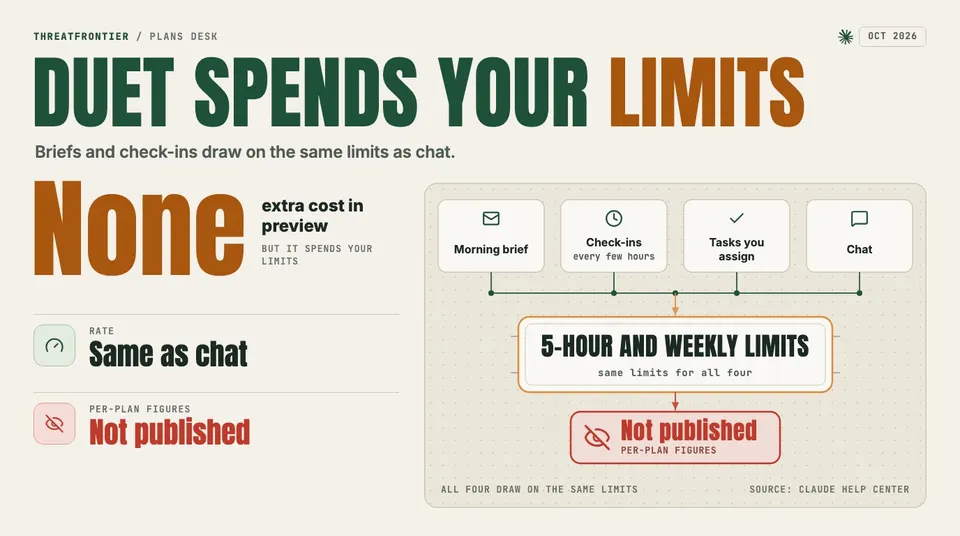
Morning briefs, check-ins, assigned tasks and chat all draw on the same 5-hour and weekly limits. Anthropic has not published per-plan figures.
The one-time reset
When you are admitted to the preview you get one full reset of both your five-hour session and weekly limits. Anthropic says this is available until 30 November 2026. It applies per admitted user, and it is not a general reset.
Keeping it from eating your limits
Anthropic's pages offer few explicit levers, and they do not describe any as a way to save limits. What they state:
- The every-few-hours check cadence is built in to limit background usage.
- You choose what you are notified about and how often.
- You can disconnect any app Duet can access at any time.
- Bigger tasks cost more turns, so a single large job is the most direct way to use up an allowance.
Anthropic does not say that notification settings or disconnecting an app lower limit use. Until it publishes figures, the only way to learn your own rate is to watch your usage after connecting Duet.