We ran FloorGen's MCP server from its own code: a scoped key, the core tools, walls to furniture, a code check, and where the PDF really comes from.
To draw a floor plan with Claude Code, you connect it to a floor-plan editor's MCP server and let the agent call that server's drawing tools: walls, rooms, doors, windows, furniture, then a code check and a render. With FloorGen that takes one claude mcp add command and an API key. What the agent can't produce yet is the PDF. FloorGen's MCP server lists export_pdf as "coming soon", so the print set still comes out of the editor.
We tested that path in October 2026. We didn't drive Claude Code itself. Instead we ran FloorGen's MCP handler, tools and runtime from its own code in-process, with the in-memory stores its test suite uses, and sent the same JSON-RPC calls an agent would. Every tool name, argument and quoted result below comes from that run. The prompt is illustrative. The setup commands were checked against Anthropic's Claude Code documentation and the help text of Claude Code 2.1.296.
Step 1: create a scoped key and add the server
The agent needs a free FloorGen account (sign-in is Google only), and it can only see projects synced to that account. Keys are made under Agents & MCP on the account's Home screen. The form asks for three things, and each one limits how much a leaked key can do:
- Access: Read only, Read & edit (the default) or Full (can delete).
- Projects: all of them, or only the ones you pick.
- Expiry: 30, 90 (the default) or 365 days, or never.
The key starts with fg_live_ and is shown once. The server keeps only its SHA-256 hash, so a database leak on FloorGen's side doesn't hand out working keys. On your side it is a password. Treat it like one.
Then, in a terminal:
export FLOORGEN_API_KEY="fg_live_..."
claude mcp add \
  --transport http \
  --scope user \
  floorgen https://floorgen.app/mcp \
  --header "Authorization: Bearer $FLOORGEN_API_KEY"
Know where the key ends up. Your shell expands $FLOORGEN_API_KEY before Claude Code sees it, and Claude Code stores user-scoped servers in ~/.claude.json, so the key sits there in plain text. For a team, FloorGen's setup page suggests committing a .mcp.json file instead, with "Authorization": "Bearer ${FLOORGEN_API_KEY}" in its headers block. Claude Code expands variables in that field when it loads the file, and it asks for approval before it uses a project-scoped server. Check the connection with claude mcp list, or /mcp inside a session. The setup for claude.ai and ChatGPT uses OAuth rather than a key, and FloorGen's own guide on how to draw a floor plan with Claude, ChatGPT or Cursor covers it.
Step 2: keep the toolset small
FloorGen's server has 149 tools in seven toolsets. A client that asks for nothing gets core, which has 43 tools: projects, walls, rooms, openings, furniture, checks, render_2d and undo. With a Read & edit key the agent saw 42, because one core tool, delete_project, needs a Full key. Tools outside the key's scope or toolsets don't show up at all.
You add toolsets with a query string on the URL, such as https://floorgen.app/mcp?toolsets=core,history, or with an X-FloorGen-Toolsets header. With a Full key, that pairing listed 52 tools in our run, and ?toolsets=all listed all 149. Quote the URL when you add it, because zsh reads the ? as a wildcard and stops with "no matches found". The FloorGen for AI agents page gives the reason for the short default: it keeps the list small enough for a model to choose well. For this walkthrough core was enough.
Step 3: from a brief to walls and rooms
Suppose you ask: "Draw a 24 by 22 foot backyard cottage with an open living area, one bedroom and a bath." (That prompt is our example, not a recorded session.) These are the calls we sent, with FloorGen's replies:
create_project   {"name":"Backyard cottage (synthetic)","region":"us"}
add_walls        {"points":[{"x":0,"y":0},{"x":"24'","y":0},{"x":"24'","y":"22'"},
                  {"x":0,"y":"22'"}],"closed":true,"kind":"exterior"}
  -> Added 4 walls, closing Room 1 (503.4 ft²).
create_room_rect {"x":"13'","y":0,"width":"11'","depth":"13'","name":"Bedroom",
                  "room_type":"bedroom","kind":"interior"}
  -> Created Bedroom, 11' 0" × 13' 0" on wall centrelines, 132.2 ft² net
create_room_rect {"x":"17'","y":"13'","width":"7'","depth":"9'","name":"Bath",
                  "room_type":"bath","kind":"interior"}
update_room      {"room":"Room 1","name":"Living / kitchen","room_type":"living"}
Lengths are in centimeters unless you pass a string such as "24'", and the y axis points down. A room drawn inside another is carved out of it, and areas are net, measured to the inside faces of the walls. Every call after create_project also carried "project":"Backyard cottage (synthetic)".
Step 4: doors, windows and furniture
add_opening takes a wall as {"room":"Bath","side":"west"}, so the agent never has to look up a wall id. The defaults filled in an 81 cm door that swings into the bath. The server also refuses geometry that can't exist. A 2-foot bath window with a 4-foot sill came back as an error, because "sill 121.92 cm plus height 121.9 cm is more than the wall height of 243.8 cm". A shorter window went in on the retry.
For furniture, search_catalog takes several queries in one call (["queen bed","sofa","dining table"]) and returns catalog ids. place_item then drops each one with arguments such as {"room":"Bedroom","anchor":"wall","wall_side":"east"}.
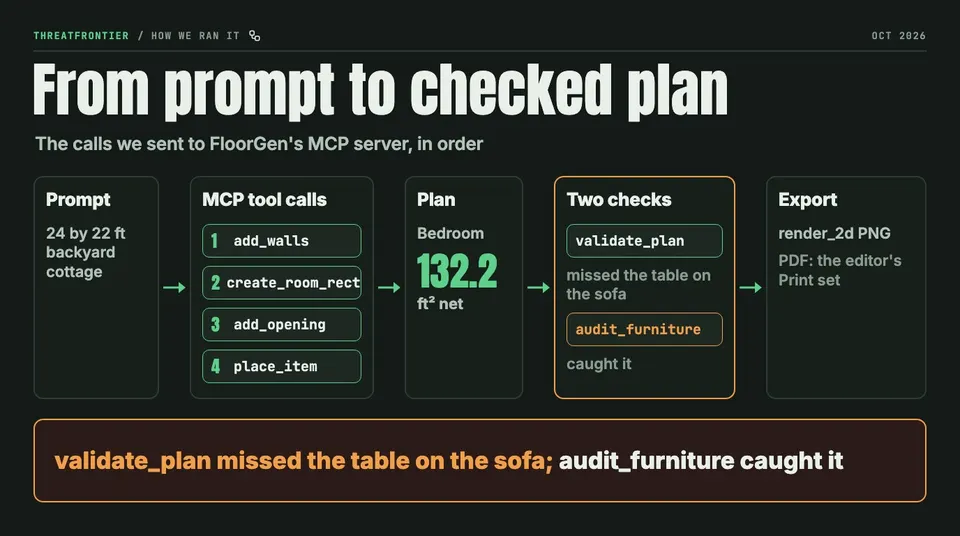
The walkthrough's steps: an example prompt, the tool calls we sent, the plan, two checks and export. The PDF step happens in the editor, not over MCP.
Step 5: run the check, then look at the plan
validate_plan is the server's audit. Run before the bedroom had a window, it returned one warning: "Bedroom: no emergency escape opening: needs a window or door to outside at least 5.0 ft² clear, 2' 0" high and 1' 8" wide, sill at most 3' 8" (IRC R310)." The 5.0 figure is the IRC minimum for a grade-floor opening. Otherwise the code asks for 5.7 sq ft. One add_opening on the bedroom's north wall cleared it.
With furniture in, the check caught a walkway 2' 4⅞" wide where 2' 5½" is needed. It did not report that the dining table sat on top of the sofa. That came from a second tool, audit_furniture: "Dining table overlaps Sofa bed." find_free_space found a clear spot, an update_items call moved the table, and both checks then came back clean. Run both. FloorGen's server instructions also tell the agent to look at a render_2d image before it calls the plan done. Ours came back as a 1400 x 1315 px PNG, drawn to scale at 0.68 cm per pixel.
Step 6: export, and where the PDF comes from
Over MCP, the outputs are render_2d (a PNG of the plan, in core), plus render_3d and export_project_json (a .floorgen.json file) in the more toolset. The server's get_context tool says it outright: "Coming soon: export_png, export_pdf, export_glb."
The drawing set comes from the editor. An agent-built plan is an ordinary FloorGen project, so you open it in the browser floor plan editor and open Export. "2D plan PDF" gives a printable plan sheet with a title block. "Print set" builds a multi-sheet PDF of every floor with schedules, on paper from Letter up to ARCH D. SVG, DXF and glTF are on the same menu.
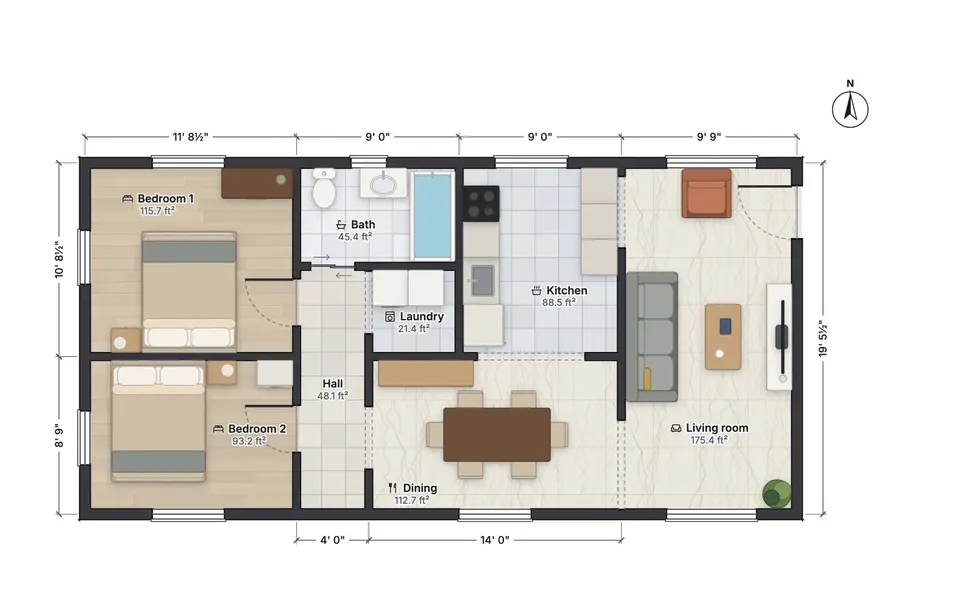
FloorGen's 800 sq ft ADU template (us-adu-800) as the editor renders it. On this template validate_plan returned 13 warnings and 2 notes in our run. Over MCP, render_2d returns a plainer line drawing.
Confirm tokens, undo and checkpoints
The agent never got a one-step way to destroy work. soft_delete moves walls or furniture to a per-design trash without asking. With a Read & edit key, a delete_project call failed as "Unknown tool". With a Full key, the first call returned CONFIRMATION_REQUIRED and a token, plus the impact: "This deletes the project Backyard cottage (synthetic) with 1 floor. It can be restored for 30 days." The token works once, for 5 minutes, and only for the same caller, tool and arguments. Emptying the trash, clearing a design and deleting a floor or design go through the same step. This is the point where Claude Code should stop and ask you.
undo is in core. We had the agent drop a dining table in the bedroom, and one undo call took it back. FloorGen also saves a checkpoint by itself, named after the key ("Before Claude Code on my laptop edits" for ours), when an agent first writes to an existing project after 30 quiet minutes. In our run that happened when the agent edited a project made earlier. It didn't happen on the project the agent had just created. Checkpoints last 30 days, at most 20 per project. Restoring one needs the history toolset and asks for its own confirmation.
What it doesn't do well
- No PDF, DXF or styled image over MCP.
render_2dis a plain line drawing. The styled sheets and the print set come from the editor. - The check is a heuristic, not a plan review. On FloorGen's own 800 sq ft ADU template,
validate_planreturned 13 warnings and 2 notes in our run, including a "walkway" of 8⅛" between a toilet and the wall. The server's instructions tell agents that a walkway measured through a wall is a false reading to explain, not fix. Still, someone has to read the list. Nothing here produces stamped construction drawings. - Account and hosting limits. The account is Google sign-in only, the service is hosted only, and agents get 60 edits and 300 reads a minute.
- The key lives on your disk. Use a Read & edit key limited to chosen projects with an expiry. Give Full access only for a session that really needs to delete something.
Disclosure: FloorGen is built by ThreatFrontier's publisher. FloorGen details were checked against its code and live site in October 2026.
Sources
- Claude Code docs, "Connect Claude Code to tools via MCP": https://code.claude.com/docs/en/mcp
- FloorGen MCP documentation: https://floorgen.app/docs/mcp
- FloorGen, connecting Claude, ChatGPT and Cursor: https://floorgen.app/blog/connect-claude-chatgpt-cursor-to-floorgen-mcp
- International Code Council, IRC R310 emergency escape and rescue openings (code change text, 2018): https://www.iccsafe.org/wp-content/uploads/IRC-3-2-EERO-9.27.2018.pdf