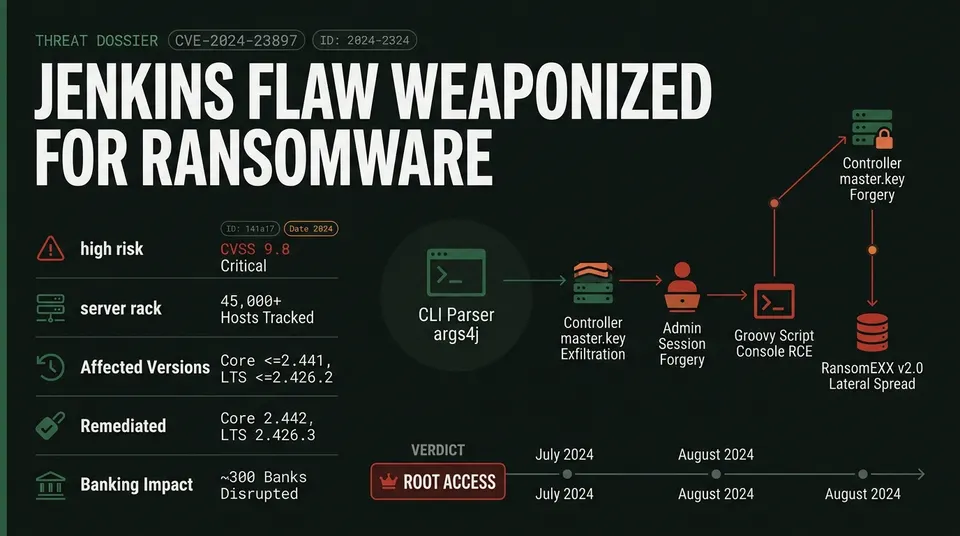
Jenkins flaw CVE-2024-23897 is being actively exploited for ransomware and RCE. Learn how to secure your CI/CD infrastructure and mitigate this critical bug.
A critical vulnerability in the core command-line interface of Jenkins automation servers has escalated into active ransomware deployment and widespread supply chain intrusions. It is not the only CI/CD tool turned against its own pipeline, as our coverage of Trivy's supply-chain secret-stealing vulnerability shows. Tracked as CVE-2024-23897 with a maximum CVSS 9.8 (Critical) severity rating, the security flaw allows unauthenticated remote attackers to read arbitrary files from underlying controller servers, leading to full cryptographic key compromise, administrative session hijacking, and remote code execution (RCE).
Federal cybersecurity agencies and threat intelligence firms have confirmed widespread exploitation in the wild. High-profile campaigns have crippled payment infrastructure across nearly 300 financial institutions and exposed proprietary source code repositories at global technology enterprises. With telemetry tracking more than 45,000 exposed instances following initial disclosure, the Cybersecurity and Infrastructure Security Agency (CISA) added the flaw to its Known Exploited Vulnerabilities catalog under Binding Operational Directive 22-01, ordering federal agencies to patch exposed servers immediately.
| Vulnerability Metric | Technical Specification |
|---|---|
| Vulnerability Identifier | CVE-2024-23897 (Advisory: SECURITY-3314) |
| CVSS v3.1 Score | 9.8 (Critical) — CVSS:3.1/AV:N/AC:L/PR:N/UI:N/S:U/C:H/I:H/A:H |
| Vulnerability Class | CWE-209 (Information Exposure Through Error Message) / Arbitrary File Read |
| Affected Versions | Jenkins Core $\le$ 2.441, Jenkins LTS $\le$ 2.426.2 |
| Remediated Versions | Jenkins Core 2.442, Jenkins LTS 2.426.3 |
| Federal Mandate | CISA KEV Catalog (BOD 22-01) |
Technical Anatomy: args4j and Argument Expansion
The vulnerability stems from the command-line interface (CLI) built into the Jenkins controller, which accepts inbound commands via HTTP endpoints (/cli), WebSockets, or SSH. To parse incoming arguments, Jenkins utilizes the third-party Java library args4j.
By default, args4j enables a feature called expandAtFiles. When a command parameter starts with an @ character (such as @/etc/passwd), the parser treats the trailing path as a local file, opens it using java.io.FileReader, and expands each line into a discrete argument. Jenkins failed to disable this parser behavior during CLI initialization, permitting remote users to force the controller to read local system files.
The depth of file exposure corresponds directly to authentication levels:
- Unauthenticated Attackers: Without system credentials, an adversary can execute basic CLI commands such as
connect-nodeorhelp. When arguments parsed from local files violate syntax rules, the controller reflects file lines in error streams. Executingconnect-node @/path/to/file, for instance, returns an error statingERROR: No such agent "LINE_CONTENT", leaking the initial line of targeted files. - Authenticated Attackers: Users holding standard
Overall/Readpermissions can invoke commands that accept arbitrary string lists (such asenable-jobordelete-build), allowing them to extract complete, multi-line system files in a single request.
While binary files processed in standard Linux UTF-8 runtime environments encounter byte-replacement corruption, all critical Jenkins configuration files, user profiles, cryptographic keys, and credential stores are stored as plaintext XML or ASCII strings, leaving them fully readable across all Java Virtual Machine (JVM) configurations. GitLab suffered a comparable arbitrary file read, covered in our GitLab unauthenticated file read blast-radius and incident recovery runbook.
Escalation Path: From File Read to Remote Code Execution
Attackers leverage arbitrary file read access to exfiltrate foundational cryptographic materials and forge administrative privileges.
High-Value Target Artifacts
Adversaries focus file-read payloads on four core controller artifacts:
$JENKINS_HOME/secrets/master.key: The raw master encryption key used to derive instance-level decryption keys.$JENKINS_HOME/secrets/hudson.util.Secret: The symmetric key that encrypts all stored secrets, passwords, and tokens.$JENKINS_HOME/credentials.xml: The central configuration database storing encrypted cloud credentials, Git deploy keys, and API tokens.$JENKINS_HOME/users/<admin>/config.xml: Stores administrative bcrypt password hashes, account seeds, and session metadata.
Session Forgery and Groovy Execution
Jenkins creates persistent administrative sessions using an HMAC-based remember-me cookie calculated from the username, expiration timestamp, password hash, and the user's secret seed. By exfiltrating users/admin/config.xml and secrets/master.key, an attacker calculates valid administrative session cookies offline.
Submitting the forged cookie bypasses authentication entirely, granting full administrative access to the web dashboard. A different secrets manager suffered a similarly blunt bypass, detailed in HashiCorp Vault's root host takeover via blank SSH certificates. Attackers then navigate to the Script Console (/script), which runs arbitrary Groovy code within the controller JVM process:
// Verification payload executed via Script Console
def proc = "whoami".execute()
println proc.text
This grants unconstrained Remote Code Execution under the host operating system context of the Jenkins daemon.
Real-World Campaigns: Financial and Supply Chain Impact
Threat actors weaponized CVE-2024-23897 within days of technical disclosure, integrating automated scanners to target exposed build servers.
In July 2024, the RansomEXX cybercrime group compromised an unpatched Jenkins controller at technology vendor Brontoo Technology Solutions. Brontoo provided payment processing infrastructure to C-Edge Technologies, a major technology provider serving cooperative and regional rural banks in India.
The attackers moved laterally to deploy RansomEXX v2.0 across interconnected systems. To contain the intrusion, the National Payments Corporation of India (NPCI) isolated C-Edge from national payment networks, temporarily severing ATM, unified payment, and automated clearing services across approximately 300 cooperative banks.
Concurrently, threat actor IntelBroker exploited vulnerable controllers at global digital agencies, including BORN Group. Unauthenticated RCE chains hit enterprise ERPs the same way, per our analysis of Apache OFBiz flaws exposing enterprise ERPs to unauthenticated RCE. By exfiltrating credentials.xml, the actor harvested enterprise GitHub tokens, internal source code repositories, and proprietary client assets.
Forensic Detection and Incident Response
Security operations teams should inspect perimeter reverse proxies, load balancers, and controller logs for indicators of compromise:
- Web Ingress Logs: Search for POST and WebSocket requests targeting
/cli,/cli?remoting=false, or/cli?channel=websocket. Unencrypted payloads containing@/indicators (such as@secrets/master.keyor@/etc/passwd) indicate exploitation attempts. - Status Code Bursts: Watch for bursts of
HTTP 101 Switching Protocolsfollowed immediately byHTTP 400orHTTP 500server errors caused by CLI argument parsing failures. - Controller Logs (
jenkins.log): Review application traces fororg.kohsuke.args4j.CmdLineException,java.io.FileNotFoundException, or syntax errors echoing system strings, such asNo such agent: <contents_of_file>.
Emergency Mitigation and Hardening
Organizations must upgrade controllers to Jenkins Core 2.442 or Jenkins LTS 2.426.3, which permanently disables expandAtFiles in the CLI parser.
Immediate CLI Disablement
If an immediate upgrade is unfeasible, administrators must disable the CLI subsystem entirely.
Method 1: JVM Startup Flag (Persistent)
Add the following system property to the Jenkins startup arguments and restart the service:
-Djenkins.CLI.disabled=true
Method 2: Groovy Script Console (Runtime Workaround)
Disable the CLI on active instances without downtime by executing the following script in Manage Jenkins $\rightarrow$ Script Console:
// Disable CLI command transport across active instances
jenkins.model.Jenkins.instance.getDescriptor("jenkins.CLI").get().setEnabled(false)
Important: The Groovy console modification resides only in memory and resets upon server restart. The
-Djenkins.CLI.disabled=trueJVM flag must be applied to ensure persistent mitigation.
Pipeline Re-Architecture
Any unpatched controller exposed to untrusted networks must be treated as fully compromised. Beyond this specific CVE, our guide to hardening Jenkins plugins across the CI/CD supply chain covers the broader attack surface. Organizations should execute the following architectural hardening measures:
- Total Credential Rotation: Rotate the controller
master.key, regenerate all user session seeds, and revoke all cloud provider IAM keys, SSH deploy keys, and GitHub access tokens stored incredentials.xml. - Network Isolation: Remove controllers from the public internet, placing them in private subnets accessible only via VPN or Zero-Trust Single Sign-On. Route external webhooks through stateless proxy relays.
- Ephemeral Build Environments: Transition from static controller-hosted agents to ephemeral containerized agents managed via the Jenkins Kubernetes plugin, terminating build pods immediately upon task completion.
- Dynamic Secret Management: Replace static keys stored on disk with short-lived tokens issued at runtime via OpenID Connect (OIDC) or cloud IAM roles.